In a Database Management System (DBMS), a schema defines the overall structure of the database, including how data is organized, stored, and accessed. To manage complexity and provide abstraction, database design is divided into different levels. Among these, the logical schema and physical schema are the most important.
The logical schema describes the structure of the database from a user or designer’s point of view. It focuses on what data is stored, such as tables, attributes, relationships, and constraints, without considering how the data is physically stored. It represents the overall logical design of the database and ensures that the system is independent of storage details.
In contrast, the physical schema defines how the data is actually stored in the database system. It includes storage structures, file organization, indexing, and access paths. This level deals with performance optimization and the internal storage of data on hardware.
Together, logical and physical schemas help achieve data abstraction and data independence, allowing database systems to be flexible, efficient, and easier to manage.
Schema can be divided into two parts
- Logical Schema
- Physical Schema
1). Logical Schema
The logical schema is the overall design of a database that describes what data is stored, how it is organized, and the relationships between different data elements, without focusing on how the data is physically stored in memory.
It defines tables, attributes, relationships, and constraints in a DBMS at the conceptual level and is independent of physical storage details.
Logical Schema Example
In our online bookstore, the logical schema focuses on how we organize and structure data without worrying about how it’s actually stored on disk. Here’s a simplified view:
- Tables:
- Books Table: Contains details about each book. Columns might include BookID, Title, Author, and Price.
- Customers Table: Holds information about customers. Columns might include CustomerID, Name, Email, and Address.
- Orders Table: Keeps track of all book orders. Columns might include OrderID, CustomerID, BookID, Quantity, and OrderDate.
- Relationships:
- Each order in the Orders Table is linked to a specific customer in the Customers Table by CustomerID.
- Each order also links to a specific book in the Books Table by BookID.
This logical schema designs our database to hold information about books, customers, and orders and shows how these entities are related.
Key Points:
- Tables: These are like the rooms in our house plan. For example, one table might be for customer information, and another for orders.
- Columns: Imagine these as the different features each room can have, like a bed in a bedroom or a stove in a kitchen.
- Relationships: It’s how the rooms are connected. Maybe the living room leads to the kitchen.
Diagram of Logical Schema

Figure: Logical Schema
Explanation of the Logical Schema Diagram
In this diagram, the logical schema shows how data is organized and related without focusing on physical storage.
Tables (Entities)
Student Table: This table stores information about students. It includes columns like Student_ID (Primary Key), Name, and Email. Each row represents one student.
Course Table: This table stores details about courses. It includes Course_ID (Primary Key), Course_Name, and Credits. Each row represents one course.
Enrollment Table: This table keeps track of which students are enrolled in which courses. It includes Student_ID (Foreign Key), Course_ID (Foreign Key), and Enroll_Date.
Relationships
Each record in the Enrollment table is linked to a specific student using Student_ID from the Student table.
Each record in the Enrollment table is also linked to a specific course using Course_ID from the Course table.
This creates a many-to-many relationship between Student and Course where one student can enroll in multiple courses and one course can have multiple students.
Components of logical schema
1. Entities (Tables)
Entities represent real-world objects or concepts in a database. In a logical schema, entities are implemented as tables that store related data in rows and columns. For example, a Student table may store information such as Student_ID, Name, and Course.
2. Attributes (Columns/Fields)
Attributes define the properties or characteristics of an entity. They are represented as columns in a table and store specific types of information. For example, in a Student entity, attributes can include Student_ID, Name, Age, and Department.
3. Relationships
Relationships define how different entities are connected to each other in the database. They help in linking tables using keys. For example, a Student enrolls in a Course, which creates a relationship between the Student and Course tables.
4. Constraints
Constraints are rules applied to maintain data accuracy and integrity. They ensure that only valid data is stored in the database. Common constraints include Primary Key, Foreign Key, Unique, Not Null, and Check constraints.
5. Keys
Keys are used to uniquely identify records in a table and establish relationships between tables. A Primary Key uniquely identifies each record, while a Foreign Key connects one table to another. For example, Student_ID can be a primary key in the Student table.
6. Data Types
Data types define what type of data can be stored in each attribute. They ensure consistency and proper storage of values. Examples include INTEGER for numbers, VARCHAR for text, and DATE for date values.
Objectives of Logical Schema
1. Data Abstraction
The logical schema provides a simplified view of the database by hiding the physical storage details. It allows users and designers to focus only on what data is stored and how it is structured, not how it is physically stored.
2. Data Organization
It helps in organizing data in a structured format using entities (tables), attributes (columns), and relationships. This makes the database easier to understand, design, and manage.
3. Data Integrity
One of the key objectives is to maintain accuracy and consistency of data. This is ensured using constraints such as primary key, foreign key, unique, and not null constraints.
4. Data Independence
Logical schema ensures that changes in the physical storage (like file organization or indexing) do not affect the logical structure of the database. This improves flexibility and reduces maintenance effort.
5. Easy Database Design
It provides a clear and structured framework for database designers to create, modify, and manage the database efficiently.
6. Efficient Data Handling
It helps in defining a well-structured database that supports efficient query processing and logical data retrieval at the conceptual level.
Advantages of Logical Schema
1. Easy Understanding of Database Structure
Logical schema provides a clear and simple view of the database using tables, attributes, and relationships, making it easier for users and designers to understand.
2. Data Abstraction
It hides the complex physical storage details and shows only the logical structure of the data, improving simplicity and usability.
3. Data Independence
Changes in physical storage (like file organization or indexing) do not affect the logical schema, making the system more flexible and stable.
4. Better Data Integrity
It supports rules and constraints such as primary key and foreign key, which help maintain accuracy, consistency, and reliability of data.
5. Easy Database Design and Maintenance
Designing and maintaining the database becomes easier because the structure is organized at a conceptual level.
6. Improved Data Management
It helps in efficiently organizing and managing large amounts of data in a structured way.
7. Supports Multiple User Views
Different users can view and access data according to their requirements without affecting the overall database structure.
Disadvantages of Logical Schema
1. Complexity in Large Databases
In large systems with many tables and relationships, the logical schema can become complex and difficult to understand and manage.
2. Requires Skilled Designers
Designing a proper logical schema needs experienced database designers who understand relationships, normalization, and constraints.
3. Limited Performance Optimization
Logical schema focuses on structure and relationships, but it does not deal with storage optimization, which can affect performance if not properly handled at the physical level.
4. Difficult to Modify in Complex Systems
Once a logical schema is designed for a large database, making structural changes can be time-consuming and may affect multiple related entities.
5. Initial Design Time is High
Creating a well-structured logical schema requires proper planning and analysis, which increases initial development time.
6. May Not Reflect Physical Efficiency
The logical design may not always represent the most efficient way to store or access data physically, leading to possible inefficiencies at runtime.
Applications of Logical Schema
1. Banking Systems
Logical schema is used to design databases for banks where entities like Customer, Account, Loan, and Transaction are defined with clear relationships and constraints.
2. Educational Institutions
It is used in university and school databases to manage Student, Teacher, Course, and Enrollment data in a structured and organized manner.
3. E-Commerce Systems
Online shopping platforms use logical schema to define entities like Product, Customer, Order, Payment, and Cart, along with their relationships.
4. Hospital Management Systems
Hospitals use logical schema to organize data such as Patient, Doctor, Appointment, Treatment, and Billing for efficient record management.
5. Government Databases
Government systems like Aadhaar, tax records, and voter databases use logical schema to manage large and secure datasets systematically.
6. Library Management Systems
Libraries use logical schema to manage Books, Members, Issue/Return Records, and Fines in an organized structure.
7. Business and Enterprise Systems
Companies use logical schema to manage Employee, Department, Payroll, and Project data for smooth business operations.
2). Physical Schema
The physical schema describes how data is actually stored in the database on storage devices. It defines the internal structure of the database, including file organization, indexing methods, data storage formats, and access paths used to retrieve data efficiently.
It focuses on the implementation details of the database and is concerned with performance and storage optimization.
Physical Schema Example
The physical schema translates our logical design into a structure that can be stored on the computer’s hard drive:
Index on OrderDate in the Orders Table: Enables efficient querying of orders within certain date ranges.
Data Storage:
- Books Table: Stored in a file with a specific format, optimized for fast search based on BookID.
- Customers Table: Stored in a separate file, indexed by CustomerID to quickly find customer details.
- Orders Table: Also stored in its file, with indexes on both OrderID for order lookup and CustomerID to efficiently retrieve all orders by a specific customer.
Data Access Paths:
Index on Author in the Books Table: Allows quick searches of books by a specific author.
Key Points:
- Data Storage: This is about where the data lives in the computer’s memory. Like deciding whether to put your bed against the wall or in the center of the room.
- Data Access: It also involves how quickly and efficiently data can be retrieved. It’s like putting the things you use most in easy-to-reach places.
Diagram of Physical Schema
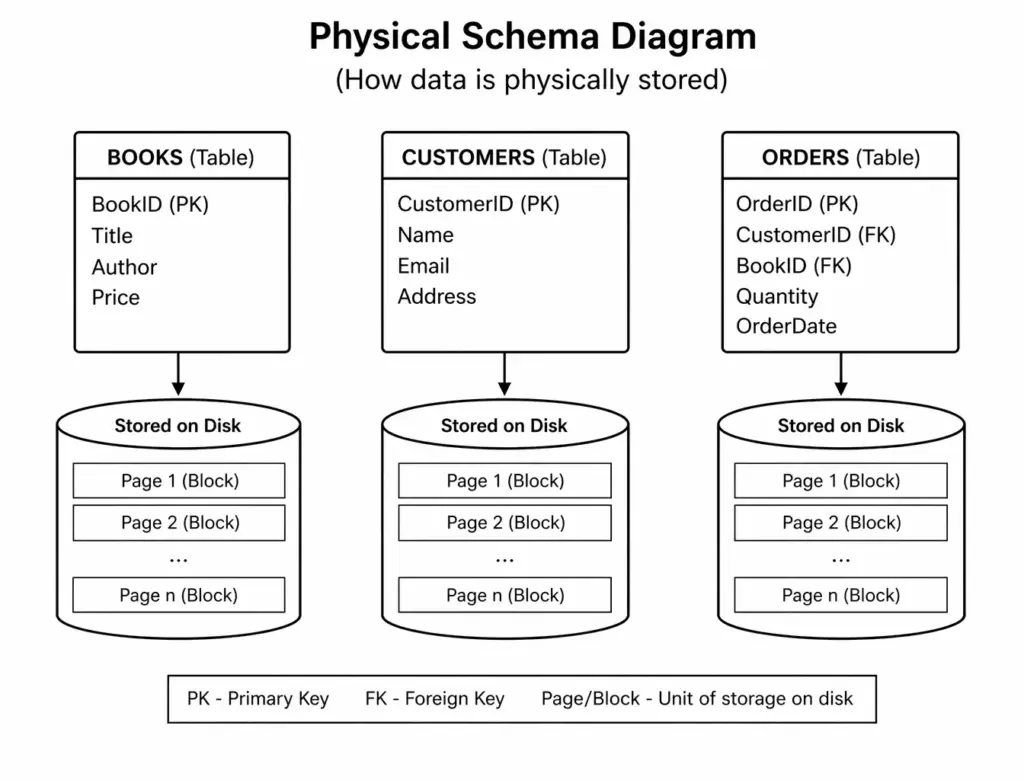
Figure: Physical Schema
Explanation of the Physical Schema Diagram
In this diagram, the physical schema shows how data is actually stored on disk and managed internally in the database system.
Tables (BOOKS, CUSTOMERS, ORDERS)
The top part of the diagram shows three tables: BOOKS, CUSTOMERS, and ORDERS.
Each table contains attributes along with Primary Keys (PK) and Foreign Keys (FK).
These tables represent the structured data, similar to the logical schema, but here the focus is on storage.
Stored on Disk (Data Storage)
Each table is connected to a disk-like structure labeled “Stored on Disk”.
This means that every table is physically saved as a data file on disk.
Pages / Blocks
Inside each disk, data is divided into pages (or blocks) such as Page 1, Page 2, … Page n.
Each page contains multiple records (rows of the table).
This division helps in efficient storage and faster data access.
Data Organization
Records are not stored randomly. They are organized into blocks so that the database can read and write data efficiently from disk.
Keys (PK and FK)
- Primary Key (PK): Uniquely identifies each record in a table.
- Foreign Key (FK): Connects one table to another, maintaining relationships even at the physical level.
Components of Physical Schema
1. Data Files
Data files are the actual files on disk where database records are stored. They contain the raw data organized in a specific format for efficient storage and retrieval.
2. Indexes
Indexes are special data structures used to speed up data retrieval operations. They allow the database to find records quickly without scanning the entire table.
3. File Organization
This defines how data is arranged in files on disk, such as sequential, hashed, or indexed file organization, which affects access speed and performance.
4. Storage Structures
Storage structures refer to how data is physically stored in memory or disk blocks, including pages, blocks, and record formats.
5. Access Paths
Access paths define the methods used to retrieve data efficiently, such as using indexes, scans, or hashing techniques.
6. Partitioning
Partitioning divides large tables into smaller parts to improve performance, manageability, and faster query processing.
7. Compression Techniques
Compression reduces the storage space required by data, improving storage efficiency and sometimes enhancing performance.
Objectives of Physical Schema
1. Efficient Data Storage
The physical schema aims to store data in an optimized way on disk, reducing storage space and improving overall efficiency.
2. Faster Data Access
It focuses on improving the speed of data retrieval by using techniques like indexing, hashing, and proper file organization.
3. Performance Optimization
Physical schema is designed to enhance database performance by minimizing query execution time and improving response speed.
4. Optimal Use of Hardware Resources
It ensures effective utilization of hardware resources such as disk space, memory, and CPU.
5. Data Security and Reliability
Physical schema supports mechanisms like backup, recovery, and secure storage to protect data from loss or unauthorized access.
6. Support for Large Data Handling
It helps in managing and processing large volumes of data efficiently through techniques like partitioning and clustering.
7. Efficient Data Retrieval Methods
It defines proper access paths and storage techniques to ensure quick and efficient data retrieval.
Advantages of Physical Schema
1. Improved Performance
Physical schema optimizes how data is stored and accessed, resulting in faster query execution and better overall database performance.
2. Efficient Data Storage
It ensures that data is stored in an organized and space-efficient manner using techniques like compression and proper file structures.
3. Faster Data Retrieval
By using indexes and optimized access paths, data can be retrieved quickly without scanning entire tables.
4. Better Resource Utilization
It makes effective use of hardware resources such as disk space, memory, and CPU, reducing wastage.
5. Scalability
Physical schema supports handling large volumes of data efficiently through partitioning and clustering techniques.
6. Enhanced Data Security
It helps in implementing security measures at the storage level, including backups, recovery mechanisms, and controlled access.
7. Supports Optimization Techniques
It allows the use of advanced optimization methods like indexing, hashing, and caching to improve database efficiency.
Disadvantages of Physical Schema
1. Complexity
Physical schema involves low-level details like file organization, indexing, and storage structures, making it complex to design and manage.
2. Requires Technical Expertise
It requires skilled database administrators with knowledge of storage systems, indexing methods, and performance tuning.
3. Lack of Data Independence
Changes in physical storage (like file structure or indexing) may affect performance and sometimes require adjustments in higher levels.
4. Time-Consuming Optimization
Designing and tuning the physical schema for optimal performance can take significant time and effort.
5. Hardware Dependency
Physical schema depends on the underlying hardware (disk type, memory, etc.), making it less flexible across different systems.
6. Maintenance Overhead
Regular maintenance such as indexing, backup, and storage management is required, increasing operational effort.
7. Difficult to Modify
Making changes in physical storage structures can be challenging and may impact system performance during updates.
Applications of Physical Schema
1. Database Performance Optimization
Physical schema is used to optimize database performance by implementing indexing, partitioning, and efficient file organization for faster query execution.
2. Data Warehousing Systems
In data warehouses, physical schema helps in storing large volumes of historical data efficiently using techniques like partitioning and compression.
3. High-Traffic Applications
Web applications and systems with heavy user traffic (like banking or e-commerce) use physical schema to ensure quick data access and smooth performance.
4. Big Data Systems
Physical schema is applied in big data environments to manage and process massive datasets efficiently across distributed storage systems.
5. Real-Time Systems
Systems that require real-time processing (such as stock trading or online transactions) rely on physical schema for fast and reliable data access.
6. Backup and Recovery Systems
Physical schema supports implementation of backup strategies and recovery mechanisms to protect data from failures and loss.
7. Cloud Databases
Cloud-based databases use physical schema to manage storage allocation, scalability, and performance across distributed servers.
Combining Logical and Physical Schemas
The logical and physical schemas work together. First, the logical schema designs the organization of data. Then, the physical schema implements this design in the most efficient way possible.
Imagine you’re planning a party. The logical schema is your guest list and the layout of the party space. The physical schema is about arranging the furniture, setting up the decorations, and making sure there’s a flow that allows guests to move easily.
In databases, this teamwork ensures that not only is the data well-organized, but it’s also stored and accessed in the best way possible. This dual approach lets databases support everything from small apps on your phone to huge websites like social media platforms, making sure they run smoothly and efficiently.
Difference between Logical Schema and Physical Schema
| Basis | Logical Schema | Physical Schema |
|---|---|---|
| Definition | Describes what data is stored and the relationships between data. | Describes how data is actually stored in the storage system. |
| Level | Conceptual level of database design. | Internal (physical) level of database design. |
| Focus | Structure of database (tables, attributes, relationships). | Storage details (files, indexing, access paths). |
| User View | Seen by database designers and users. | Seen by database administrators and system. |
| Data Independence | Provides abstraction from physical storage. | Depends on hardware and storage structure. |
| Example | Tables like Student(Student_ID, Name) and Course(Course_ID, Course_Name). | Student table stored using B+ tree index or hashed file structure on disk. |
Conclusion
Logical and Physical Schemas are essential components of a Database Management System that work together to manage data efficiently. The logical schema focuses on the structure and organization of data, including tables, attributes, and relationships, making it easier for users and designers to understand and work with the database. On the other hand, the physical schema deals with how data is actually stored on disk, including file structures, indexing, and storage methods, ensuring better performance and efficient data access.
Together, they provide data abstraction and data independence, allowing changes in physical storage without affecting the logical design. This separation improves flexibility, performance, and maintainability of the database system, making it suitable for handling large and complex data in real-world applications.