A B-Tree is a special kind of self-balancing search tree that keeps data sorted and allows fast searching, insertion, and deletion just like a Binary Search Tree (BST), but more efficient for large amounts of data, especially when stored on disks or databases. Basically it maintain sorted data and allows searches, sequential access, insertions, and deletions in logarithmic time.
It is widely used in databases, file systems, and operating systems because it reduces the number of disk accesses needed to find or modify data
B Trees reduce the height of the tree significantly by packing multiple keys in a single node, leading to fewer disk accesses in environments where accessing memory or disk is costly in time. The tree is always balanced, meaning all leaf nodes appear at the same level, ensuring uniform access time regardless of the key searched.
What is a B-Tree?
A B-Tree is a self-balancing multi-way search tree in which each node can have multiple keys and multiple children. Unlike a Binary Search Tree (BST) that allows at most 2 children per node, a B-Tree allows many children depending on its order.
It was invented by Rudolf Bayer and Edward M. McCreight in 1972 and is considered one of the most popular data structures for disk-based storage.
B-Trees keep data sorted and allow:
- Fast search
- Fast insertion
- Fast deletion
- Sequential access
A B-Tree minimizes disk I/O operations, which is why it is highly used in database indexing and file systems like NTFS, HFS+, and EXT4.
Why Do We Need a B-Tree?
Normally BSTs (binary search trees) can become unbalanced, leading to worst-case time complexity of O(n). This is inefficient for large databases.
Also, reading from disk is slow. If each node contains only one key (like in a BST), the number of disk reads becomes very high.
B-Trees reduce the height of the tree by storing multiple keys in a single node. This minimizes disk access and keeps the operations fast.
Properties of B Tree
- Node Capacity: Each node can contain a maximum of m−1 keys and mm children.
- Minimum Children: Every node other than root and leaves has at least ⌈m/2⌉ children.
- Root Node: The root node must have at least two children if it is not a leaf.
- Keys Ordering: Keys within nodes are sorted in ascending order.
- Balanced Height: All leaf nodes are at the same level (height balanced).
- Separation of Values: Keys in internal nodes act as separation values dividing their subtrees, guiding searches efficiently.
- Storage: Internal nodes store keys and pointers to children, leaf nodes store keys and possibly pointers to actual data records.
How a B-Tree Looks
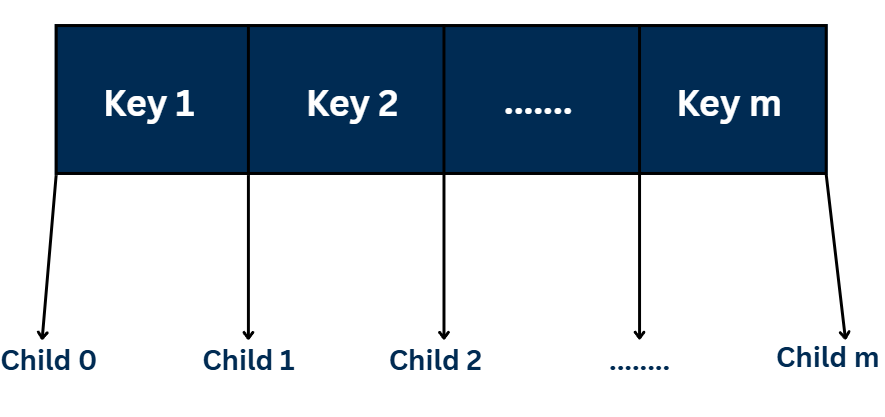
The image above shows the internal structure of a B-Tree node. Unlike a Binary Search Tree (BST), where each node holds only one key and two child pointers, a B-Tree node can store multiple keys and multiple child pointers, making the tree wide and shallow instead of tall and narrow.
Structure Explanation
Each B-Tree node contains:
- Keys: These are the actual data items (like numbers or words) stored in sorted order.
- Example:
Key 1,Key 2, …,Key m - The number of keys in a node can vary, but it must stay within specific limits (depending on the order of the tree).
- Example:
- Children: These are pointers or links to the node’s subtrees.
- Example:
Child 0,Child 1, …,Child m - Each key divides the data range of its children.
- Example:
How Keys and Children Are Related
- All values in Child 0 are less than Key 1.
- All values in Child 1 are between Key 1 and Key 2.
- All values in Child 2 are between Key 2 and Key 3.
- This pattern continues until Child m, which contains all values greater than Key m.
So, if a node has m keys, it will always have m + 1 children.
Why This Design Is Useful
- The B-Tree remains balanced no matter how many elements are inserted or deleted.
- The height of the tree grows slowly, keeping operations efficient — all major operations like search, insert, and delete take O(log n) time.
- Because each node holds multiple keys, it reduces the number of steps (or disk reads) needed to find data — making it ideal for databases and file systems.
Example of a B-Tree (Order = 3)
To understand how a B-Tree is structured, let’s take an example of a B-Tree of order 3. The order (m) of a B-Tree defines how many children and keys each node can have.
Meaning of Order = 3
If the order m = 3, then:
- Each node can have at most 3 children.
This means a node can branch into up to three subtrees. - Each node can have at most m – 1 = 2 keys.
So, each node can store a maximum of two data items or keys. - Each node (except the root) must have at least ⌈m/2⌉ = ⌈3/2⌉ = 2 children and at least 1 key.
This ensures that the tree stays dense and balanced.
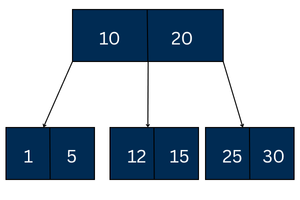
Explanation
- Root Node:
The root contains two keys — 10 and 20.- These keys divide the data range into three parts:
- Left part: values less than 10
- Middle part: values between 10 and 20
- Right part: values greater than 20
- These keys divide the data range into three parts:
- Children of the Root:
- The left child
[1 | 5]holds values smaller than 10. - The middle child
[12 | 15]holds values between 10 and 20. - The right child
[25 | 30]holds values greater than 20.
- The left child
- Keys Are Sorted Within Each Node:
Inside every node, the keys are stored in sorted order (ascending).
For example, in the left child[1 | 5], 1 < 5, and in the middle child[12 | 15], 12 < 15. - All Leaf Nodes Are at the Same Level:
The three child nodes[1 | 5],[12 | 15], and[25 | 30]are leaf nodes, meaning they don’t have any children.
Since they are all at the same level, the tree is perfectly balanced.
Time Complexity of B-Tree
| Operation | Time Complexity |
|---|---|
| Search | O(log n) |
| Insert | O(log n) |
| Delete | O(log n) |
| Traversal | O(n) |
Difference Between B-Tree and Binary Search Tree (BST)
| B-Tree | BST |
|---|---|
| Multi-way tree (many children) | Only 2 children |
| Height is small | Can become tall and skewed |
| Used in disk-based storage | Used for in-memory storage |
| Fast for large datasets | Slower for large datasets if unbalanced |
| Self-balancing | Not necessarily balanced |
Difference Between B-Tree and B+Tree
| B-Tree | B+ Tree |
|---|---|
| Keys stored in internal + leaf nodes | All keys stored only in leaf nodes |
| Searching may end at internal node | Search always ends at leaf |
| Slower sequential access | Faster sequential access |
| Used in older DB systems | Used in modern DB systems like MySQL |
Advantages of B-Tree
1. Balanced Tree
A B-Tree always remains height-balanced, meaning all leaf nodes stay at the same level. This prevents the tree from becoming skewed and ensures consistent performance for all operations.
2. Efficient Disk Access
Since each node stores multiple keys, one disk read retrieves a large portion of the data. This significantly reduces disk I/O operations, which are the slowest part of data processing.
3. Fast Search, Insert, and Delete
All major operations—search, insertion, and deletion—have a time complexity of O(log n). This guarantees fast performance even as the size of the data grows.
4. Suitable for Large Data
B-Trees are ideal when working with huge datasets stored on external memory or disks. They are widely used in databases, file systems, and indexing because they scale well with large data.
5. Nodes Use Maximum Space
Nodes are filled as much as possible before splitting, ensuring optimal use of each disk block. This reduces the number of empty spaces and increases storage efficiency.
Disadvantages of B-Tree
1. Complex to Implement
Compared to simpler trees like BSTs or AVL trees, implementing a B-Tree requires handling multiple keys and pointers. The logic for splitting and merging nodes makes the design more complicated.
2. Inefficient for Small Data
For small datasets that fit entirely in RAM, the overhead of managing multiple keys per node becomes unnecessary. In these cases, simpler trees perform better.
3. Splitting and Merging Are Costly
During insertions and deletions, nodes often need to split or merge to maintain B-Tree properties. These operations are heavy and involve multiple pointer updates.
4. Memory Wastage in Sparse Trees
If the B-Tree is not densely filled, some nodes may remain partially empty. This results in wasted memory, especially in scenarios where data is removed frequently.
Applications of B-Tree
B-Trees are one of the most widely used data structures in system-level software. Some major applications include:
1. Database Indexing
Databases like MySQL, PostgreSQL, MS SQL use B-Trees and B+ Trees.
2. File Systems
File systems such as:
- NTFS (Windows)
- HFS+ (macOS)
- ext4 (Linux)
use B-Trees for directory indexing.
3. Multilevel Indexing
Used in secondary storage indexing for large datasets.
4. Search Engines
Used to index web pages quickly.
5. Operating System Storage Management
Used in maintaining metadata of files and directories.
6. Non-relational Databases
Popular NoSQL databases also use B+Tree variants.
7. Data Compression Tools
Used in managing large compressed archives.
Why B-Tree is Perfect for Disk-Based Storage
- Disk blocks are usually large (for example, 4 KB or more), so storing only one key in a node — like in a Binary Search Tree — wastes valuable space.
- A B-Tree efficiently packs many keys into a single disk block, utilizing the entire block.
- When a disk block (node) is read, multiple keys are loaded into memory at once, which means fewer disk accesses.
- Since disk access is slow and expensive, reducing the number of reads significantly improves performance.
- Because of this efficiency, B-Trees are widely used in databases, file systems, and indexing, making them the backbone of most modern storage systems.
Conclusion
A B-Tree is a balanced search tree that keeps data sorted and allows fast searching, insertion, and deletion. It stores multiple keys in each node, reducing tree height and disk access. Because of this, B-Trees are widely used in databases and file systems for efficient data storage and quick retrieval.