Searching in data structures is a fundamental concept in computer science, focusing on finding an element within a data structure. This operation is crucial for numerous applications, such as database management, information retrieval and the organization of large datasets. The efficiency of a search operation depends on the data structure used and the algorithm implemented.
What is Searching?
Searching is a process of finding a element in a large collection of data. In the main memory, data is organized in an array, linked list, graph, and tree, etc.
If required data is available in a file or any data structure, we get the desired output. if the data is not available then we get the output as “no items is found” or any customizable message. We can perform a searching operation in both primary and secondary memory. The complexity of the searching algorithm depends on the number of comparisons required to find specific element from the data collection.
Types of Searching Technique
Different types of Searching Techniques are:
- Sequential Search/Linear Search
- Binary Search
- Jump Search
- Interpolation Search
- Exponential Search
- Fibonacci Search
- Hashing
- Depth-First Search (DFS)
- Breadth-First Search (BFS)
1. Sequential Search/Linear Search
Linear Search checks each element in a list one by one until it finds the target element or reaches the end of the array or list. Imagine looking for your shoe in a line of shoes. You check each shoe until you find yours. It’s simple and works for ordered or unordered sequence.
Example:
Find Element 25
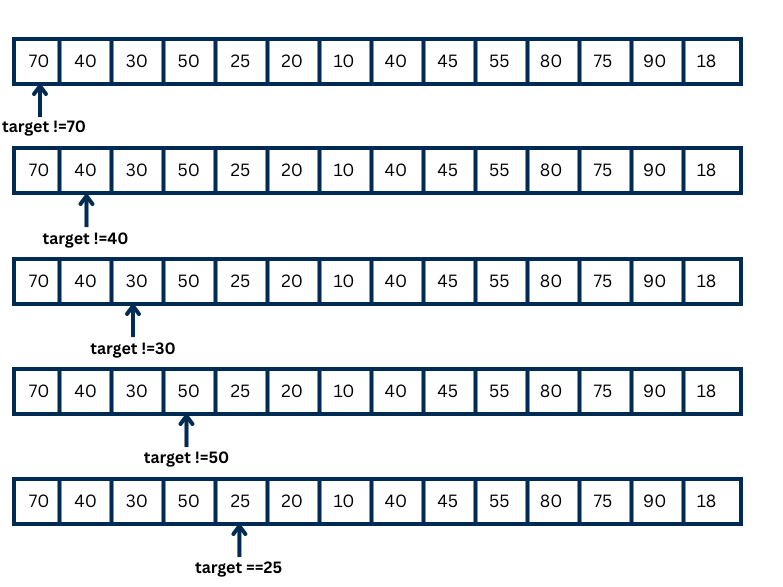
In the above figure, the element we want to find is 25.
First, we compare with the first element, 70. It is not 25, so we then compare the next element, 40. It is also not 25. Then we compare 30 and 50 which are the next numbers, but they are not 25 either. Finally, we compare with the next element, and this time it is 25. So, we found the element we were looking for.
In the best case, the number 25 is the first number in the array or the list. In the worst case, 25 is either the last number in the array or the list, or not present at all.
- Uses: Best when the list is small or unsorted.
- Limitation: Linear search is slow for large arrays or lists because it checks each element one by one.
- Complexity:
- Best Case: O(1) – The element is found at the first position.
- Worst Case: O(n) – The element is at the last position or not present at all.
- Real-time Application: Searching for a contact in a short list on a phone.
2. Binary Search
Binary Search is a searching method to find a target value in a sorted list. It works by repeatedly dividing the list in equal half. First, you compare the target value with the middle element. If the target value is smaller, you continue searching in the left half and if the target value is greater then continue the search in the right half. You keep repeating this process until the target value is found or the list ends.
Example:
Find Element 78
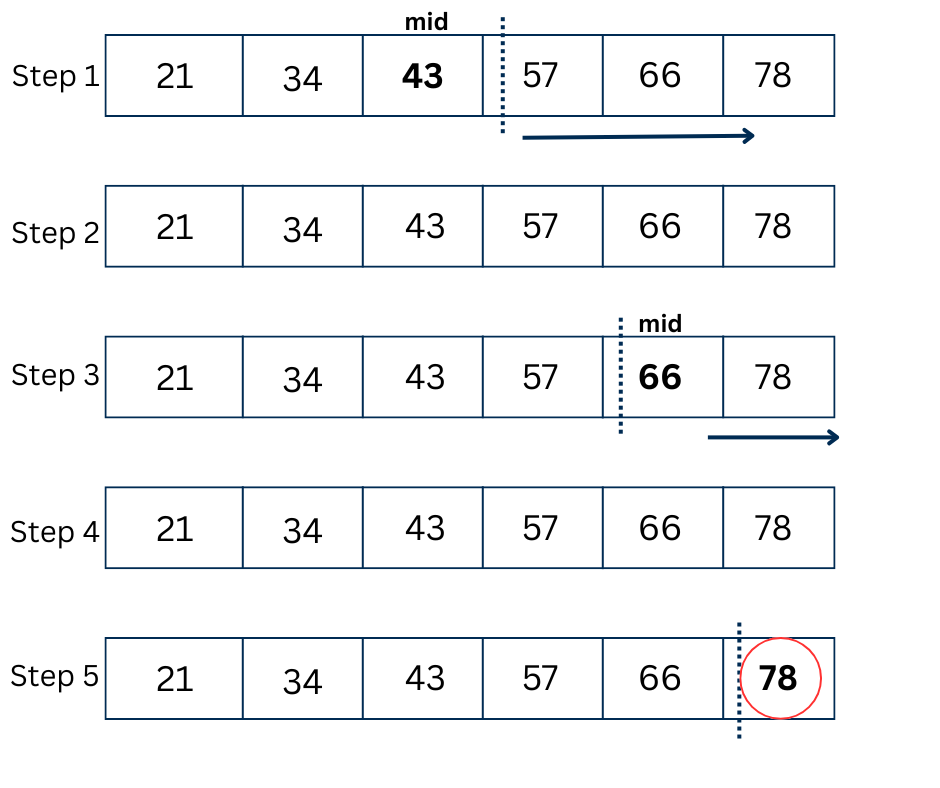
In the above figure, the element we want to find is 78.
Step 1: We calculate the middle index, which is at 43. Since 78 is bigger than 43, the element must be on the right side.
Step 2: We calculate the new middle index, which is at 66.
Step 3: We compare 66 with 78 which is greater meaning the element must be right of the middle element.
Step 4: We calculate the middle index again which comes to be at 78.
Step 5: We compare the 78 with the middle element which is also 78. Therefore the element is found.
- Uses: Efficient for sorted lists.
- Limitation: Binary search only works on lists that are sorted. If the list is unsorted, it cannot be used.
- Complexity:
- Best Case: O(1) – The element is at the middle of the list.
- Worst Case: O(log n) – The search may require looking through the entire tree depth.
- Real-time Application: Finding a player’s score in a sorted leaderboard.
3. Jump Search
Jump Search is a searching technique for sorted lists where you move forward by fixed-size blocks to locate the block that may contain the target element, and then perform a linear search in backward direction within that block to find the target element. It’s like skipping stones across a pond while looking for a special one. You jump ahead several stones at once, then look around carefully once you’ve gone too far.
Example:
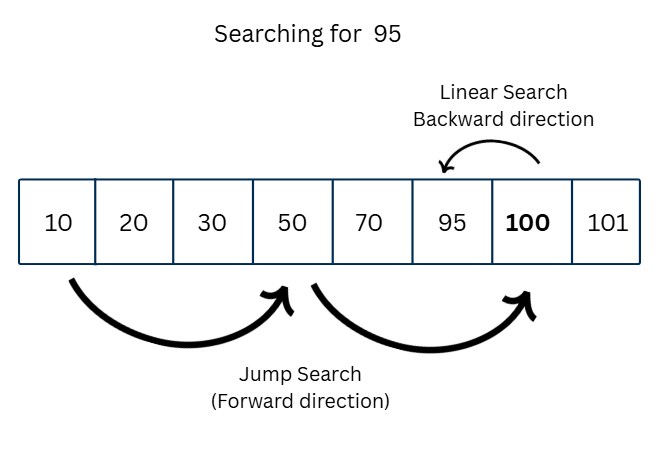
In the above figure, we first jump from 10 to 50. Since 50 is still less than the target 95, we jump again. This time, we reach 100, which is more than 95. So, we do a linear search in backward direction in the previous block (50 to 100). We check 95, which is the next element from 100, and also the target element.
- Uses: Jump Search is helpful for sorted lists where Binary Search is too hard to use.
- Limitation: Jump Search only works on sorted lists and needs the jump size to be chosen carefully.
- Complexity:
- Best Case: O(1) – The element is close to the first Jump Block.
- Worst Case: O(√n) -This happens when the target element is at the end of a block or is not in the list.
- Real-time Application: Searching in database indexes that are too large for memory.
4. Interpolation Search
Interpolation Search is a method to find the target element in a sorted list where the values are evenly spread(“Evenly spread” means that the values in the list are distributed in a regular or uniform way, without big difference between them. For example, 10, 20, 30, 40 is evenly spread, but 5, 10, 50, 100 is not.). It guesses the position of the target based on the values and keeps adjusting until it finds it. It’s like guessing the price of a prize on a game show, getting closer with each guess.
- Example: Picking a specific level in a video game based on progress.
- Uses: Great for uniformly distributed, sorted data.
- Limitation: It is only used when the list is sorted and also is distributed in a regular way.
- Complexity:
- Best Case: O(1) – When the element being searched is the initial guess.
- Worst Case: O(n) – When elements are not uniformly distributed, the algorithm may degrade to linear search.
- Real-time Application: Lookup in phone books or address directories.
5. Exponential Search
Exponential Search is a searching method to find the target value in a sorted list. First, it doubles the range to quickly find the part of the list where the item might be. Then, it uses binary search inside that range to find the exact item. It’s like zooming out on a map to see the area, and then zooming in to find the exact spot.
- Example: Expanding a search for a Wi-Fi signal by doubling the distance.
- Uses: Effective for unbounded or infinite sorted lists.
- Complexity:
- Best Case: O(1) – The element is at the first position.
- Worst Case: O(log n) – Involves first finding the range using exponential bounds and then binary searching that range.
- Real-time Application: Searching in unbounded streaming data.
6. Fibonacci Search
A search technique that uses Fibonacci numbers to divide the list into sections and finds the target element by eliminating sections where the element cannot be. You’re dividing a treasure map into sections that get smaller like a Fibonacci sequence. You check the bigger sections first, narrowing down where the treasure is hidden.
- Example: Organizing books by Fibonacci sequence sizes and searching accordingly.
- Uses: Useful for sorted data and reduces the number of comparisons.
- Complexity:
- Best Case: O(1) – The element is found during the first comparison.
- Worst Case: O(log n) – Similar to binary search, but without the need for predefined intervals.
- Real-time Application: Accessing data in databases where the split of data matters.
7. Hashing
Hashing is a searching method where we use a special function, called a hash function, to directly find where something is stored. Imagine you keep your toys in different boxes, and each box has a label like “cars,” “dolls,” or “balls.” When you want a toy car, you don’t search all boxes one by one—you just look at the “cars” box and get it immediately. In the same way, hashing uses labels (hash values) to quickly jump to the right spot in memory, making the search super fast and easy.
Example:
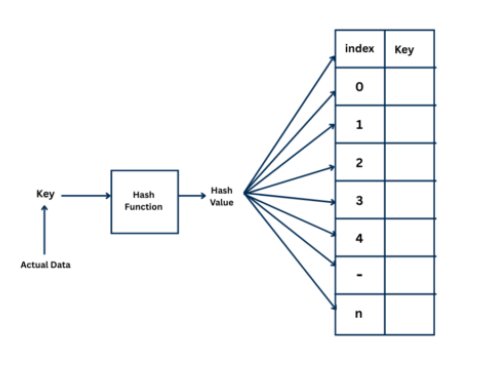
The figure shows how a hashing works. The actual data, called the key, is given as input to a hash function. The hash function produces a hash value or the index, which tells where to store the corresponding value or key in the table.
- Uses: Fast retrieval from a large dataset.
- Limitation: Collisions happen when different keys map to the same index, needing extra steps to handle them.
- Complexity:
- Best Case: O(1) – Direct access to the element through its hash, without any collisions.
- Worst Case: O(n) – All elements collide into the same hash bucket, turning the hash table search into a linear search.
- Real-time Application: Looking up a user’s profile in a social network.
8. Depth-First Search (DFS)
Depth-First Search (DFS) is traversal method to explore a graph or tree by going as far as possible along one path before coming back and trying another path. It’s like exploring a cave: you follow one path all the way, then backtrack to explore other paths.
- Example: Exploring every path in a maze before trying a new direction.
- Uses: Solving puzzles, pathfinding.
- Limitation: DFS can go very deep down one path and miss the solution in other parts.
- Complexity:
- Best Case: O(1) – The target node is the first visited.
- Worst Case: O(V + E) for graphs, where V is the number of vertices and E is the number of edges. It may need to explore all nodes and edges.
- Real-time Application: Web crawlers scanning every link on a webpage deeply.
9. Breadth-First Search (BFS)
Breadth-First Search (BFS) is a way to explore a tree or graph by visiting all nodes at one level before moving to the next level. You’re at a party, saying ‘hi’ to everyone at your table before moving to the next. You meet everyone, making sure not to skip anyone close by.
- Example: Spreading out a search evenly across all directions in a maze.
- Uses: Finding the shortest path, level-wise traversal.
- Limitation: BFS can use a lot of memory because it stores all nodes at each level.
- Complexity:
- Best Case: O(1) – The target node is the first visited.
- Worst Case: O(V + E) – Similar to DFS, BFS might need to explore all vertices and edges in the worst case.
- Real-time Application: GPS navigation systems finding the shortest route.
Each search method serves a unique purpose, optimized for specific data structures and use cases to efficiently locate elements within collections.
Conclusion
Searching in data structures is a way to quickly find the needed element from the data. There are different methods like linear search, binary search, and jump search for arrays, and tree or graph search for non-linear data. Each method has its own good and bad sides in terms of time and memory use. Choosing the right method makes searching faster and more useful in real-life problems.