Work Breakdown Structure (WBS) is a project management technique used to divide a software project into smaller and manageable tasks. It helps in organizing project work in a structured and systematic way. Moreover, WBS improves planning, scheduling, and resource allocation in software development. Therefore, WBS is an important tool for successful software project and product development.
WBS breaks a large software project into smaller components or modules. First, the project is divided into major activities, and then each activity is divided into smaller tasks. Moreover, this makes project planning easy and clear for the team. Therefore, WBS helps in better control and management of software projects.
What is Work Breakdown Structure(WBS)?
Work Breakdown Structure (WBS) is a hierarchical decomposition of a software project or product into smaller, manageable tasks or components. It divides the entire project work into smaller units so that each task can be planned, scheduled, and controlled easily. WBS helps project managers organize work, assign responsibilities, estimate time and cost, and monitor progress effectively. It provides a clear structure of the project and ensures that all required activities are properly completed in a systematic manner.
For example, an Online Shopping System Software can be divided using Work Breakdown Structure (WBS) into smaller tasks like requirement analysis, system design, development, testing, deployment, and maintenance. Each phase is further divided into sub-tasks such as login module, product module, payment module, and database design. This makes the software project easy to manage and organize. WBS helps in proper planning, task assignment, and timely completion of the software product.
WBS in Software Project
In a software project, WBS focuses on project activities like planning, design, coding, and testing. It helps in organizing project tasks and assigning responsibilities. Moreover, it improves project control and coordination among team members. Therefore, WBS supports efficient project management.
For example, in a mobile application project, the WBS includes planning, requirement analysis, design, coding, testing, and deployment. Each task is divided into smaller activities. Moreover, the team works step by step. Therefore, the project is completed on time.
Diagram of Software Project WBS
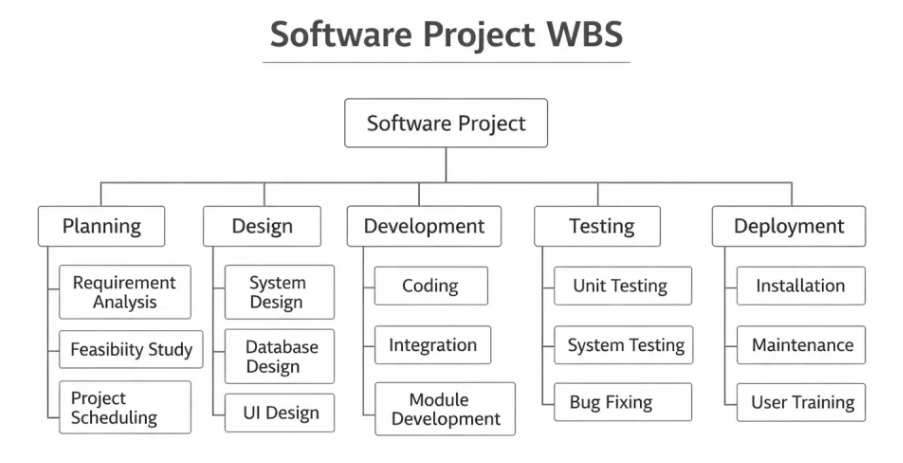
Figure: WBS in Software Project
Following are the explanation of Software Project WBS Diagram:-
The Software Project WBS (Work Breakdown Structure) diagram shows how a software project is divided into smaller and manageable tasks. First, the main Software Project is placed at the top, and then it is divided into five major phases: Planning, Design, Development, Testing, and Deployment. This structure helps project managers understand the complete workflow clearly and organize tasks step by step. As a result, the project becomes easy to manage, track, and complete on time.
1. Planning
In this phase, the project team collects requirements and studies the project feasibility. It includes Requirement Analysis, Feasibility Study, and Project Scheduling. Moreover, this stage helps in understanding project goals and timeline. Therefore, planning builds a strong foundation for the project.
2. Design
The design phase focuses on creating the structure of the software system. It includes System Design, Database Design, and UI Design. Furthermore, this phase defines how the software will look and work. As a result, developers get a clear blueprint before coding starts.
3. Development
In this phase, actual coding and software creation take place. It includes Coding, Integration, and Module Development. Moreover, developers write programs and connect different modules together. Therefore, this phase converts design into a working software system.
4. Testing
The testing phase checks the software for errors and bugs. It includes Unit Testing, System Testing, and Bug Fixing. In addition, testers ensure that the software works correctly and meets requirements. As a result, software quality improves before release.
5. Deployment
This is the final phase where software is delivered to users. It includes Installation, Maintenance, and User Training. Moreover, the software is installed and users are trained to use it properly. Therefore, the project is successfully completed and maintained.
WBS in Software Product
In a software product, WBS focuses on product components like modules, features, and functions. It helps in organizing product development activities. Moreover, it ensures proper development and testing of each module. Therefore, WBS improves product quality.
For example, in an e-commerce software product, the WBS includes user module, payment module, product module, and admin module. Each module is developed and tested separately. Moreover, this improves product performance. Therefore, WBS supports product development.
Diagram of Software Product WBS
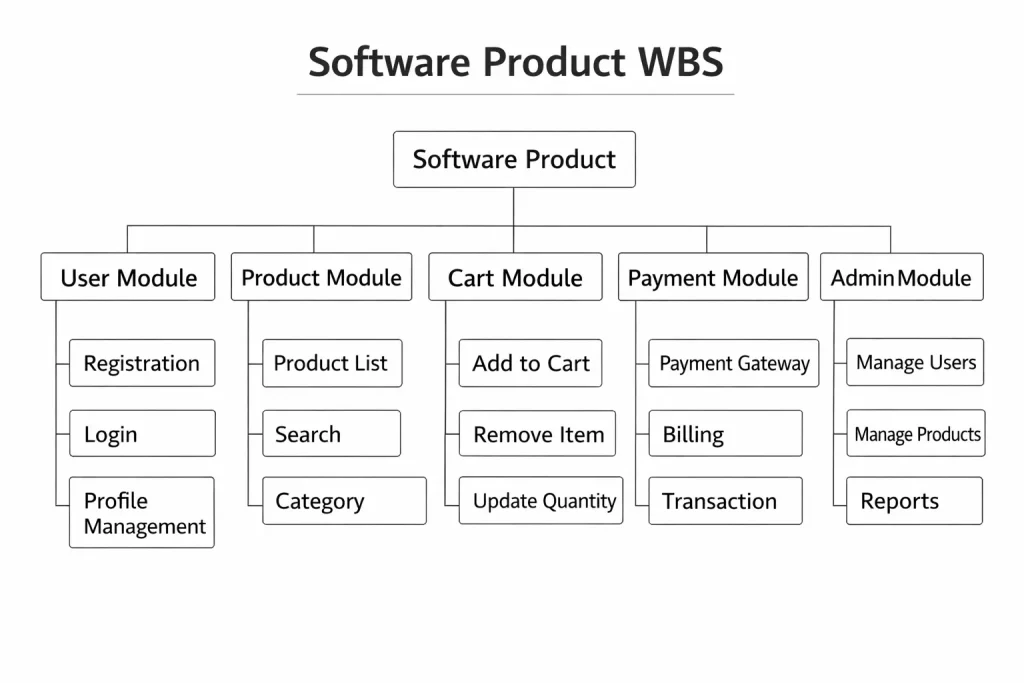
Figure: Software Product WBS
Following are the explanation of Software Product WBS Diagram:-
The Software Product WBS (Work Breakdown Structure) diagram shows how a software product is divided into different modules and sub-modules. First, the main Software Product is placed at the top, and then it is divided into five important modules: User Module, Product Module, Cart Module, Payment Module, and Admin Module. Moreover, each module is further divided into smaller functions to clearly show the structure of the product. As a result, developers and project managers can easily understand the features and components of the software.
1. User Module
The User Module handles all user-related activities in the software product. It includes Registration, Login, and Profile Management features. Moreover, this module helps users create accounts and manage their personal information. Therefore, it improves user interaction and system accessibility.
2. Product Module
The Product Module manages product-related information in the system. It includes Product List, Search, and Category features. Furthermore, users can view and search products easily through this module. As a result, it helps in organizing and displaying product data efficiently.
3. Cart Module
The Cart Module controls shopping cart operations in the software product. It includes Add to Cart, Remove Item, and Update Quantity features. Moreover, it allows users to manage selected products before purchase. Therefore, it supports smooth shopping and order management.
4. Payment Module
The Payment Module handles all payment-related processes in the system. It includes Payment Gateway, Billing, and Transaction features. In addition, this module ensures secure payment and order completion. As a result, users can make safe and quick payments.
5. Admin Module
The Admin Module manages system control and monitoring. It includes Manage Users, Manage Products, and Reports features. Moreover, the admin can control product data and user activities. Therefore, it helps in maintaining the overall system efficiently.
Objectives of WBS
The main objective of WBS is to divide the project into manageable tasks for easy execution. Moreover, it helps in proper resource allocation and time scheduling. It also improves project monitoring and control. Therefore, WBS ensures smooth and successful project completion.
Following are the main objectives:-
1. To Divide Project into Manageable Tasks
The main objective of WBS is to break the software project into smaller and manageable tasks. This helps in understanding the project work clearly and systematically. Smaller tasks are easier to plan and execute. It reduces complexity in project management. This ensures smooth project execution.
2. To Improve Project Planning
WBS helps in organizing project activities in a structured way. It allows project managers to plan each phase of the software project properly. Proper planning reduces confusion and errors during development. It ensures that all tasks are completed in sequence. This improves overall project efficiency.
3. To Assign Responsibilities Clearly
Another objective of WBS is to assign tasks to team members clearly. Each member knows their role and responsibilities in the project. This improves coordination and teamwork among developers and managers. It reduces misunderstanding and conflicts. This leads to better project performance.
4. To Estimate Time and Cost Accurately
WBS helps in estimating the time and cost required for each task. Breaking the project into smaller units makes estimation easier and more accurate. It helps in controlling project budget and schedule. Proper estimation reduces delays and extra expenses. This supports successful project completion.
5. To Monitor and Control Project Progress
WBS allows project managers to track and monitor project activities regularly. Each task can be checked and evaluated easily. Problems can be identified and corrected at an early stage. It helps in maintaining project performance. This ensures timely completion of the software project.
6. To Reduce Project Risks
WBS helps in identifying possible risks and challenges in different project stages. Smaller tasks make it easier to analyze and manage risks. Proper planning reduces uncertainties in the project. It improves project stability and safety. This increases the chances of success.
7. To Ensure Quality of Software Product
WBS focuses on completing each task with proper quality standards. It ensures that all modules of the software are developed and tested properly. Quality checks can be done at every stage. This reduces errors and defects in the final product. It improves software reliability.
Characteristics of Work Breakdown Structure (WBS)
1. Hierarchical Structure
WBS follows a hierarchical structure where the project is divided into levels and sub-levels. Each level represents a part of the project work. This structure helps in organizing tasks in a clear manner. It makes project management easier. This improves understanding of project activities.
2. Task-Oriented Approach
WBS focuses on project tasks and activities rather than outcomes. It divides work into smaller tasks that can be easily managed and completed. Each task has a specific purpose in the project. This ensures proper execution of activities. It increases project efficiency.
3. Clear and Structured
WBS provides a clear and structured view of the project. All tasks and sub-tasks are organized in a logical order. This reduces confusion and improves coordination among team members. Proper structure helps in better planning. This ensures smooth project management.
4. Flexible and Scalable
WBS can be modified according to project requirements. New tasks can be added or removed when needed. It can be used for small as well as large software projects. This flexibility makes it useful in different situations. It supports project growth and changes.
5. Focus on Deliverables
WBS mainly focuses on project deliverables and outputs. Each task contributes to the final software product. It ensures that all required components are completed properly. This improves project quality and performance. It helps in achieving project goals.
6. Supports Monitoring and Control
WBS helps in tracking project progress and performance. Managers can monitor each task and identify delays or issues. This allows quick decision-making and problem-solving. It improves project control. This ensures timely completion.
7. Improves Communication
WBS provides a common understanding of project work among stakeholders. It helps in clear communication between team members and managers. Everyone knows the project structure and responsibilities. This reduces misunderstandings. It improves teamwork and coordination.
Types of WBS
Work Breakdown Structure (WBS) is mainly divided into two types: Project-Oriented WBS and Product-Oriented WBS. Project-Oriented WBS focuses on project activities such as planning, design, coding, and testing. On the other hand, Product-Oriented WBS focuses on software modules and system components. Therefore, both types help in organizing and managing software projects effectively.
1. Project-Oriented WBS
Project-oriented WBS divides the project based on activities and tasks. It focuses on project phases like planning, design, and development. Moreover, it helps in managing project workflow. Therefore, it is useful for project management.
For example, a banking software project is divided into planning, design, coding, testing, and maintenance. Each phase has specific tasks. Moreover, the team works in sequence. Therefore, the project is managed properly.
2. Product-Oriented WBS
Product-oriented WBS divides the project based on product components and modules. It focuses on system features and functions. Moreover, it helps in developing each module properly. Therefore, it is useful for product development.
For example, an online shopping system is divided into login module, cart module, and payment module. Each module is developed separately. Moreover, this improves product quality. Therefore, product-oriented WBS is useful.
Advantages of Work Breakdown Structure (WBS)
1. Improves Project Planning
WBS helps in breaking the project into smaller and manageable tasks. This makes planning easier and more systematic. Each task can be clearly defined and organized properly. It reduces confusion in project execution. Proper planning leads to smooth project management.
2. Better Task Management
Work Breakdown Structure helps in organizing tasks in a structured way. It allows project managers to assign responsibilities to team members easily. Each team member knows their work clearly. This improves coordination and teamwork. It increases overall project efficiency.
3. Accurate Time and Cost Estimation
WBS helps in estimating project time and cost more accurately. Breaking the project into smaller parts makes it easier to calculate required resources. This reduces the chances of budget and schedule errors. It ensures better financial and time control. Proper estimation improves project success.
4. Easy Monitoring and Control
WBS allows project managers to monitor progress easily. Each task can be tracked and evaluated regularly. Problems can be identified and solved quickly. It helps in maintaining project performance. This ensures timely completion of the project.
5. Reduces Project Risks
Work Breakdown Structure helps in identifying possible risks at an early stage. Smaller tasks are easier to analyze and manage. Risk management becomes more effective and controlled. It reduces chances of project failure. This improves project stability.
6. Improves Communication
WBS provides a clear structure of the project to all stakeholders. It helps in better understanding of project tasks and responsibilities. Team members can communicate effectively. Misunderstandings are reduced. This leads to smooth project coordination.
7. Enhances Quality of Work
WBS ensures that every part of the project is properly completed. It helps in focusing on each task carefully. Quality checks can be done at every stage. This reduces errors and defects. It improves the overall quality of the software project.
Disadvantages of Work Breakdown Structure (WBS)
1. Time-Consuming Process
Creating a Work Breakdown Structure requires a lot of time and effort. It involves detailed planning and analysis of project tasks. This may delay the start of the project. Proper structure creation needs careful thinking. This makes the process lengthy.
2. Requires Skilled Professionals
WBS preparation needs experienced project managers and team members. Lack of knowledge can lead to incorrect task breakdown. Poor planning may affect project performance. Skilled professionals are required for proper implementation. This increases project dependency on experts.
3. Difficult for Large Projects
For large and complex software projects, WBS becomes difficult to manage. Too many tasks and sub-tasks create complexity. It becomes hard to maintain and update the structure. This may lead to confusion. Managing large WBS requires extra effort.
4. Risk of Over-Detailing
Sometimes WBS includes too many small tasks, making it complex. Over-detailing can increase workload and confusion. It may slow down project planning. Too much information becomes difficult to manage. This affects project efficiency.
5. Lack of Flexibility
WBS is usually fixed once created and changes are difficult to manage. Any change in project scope requires updating the entire structure. This takes time and effort. It reduces flexibility in project management. This may affect project progress.
6. High Planning Effort
Developing WBS requires proper documentation and coordination. It involves meetings, discussions, and analysis. This increases planning effort and cost. Small organizations may find it difficult. This makes implementation challenging.
7. Communication Gaps May Occur
If WBS is not properly explained, team members may misunderstand tasks. Poor communication can create confusion in responsibilities. This may lead to delays and errors. Proper explanation is necessary. Otherwise, project performance may suffer.
Applications of Work Breakdown Structure (WBS)
1. Software Development Projects
WBS is widely used in software development to divide the project into modules and tasks. It helps in managing coding, testing, and deployment activities. Proper task division improves project organization. It ensures timely delivery of software. This increases development efficiency.
2. Construction Projects
WBS is used in construction projects to manage building and infrastructure tasks. It helps in organizing labor, materials, and schedules. Proper planning ensures smooth project execution. It reduces delays and cost overruns. This improves construction management.
3. IT and Networking Projects
WBS helps in planning IT and networking system implementation. It divides tasks like hardware setup, software installation, and testing. Proper structure improves system performance. It reduces technical errors and risks. This ensures efficient project completion.
4. Business and Management Projects
WBS is applied in business projects for planning and organizing activities. It helps in managing marketing, finance, and operations tasks. Proper task breakdown improves coordination. It supports decision-making and control. This improves business performance.
5. Educational and Research Projects
WBS is useful in academic and research projects. It helps in dividing research work into smaller tasks. Proper planning ensures timely completion of assignments and research. It improves work organization. This supports academic success.
6. Healthcare Projects
WBS is used in healthcare system development and hospital management projects. It helps in organizing medical resources and services. Proper planning improves patient care and safety. It ensures efficient operations. This supports healthcare management.
7. Government and Public Projects
WBS is applied in government and public development projects. It helps in managing infrastructure and welfare programs. Proper planning ensures effective use of public resources. It improves transparency and accountability. This benefits society.
Conclusion
Work Breakdown Structure (WBS) is an important tool in software project and product development that helps in dividing the project into smaller and manageable tasks. It improves planning, task allocation, time and cost estimation, and project monitoring. WBS ensures better coordination, reduces risks, and maintains quality in software development. Proper use of WBS leads to systematic project execution and successful completion of the software project.