The Prototyping Model is a software development model in which a sample or prototype of the software is created before the final product. This prototype helps users understand how the system will work. Moreover, developers collect feedback from users and improve the system step by step. Therefore, it helps in clearly defining requirements and reducing confusion in the early stages. As a result, the final software becomes more accurate and user-friendly.
For example, of the Prototyping Model is online shopping website development. First, developers create a prototype of the homepage and product page. Then, users test the design and give feedback. Finally, developers improve the system and build the complete e-commerce website based on user requirements.
What is Prototyping Model?
The Prototyping Model in Software Engineering is a development approach where an early version of the software, called a prototype, is built to demonstrate the system’s features and design before the final product is created.
A prototype is a simple and early working model of the software that shows how the system will look and function. It helps users and developers understand requirements clearly, collect feedback, and make improvements. Therefore, the final software is developed based on the refined and validated prototype.
When Prototyping Model is Used?
1. When Requirements Are Not Clear
The Prototyping Model is used when user requirements are not clearly defined. Developers create a sample system to understand needs. Therefore, it helps in collecting accurate requirements.
2. For User Interface-Based Systems
This model is useful in systems where user interaction is important. For example, websites and mobile applications require user feedback. Hence, prototypes help in improving design and usability.
3. For New or Innovative Projects
When a project involves new technology or new ideas, this model is helpful. Developers test concepts using prototypes. As a result, risks are reduced and development becomes easier.
4. For Customer-Oriented Software
This model is used in customer-focused applications. Users can test the system and suggest improvements. Therefore, customer satisfaction increases.
Objectives of Prototyping Model
The main objective of the Prototyping Model is to understand user requirements clearly and improve communication between users and developers. It helps developers create a sample system so that users can see and test the software in the early stage. Moreover, it reduces development errors by identifying problems before final implementation and allows quick changes based on feedback. Therefore, the model saves time and cost while improving software quality and user satisfaction.
Following are the four objectives of Prototyping model:-
1. Understand User Requirements
The main objective of the Prototyping Model is to understand user requirements clearly. Developers create a sample version of the software for users. Moreover, users give feedback after seeing the prototype. Therefore, developers can improve the system based on real needs. As a result, requirement confusion is reduced.
2. Improve User Interaction
Another objective is to improve communication between users and developers. The prototype allows users to see and test the system early. Furthermore, users can suggest changes easily. Hence, better interaction leads to a better final product.
3. Reduce Development Errors
The Prototyping Model helps in identifying errors in the early stage. Developers test the prototype before final development. Moreover, necessary changes are made quickly. Therefore, the chances of major errors decrease and development becomes smoother.
4. Save Time and Cost
This model helps in saving time and cost by reducing rework. Developers fix problems in the prototype stage itself. As a result, fewer changes are required in the final system. Thus, the project becomes more efficient and cost-effective.
Characteristics of Prototyping Model
1. Early Working Model
A prototype of the system is developed at the early stage to understand requirements. This helps users visualize the system and provide feedback.
2. User Involvement
Users actively participate in reviewing the prototype and suggesting improvements. This ensures that the final system meets user expectations.
3. Iterative Process
The prototype is refined repeatedly based on user feedback. This iterative approach improves system accuracy and functionality.
4. Requirement Clarification
The model helps in identifying and clarifying unclear or incomplete requirements. It reduces misunderstandings between developers and users.
5. Flexible Development Approach
Changes can be made easily during prototype development. This flexibility improves system design and usability.
6. Improved Communication
The prototype acts as a communication tool between developers and users. It helps in better understanding of system features and requirements.
7. Focus on User Interface
The model emphasizes designing a user-friendly interface and system functionality. This ensures better user experience and system performance.
Uniqueness of Prototyping Model in Comparison to Other Models
The Prototyping Model is unique among software development models because it focuses on creating an early working version of the software to understand and refine user requirements. Unlike traditional models such as Waterfall, which require clear requirements at the beginning, the Prototyping Model allows continuous user interaction and feedback during development. This makes it more flexible and user-centered compared to other models.
Let’s see the detailed explanations,
1. Early Prototype Development
The Prototyping Model creates a working model of the system at an early stage. Other models like Waterfall and V-Model focus on documentation first, while Prototyping focuses on building a sample system to understand requirements.
2. High User Involvement
Users actively participate in reviewing and improving the prototype. Unlike other models where user involvement is limited, this model encourages continuous feedback and interaction.
3. Requirement Clarification
The model is especially useful when requirements are unclear or incomplete. Other models require clear requirements at the beginning, but Prototyping helps in discovering requirements through system visualization.
4. Iterative Improvement
The prototype is repeatedly refined based on feedback. Compared to linear models, this iterative nature makes the Prototyping Model more flexible and adaptive.
5. Focus on User Interface and Functionality
The Prototyping Model emphasizes system design and user interface early in development. Other models focus more on technical structure before showing the system to users.
6. Reduces Development Risk
By testing ideas through prototypes, risks and errors are identified early. This makes the model safer compared to models that test only after full development.
7. Better Communication Between Users and Developers
The prototype acts as a communication tool that bridges the gap between users and developers. Other models rely mostly on documentation, while Prototyping uses visual representation.
8. Flexible and Adaptive Approach
The Prototyping Model allows easy changes and improvements during development. Compared to rigid models like Waterfall, it adapts better to changing user needs and project requirements.
Prototyping Model Diagram
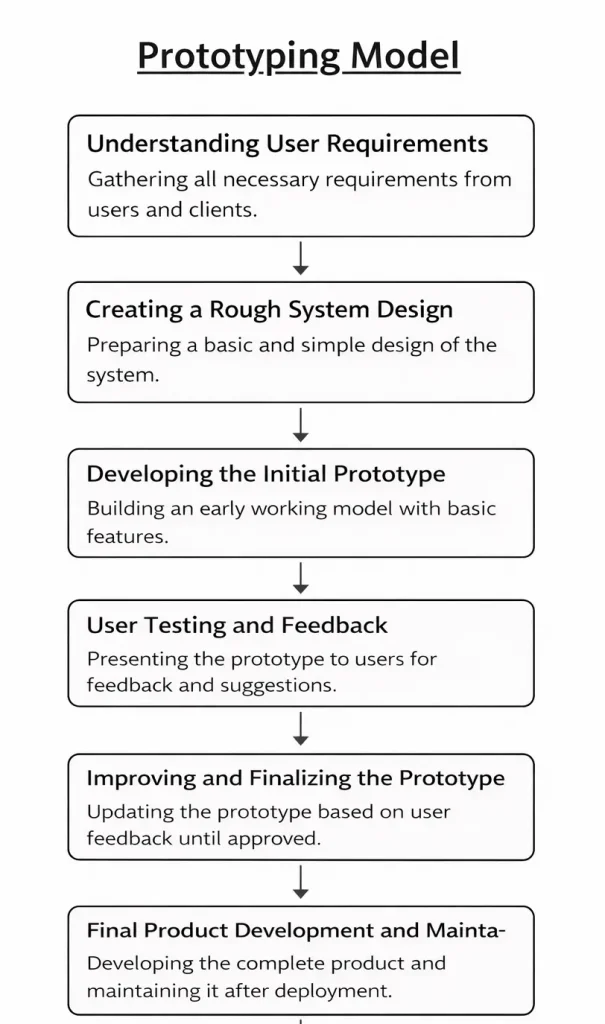
Figure: Phases of Prototyping Model
Following are the phases of Prototyping model:-
1. Understanding User Requirements
In this phase, the development team collects all the necessary requirements from users and clients. The main aim is to understand what the system should do and what features are needed. Moreover, meetings, interviews, and discussions are conducted to gather clear information. Therefore, this phase builds a strong foundation for prototype development.
Additionally, developers try to understand the problems faced by users in the current system and identify possible solutions. They also analyze business needs, system goals, and expected outputs. This helps in reducing confusion and ensures that the system is developed according to user expectations. Proper documentation is also prepared to keep all requirements organized and clear.
For example, For an online shopping system, users may request product search, add to cart, payment, and order tracking features. Developers also note requirements like secure login, fast performance, and easy navigation.
2. Creating a Rough System Design
In this phase, a simple and basic design of the system is prepared. It shows the overall structure, layout, and flow of the software. Additionally, the design focuses on user interface and main system functions without going into detailed coding. Hence, it gives a quick overview of how the system will look.
Furthermore, developers create sketches, wireframes, and flow diagrams to present the system structure. This rough design helps in identifying major components and system behavior. It also ensures that both users and developers have a common understanding of the system before building the prototype.
For example, Designing the homepage, product page, cart page, and checkout page layout, along with simple navigation between pages.
3. Developing the Initial Prototype
In this phase, a small working model of the system is created based on the rough design. This prototype includes basic features and allows users to see how the system will function. Moreover, it helps developers understand the practical working of the software. As a result, users can interact with the system early.
In addition, the prototype is not the final product but a temporary model used for demonstration. It may not include all features, but it shows the main functionality of the system. This helps in identifying missing requirements and improving system usability before full development begins.
For example, A basic shopping website where users can view products and add items to the cart, but payment and order tracking may still be incomplete.
4. User Testing and Feedback
In this phase, the prototype is presented to users for testing and evaluation. Users check the system and provide feedback about improvements and missing features. Furthermore, developers identify errors and weak areas in the prototype. Therefore, this phase ensures that the system meets user expectations.
Moreover, user feedback plays a very important role in improving the system. Developers carefully analyze suggestions and understand user experience. This helps in making the system more user-friendly, efficient, and reliable. Continuous feedback improves the quality of the final product.
For example, Users suggest adding product filters, login options, better navigation, and faster search functionality.
5. Improving and Finalizing the Prototype
In this phase, developers update and improve the prototype according to user feedback. New features are added, and problems are fixed step by step. This process continues until users are satisfied with the system. Hence, a final approved prototype is ready for full development.
Additionally, developers ensure that the system design, functionality, and performance meet user requirements. Multiple versions of the prototype may be created during this process. This step reduces risks and ensures that the final system will work smoothly.
For example, Adding payment gateway, order tracking, user login, and improved design based on feedback.
6. Final Product Development and Maintenance
In this phase, the final software is developed, tested, and deployed in the real environment. After deployment, regular maintenance and updates are done to improve performance and fix bugs. Therefore, the software continues to work efficiently over time.
Furthermore, maintenance includes updating security, adding new features, and improving system performance based on changing user needs. This phase ensures long-term system stability and reliability. Continuous monitoring helps in preventing system failures and maintaining smooth operation.
For example, Launching the shopping website online and updating it regularly with new features, security updates, and performance improvements.
Advantages of Prototyping Model
1. Clear Understanding of Requirements
The Prototyping Model helps developers and users clearly understand system requirements by providing a working model of the software. Users can see how the system will function and suggest necessary changes. This reduces confusion and ensures accurate requirement collection, leading to better system development.
2. Early Error Detection
Since a prototype is developed at an early stage, errors and design issues can be identified quickly. Developers can fix these issues before final development begins. This reduces the chances of major problems in later stages and improves overall system reliability.
3. High User Involvement
The model encourages continuous interaction between users and developers. Users actively review the prototype and provide feedback for improvement. This involvement ensures that the final software meets user expectations and increases customer satisfaction.
4. Flexible and Easy to Modify
The prototype can be easily modified based on feedback and changing requirements. This flexibility allows developers to make improvements without affecting the entire system. It supports better system design and adaptability.
5. Improved Communication
The working prototype serves as a visual communication tool between developers and users. It helps both parties understand system features and functionality clearly. This reduces misunderstandings and improves coordination.
6. Reduces Development Risk
By testing system features early, the Prototyping Model reduces project risks and uncertainties. Developers can evaluate technical feasibility and user acceptance before full-scale development. This ensures a safer development process.
7. Better User Interface Design
The model focuses on designing a user-friendly interface through continuous feedback. This improves usability and enhances the overall user experience. A well-designed interface makes the software more efficient and effective.
Disadvantages of Prototyping Model
1. High Development Cost
Developing multiple prototypes requires additional time, effort, and resources. Continuous changes and modifications increase the overall project cost. This makes the model expensive compared to simpler models.
2. Time-Consuming Process
Frequent feedback and repeated improvements can delay final software development. Developers may spend too much time refining the prototype. This increases the project duration.
3. Incomplete System Analysis
Developers may focus more on building the prototype and less on detailed system analysis. This can lead to weak system design and poor documentation. As a result, the final system may lack proper structure.
4. User Misunderstanding
Users may assume that the prototype is the final product and expect quick delivery. This can create unrealistic expectations and pressure on the development team. It may also lead to confusion during project execution.
5. Complex Project Management
Managing multiple versions of prototypes and continuous feedback can be difficult. It requires proper coordination and planning to control changes and maintain project direction. This increases management complexity.
6. Scope Creep Risk
Continuous user feedback may lead to frequent changes in requirements. This can expand the project scope beyond the original plan. As a result, the project may face delays and increased costs.
7. Requires Skilled Developers
The Prototyping Model requires experienced developers who can quickly design and modify prototypes. Lack of skilled professionals can reduce the effectiveness of the model and affect software quality.
Applications of Prototyping Model
1. Web Application Development
The Prototyping Model is widely used in web application development to design user interfaces and system functionality. It helps in creating interactive and user-friendly websites through continuous feedback and improvements.
2. Mobile Application Development
Mobile app development benefits from prototyping because it allows developers to test app design, navigation, and features before final development. This ensures better performance and user experience.
3. E-Commerce Systems
Prototyping is used in online shopping platforms to design product pages, payment systems, and user interfaces. It helps in improving customer interaction and system functionality before full implementation.
4. Banking and Financial Systems
Banking applications use prototyping to design transaction systems, dashboards, and user interfaces. This ensures secure, reliable, and user-friendly financial software.
5. Healthcare and Hospital Systems
Healthcare software uses prototyping to design patient management systems, medical record systems, and user interfaces. It helps in improving system accuracy and usability.
6. Educational and Learning Systems
Learning management systems and educational software use prototyping to test features and user interaction. This ensures better learning experience and system functionality.
7. User Interface and UX Design Projects
Prototyping is commonly used in UI/UX design projects to create sample screens and layouts. It helps designers evaluate usability and improve system design before final development.
Conclusion
The Prototyping Model is a useful software development approach that helps in understanding user requirements clearly and improving system design. It allows developers to create a sample system and collect feedback before final development. Moreover, it reduces errors and improves user satisfaction through continuous interaction. Therefore, this model is best suited for projects where requirements are not clear and user involvement is important.