Arrays are one of the most important data structures in C programming. They allow developers to store and manage multiple values under a single variable name, enabling cleaner code and efficient data processing. Whether working with simple lists or complex grid-based data, arrays provide a structured way to organize information in memory. This article explains one-dimensional and multi-dimensional arrays in simple technical terms with examples to help you understand how they work.
Basic Array Declaration
int arr[50];This declares an array named arr with the capacity to store 50 integer values. Arrays provide an efficient way to manage collections of related data under a single identifier, eliminating the need for multiple individual variables.
Types of Arrays in C
- One-Dimensional Array (1D) – Linear list of elements
- Two-Dimensional Array (2D) – Data organized in rows and columns
- Three-Dimensional Array (3D) – Layered or cube-like data
- Higher-dimensional arrays – Used rarely, mostly in advanced applications
1. One Dimensional Array
A one-dimensional array is a list of elements arranged in a single row or single line, where each element can be accessed using its index.
1D Array Declaration Syntax
An array can be declared with the bracket punctuators [ ], as shown in the below syntax:
data_type array_name[array_size];Example of 1D Array with a Diagram
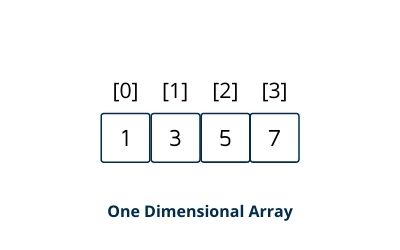
Array Initialization Methods of One Dimensional Array
Method 1: Element-by-Element Assignment
int numbers[5];
numbers[0] = 10;
numbers[1] = 20;
numbers[2] = 30;
numbers[3] = 40;
numbers[4] = 50;
Method 2: Initializer List (Compact Form)
int numbers[5] = {10, 20, 30, 40, 50};Note: If you provide fewer values than the array size, remaining elements are automatically initialized to zero:
int arr[10] = {1, 2, 3}; // arr[3] to arr[9] are initialized to 01D Array Implementation in C
#include <stdio.h>

int main() {
    int numbers[10];
    int i;

    // Initialize array with values 10 through 19
    for (i = 0; i < 10; i++) {
        numbers[i] = i + 10;
    }

    // Display all elements
    printf("Array elements:\n");
    for (i = 0; i < 10; i++) {
        printf("numbers[%d] = %d\n", i, numbers[i]);
    }

    return 0;
}
Output
Array elements:
numbers[0] = 10
numbers[1] = 11
numbers[2] = 12
numbers[3] = 13
numbers[4] = 14
numbers[5] = 15
numbers[6] = 16
numbers[7] = 17
numbers[8] = 18
numbers[9] = 19
Key Characteristics of One Dimensional Array
- Homogeneous Elements: All elements must be of the same data type
- Contiguous Memory: Elements are stored in consecutive memory addresses
- Zero-based Indexing: Indexing starts from 0 and goes up to
size-1 - Fixed Size: The size is determined at compile time and cannot be changed during execution
- Constant-Time Access: Any element can be accessed directly in O(1) time using its index
2. Multi-Dimensional Array
A multi-dimensional array is essentially an "array of arrays." It extends the concept of 1D arrays to two or more dimensions, allowing data to be organized in tabular or grid-like structures. The most common multi-dimensional arrays are two-dimensional (2D) and three-dimensional (3D) arrays.
Multi-Dimensional Array Declaration Syntax
data_type array_name[dim1][dim2]...[dimN];Where:
- data_type: Type of elements (int, float, char, etc.)
- array_name: Identifier for the array
- dim1, dim2, ..., dimN: Sizes of each dimension
2.1 Two Dimensional Array (Matrix)
A two-dimensional array organizes data in a grid of rows and columns, similar to a mathematical matrix or spreadsheet. Each element is identified by two indices: [row][column].
Example of 2D Array with a Diagram
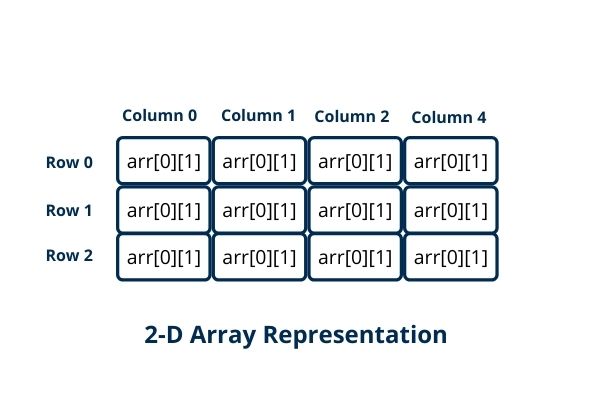
Declaration and Initialization of Two Dimensional Array
// Declaration
int matrix[3][4];

// Initialization with values
int matrix[3][4] = {
    {1, 2, 3, 4},    // Row 0
    {5, 6, 7, 8},    // Row 1
    {9, 10, 11, 12}  // Row 2
};

// Alternative: Flattened initialization
int matrix[3][4] = {1, 2, 3, 4, 5, 6, 7, 8, 9, 10, 11, 12};
Note: For partial initialization, unspecified elements are set to zero automatically.
2D Array Implementation in C
#include <stdio.h>

int main() {
    int matrix[3][3] = {
        {1, 2, 3},
        {4, 5, 6},
        {7, 8, 9}
    };

    printf("2D Array elements:\n");
    for(int row = 0; row < 3; row++) {
        for(int col = 0; col < 3; col++) {
            printf("matrix[%d][%d] = %d\n", row, col, matrix[row][col]);
        }
    }

    return 0;
}
Output
2D Array elements:
matrix[0][0] = 1
matrix[0][1] = 2
matrix[0][2] = 3
matrix[1][0] = 4
matrix[1][1] = 5
matrix[1][2] = 6
matrix[2][0] = 7
matrix[2][1] = 8
matrix[2][2] = 9
Key Characteristics of Two Dimensional Array
- Tabular Structure: Data organized in rows and columns
- Double Indexing: Each element requires two indices for access
- Memory Layout: Stored in row-major order in C (rows stored contiguously)
- Total Elements: rows × columns
- Common Uses: Matrices, game boards, images, spreadsheets
2.2 Three Dimensional Array
A three dimensional array extends the 2D concept by adding a third dimension, often thought of as depth or layers. It's useful for representing volumetric data or collections of 2D arrays.
Example of 3D Array with a Diagram
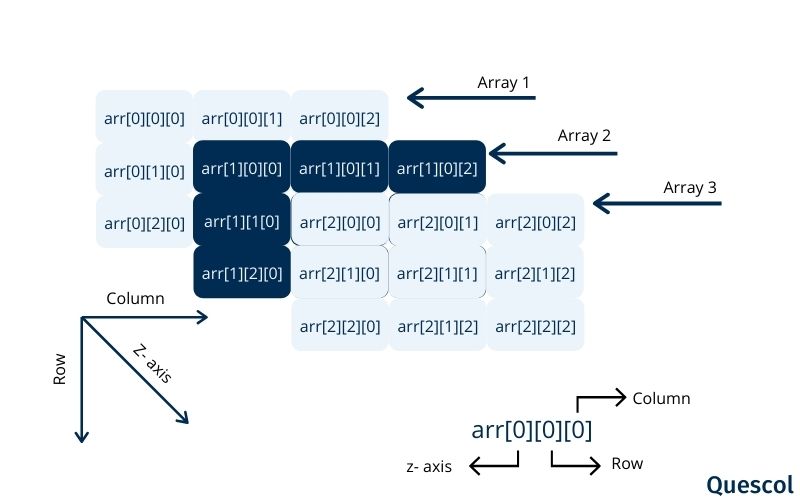
Declaration and Initialization of Three Dimensional Array
// A 2×3×4 array: 2 layers, each with 3 rows and 4 columns
int cube[2][3][4] = {
    {   // Layer 0
        {1, 2, 3, 4},
        {5, 6, 7, 8},
        {9, 10, 11, 12}
    },
    {   // Layer 1
        {13, 14, 15, 16},
        {17, 18, 19, 20},
        {21, 22, 23, 24}
    }
};
3D Array Implementation in C
#include <stdio.h>

int main() {
    int arr[2][3][2];  // 2 layers × 3 rows × 2 columns = 12 elements
    int i, j, k;
    int value = 1;

    // Initialize with sequential values
    for(i = 0; i < 2; i++) {
        for(j = 0; j < 3; j++) {
            for(k = 0; k < 2; k++) {
                arr[i][j][k] = value++;
            }
        }
    }

    printf("3D Array Contents:\n");

    // Display the 3D array with [i][j][k] format
    for(i = 0; i < 2; i++) {
        for(j = 0; j < 3; j++) {
            for(k = 0; k < 2; k++) {
                printf("arr[%d][%d][%d] = %d\n", i, j, k, arr[i][j][k]);
            }
        }
    }

    return 0;
}
Output
3D Array Contents:
arr[0][0][0] = 1
arr[0][0][1] = 2
arr[0][1][0] = 3
arr[0][1][1] = 4
arr[0][2][0] = 5
arr[0][2][1] = 6
arr[1][0][0] = 7
arr[1][0][1] = 8
arr[1][1][0] = 9
arr[1][1][1] = 10
arr[1][2][0] = 11
arr[1][2][1] = 12
Key Characteristics of Three Dimensional Array
- Three Indices: Each element accessed as
[layer][row][column] - Cubic Structure: Can be visualized as a cube or stack of matrices
- Total Elements: layers × rows × columns
- Common Uses: RGB color images (3 channels), video frames, 3D spatial data, scientific simulations
Conclusion
Arrays play a fundamental role in C programming by providing a structured way to store and access multiple values efficiently. One-dimensional arrays handle linear collections, while multi-dimensional arrays extend this structure to grids, layers, and more complex data models. Understanding how arrays are stored, accessed, and initialized helps you write faster, cleaner, and more organized C programs. Mastering these concepts also builds a strong foundation for advanced data structures and algorithms.