Polynomial representation using linked lists is a critical concept in computer science and mathematics. In this guide, we explore how linked lists can effectively represent polynomials, especially in situations where polynomials are sparse (i.e., have many zero coefficients). Unlike arrays, linked lists provide a dynamic and memory-efficient way of representing polynomials, making operations like addition, subtraction, and multiplication more manageable and efficient. Understanding this representation is crucial for students and professionals dealing with complex mathematical computations and algorithm design.
Understanding Linked Lists
Linked lists are fundamental data structures consisting of a sequence of nodes. Each node typically contains two parts: data and a reference (or pointer) to the next node in the sequence. Unlike arrays, linked lists do not require contiguous memory allocation, making them ideal for dynamic data storage. In the context of polynomial representation, each node in a linked list can represent a term of the polynomial, storing both its coefficient and exponent.
Representing a Polynomial Term
In the linked list representation of a polynomial, each node corresponds to a term of the polynomial. The node structure usually contains three components:
- Coefficient: The numerical multiplier of the term.
- Exponent: The power to which the variable is raised in the term.
- Next: A pointer to the next term (node) in the polynomial.
This structure allows the polynomial to be stored as a linked list, where each node directly represents a term, and the entire list represents the polynomial in its entirety.
Advantages of Using Linked Lists
Using linked lists for polynomial representation offers several advantages:
- Dynamic Size: The size of the polynomial isn’t fixed, allowing for easy addition or removal of terms.
- Efficient Storage: Especially beneficial for sparse polynomials where many coefficients are zero, as it only stores non-zero terms.
- Flexibility: Easier to implement operations like addition, multiplication, and differentiation compared to array-based representations.
Example
To illustrate how a polynomial is represented using a linked list, let’s consider a specific example. Suppose we have a polynomial:
P(x)=7x3+5x2−2x+4
This polynomial will be represented as a linked list where each node represents a term of the polynomial.
Node Structure
Each node in the linked list will typically have the following structure:
- Coefficient: The numerical coefficient of the term.
- Exponent: The exponent of the variable in the term.
- Next: A pointer to the next term (node) in the polynomial.
Representation of the Polynomial as a Linked List
- First Node (7x3):
- Coefficient: 7
- Exponent: 3
- Next: Pointer to the second node
- Second Node (5x2):
- Coefficient: 5
- Exponent: 2
- Next: Pointer to the third node
- Third Node (-2x):
- Coefficient: -2
- Exponent: 1
- Next: Pointer to the fourth node
- Fourth Node (4):
- Coefficient: 4
- Exponent: 0 (since it’s a constant term)
- Next: NULL (as it is the last term)
Visual Representation
The linked list for polynomial P(x) would visually look like this:
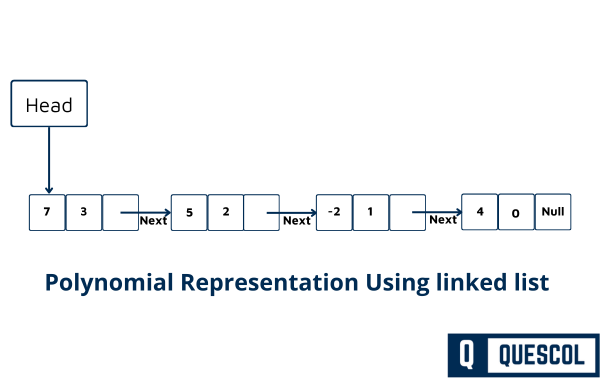
Each box represents a node, with the first number being the coefficient and the second number being the exponent. The arrows indicate the ‘next’ pointers linking each term of the polynomial.
Let’s break down the example of evaluating a polynomial using a linked list for the given polynomial:
P(x)=7x3+5x2−2x+4
and calculate its value for x=2.
Step-by-Step Evaluation of Polynomial
- Initial Setup:
- Polynomial: 7x3+5x2−2x+4
- Value to evaluate: x=2
- Initialize
Sumto 0.
- Evaluate First Term (7x3):
- Calculation: 7×23
- Process: 7×8=56
- Update Sum=0+56=56
- Evaluate Second Term (5x2):
- Calculation: 5×22
- Process: 5×4=20
- Update Sum=56+20=76
- Evaluate Third Term (-2x):
- Calculation: −2×2
- Process: −2×2=−4
- Update Sum=76−4=72
- Evaluate Fourth Term (4):
- This is a constant term.
- Update Sum=72+4=76
- Conclusion:
- The final value of P(2) is 76.
- So, when we substitute x=2 into the polynomial, the result is 76.
C Program Program to Solve Polynomial
#include <stdio.h>
#include <stdlib.h>
#include <math.h>

struct Node {
    int data;
    struct Node *next;
    struct Node *prev;
};

typedef struct Node Node;

// Create a node
Node* createNode(int coeff, int exp) {
    Node* newNode = (Node*)malloc(sizeof(Node));
    newNode->coeff = coeff;
    newNode->exp = exp;
    newNode->next = NULL;
    return newNode;
}

void appendNode(Node** head, int coeff, int exp) {
    Node* newNode = createNode(coeff, exp);
    if (*head == NULL) {
        *head = newNode;
        return;
    }
    Node* temp = *head;
    while (temp->next != NULL) {
        temp = temp->next;
    }
    temp->next = newNode;
}

// Function to evaluate the polynomial for a given value of x
int polynomialCalculation(Node* head, int x) {
    int sum = 0;
    Node* temp = head;
    while (temp != NULL) {
        sum += temp->coeff * pow(x, temp->exp);
        temp = temp->next;
    }
    return sum;
}

int main() {
    Node* poly = NULL;
    // Polynomial Construction 7x^3+5x^2−2x+4
    appendNode(&poly, 7, 3);
    appendNode(&poly, 5, 2);
    appendNode(&poly, -2, 1);
    appendNode(&poly, 4, 0);

    int x = 2;
    printf("Polynomial value for x = %d is: %d\n", x, polynomialCalculation(poly, x));

    return 0;
}
Output
Polynomial value for x = 2 is: 76
Program Explanations
Header Files (#include Statements):
#include <stdio.h>
#include <stdlib.h>
#include <math.h>
In the above code, #include <stdio.h>, #include <stdlib.h>, and #include <math.h> are used to include important header files that make certain functions available in your program. The stdio.h header allows you to use input and output functions like printf() and scanf(). The stdlib.h header provides general-purpose functions such as memory management, random number generation, and type conversions. The math.h header gives access to mathematical functions like sqrt() for square root, pow() for power, and sin() for sine.
Node Structure Definition:
struct Node {
    int data;
    struct Node *next;
    struct Node *prev;
};

typedef struct Node Node;
In the above code, a structure named Node is defined, which is used to create nodes for a linked list, especially a doubly linked list. The structure contains three parts: an integer variable data that stores the node’s value, a pointer next that points to the next node in the list, and another pointer prev that points to the previous node. This allows each node to connect in both directions, making it easy to move forward and backward through the list. The line typedef struct Node Node is used to simplify the code by allowing you to use Node directly instead of writing struct Node every time.
createNode Function:
// Create a node
Node* createNode(int coeff, int exp) {
    Node* newNode = (Node*)malloc(sizeof(Node));
    newNode->coeff = coeff;
    newNode->exp = exp;
    newNode->next = NULL;
    return newNode;
}
The function createNode is used to create a new node for a linked list that represents a polynomial term. It takes two values coeff (the coefficient) and exp (the exponent) as inputs. Inside the function, memory is first allocated for a new node using malloc(). Then, the values of coeff and exp are stored in the new node’s variables. The pointer next is set to NULL to show that this new node doesn’t link to any other node yet. Finally, the function returns the address of this newly created node so it can be connected to other nodes later.
appendNode Function:
void appendNode(Node** head, int coeff, int exp) {
    Node* newNode = createNode(coeff, exp);
    if (*head == NULL) {
        *head = newNode;
        return;
    }
    Node* temp = *head;
    while (temp->next != NULL) {
        temp = temp->next;
    }
    temp->next = newNode;
}
The function appendNode is used to add a new node at the end of a linked list. It takes three arguments a pointer to the head of the list (Node** head), and two integers coeff and exp that represent the coefficient and exponent of a polynomial term. Inside the function, a new node is created using createNode(). If the list is empty (meaning *head is NULL), the new node becomes the first node in the list. If the list already has nodes, the function uses a temporary pointer temp to move through the list until it reaches the last node. Once it reaches the end, it links the new node to the last node by setting temp->next = newNode.
polynomialCalculation Function:
// Function to evaluate the polynomial for a given value of x
int polynomialCalculation(Node* head, int x) {
    int sum = 0;
    Node* temp = head;
    while (temp != NULL) {
        sum += temp->coeff * pow(x, temp->exp);
        temp = temp->next;
    }
    return sum;
}
This function polynomialCalculation is used to evaluate the value of a polynomial for a given number x. It takes two inputs the head of the linked list head, which stores all the terms of the polynomial, and the value of x. Inside the function, a variable sum is initialized to 0 to store the total result. Then, using a pointer temp, the function goes through each node of the linked list. For every term, it calculates the value of coefficient × using the pow() function and adds it to sum. After all nodes are processed, the total sum is returned.
main Function:
int main() {
    Node* poly = NULL;
    // Polynomial Construction 7x^3+5x^2−2x+4
    appendNode(&poly, 7, 3);
    appendNode(&poly, 5, 2);
    appendNode(&poly, -2, 1);
    appendNode(&poly, 4, 0);

    int x = 2;
    printf("Polynomial value for x = %d is: %d\n", x, polynomialCalculation(poly, x));

    return 0;
}
In this main() function, the program starts by creating an empty linked list named poly to store the polynomial. Then, using the appendNode() function, it builds the polynomial 7x3+5x2−2x+4 by adding each term one by one, where each node holds a coefficient and its corresponding exponent. After constructing the polynomial, the variable x is set to 2, meaning the program will find the value of the polynomial when x=2. The printf() function then calls polynomialCalculation(poly, x) to calculate and display the result. Finally, the program ends with return 0;, indicating successful execution.
Time & Space Complexity
| Operation | Time Complexity |
|---|---|
| createNode() | O(1) |
| appendNode() | O(n) |
| polynomialCalculation() | O(n * log(exp)) |
| Overall Evaluation | O(n * log(exp)) |
| Operation | Space Complexity |
|---|---|
| createNode() | O(1) |
| appendNode() | O(1) |
| polynomialCalculation() | O(1) |
| Overall Evaluation | O(n) |