Insertion in a singly linked list refers to adding a new node at a specific position in the list. Each node in the list has two parts: the data and the pointer that stores the address of the next node. Unlike arrays, we do not shift elements to insert new data. Instead, we simply adjust the pointer links to include the new node. This makes insertion operations faster and more efficient, especially for large datasets.
Structure of Singly Linked List
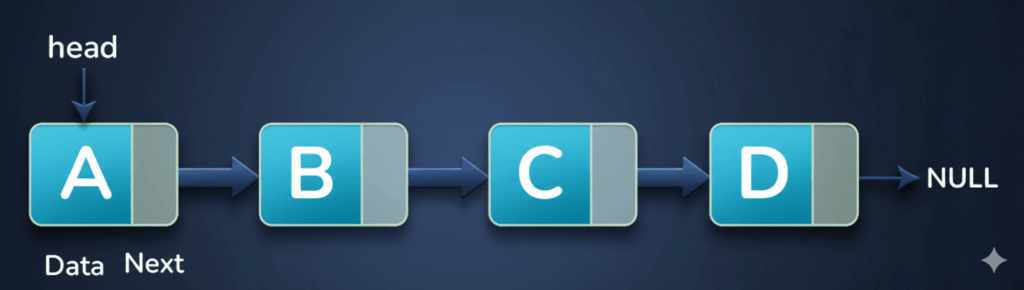
Node:
The basic part of a singly linked list is a node. Each node has two parts:
- Data: This holds the actual value, like a number, letter, or any type of information we want to store.
- Next: This is a pointer that tells where the next node is present. It connects nodes together, keeping the list in order.
Head:
- The head is a special pointer that points to the first node of a singly linked list.
NULL:
- NULL is a special value used in a linked list to show that a node does not point to any other node. In a singly linked list, the last node’s pointer is set to NULL, which means it is the end of the list.
What is Singly Linked List?
A singly linked list is a type of linked list where each node contains a data value and a single pointer that stores the address of the next node in the sequence. This one-way linking allows the list to be traversed only in the forward direction.

In the given figure it has 3 Nodes:
- Node A has Data and an Address pointer, which is pointing to Node B.
- Node B also has Data and an Address pointer, which is pointing to Node C.
- Node C has Data, but its Address pointer points to NULL, which means the end of the list.
Why Insertion is Needed at the Beginning and End ?
Insertion at the beginning of a linked list is used when we want to add a new node as the first element. This operation is very fast because we only create a new node, point its next pointer to the current head, and then update the head to this new node. It is useful when the new data needs to appear at the start of the list.
Insertion at the end of a linked list is used when we want to add a new node after all the existing nodes. This keeps the original order of the list unchanged while placing the new data at the last position. To perform this operation, we start from the head and traverse the list until we reach the final node. Then, we update the last node’s next pointer to link it with the new node.
Example
Suppose we have a linked list:
10 → 20 → 30 → NULL
- Insertion at the Beginning:
- We want to add
5at the start. - The new list will be:
- We want to add
5 → 10 → 20 → 30 → NULL
- Insertion at the End:
- We want to add
40at the end. - The new list will be:
- We want to add
5 → 10 → 20 → 30 → 40 → NULL
Explanation
- Inserting at the beginning makes the new node the first node.
- Inserting at the end keeps all existing nodes in the same order and adds the new node at the last position.
Insert a node at the Beginning of linked list
Algorithm
Step 1: Start
Begin the process by creating a new node that will be inserted into the list.
Step 2: Allocate Memory
Use malloc() to allocate memory for the new node.
Step 3: Check Memory Availability
If memory allocation fails (new_node == NULL), display “Memory not available” and stop the operation.
Step 4: Initialize the New Node
- Set the data field of the new node to the value you want to insert.
- Set the next pointer of the new node to
NULLtemporarily.
Step 5: Insert the New Node
- If the list is empty (
head == NULL):- Make the new node the head.
- If the list is not empty:
- Create a temporary pointer
tempand set it tohead. - Point the new node’s next pointer to the current head.
- Update head to the new node.
- Create a temporary pointer
Step 6: Display Success Message
Print “Node added successfully!” once insertion is complete.
Step 7: End
C Code to Insert a node at the Beginning of linked list
#include<conio.h>
#include<stdio.h>
#include<stdlib.h>
struct node{
    int data;
    struct node *next;
    };
struct node *head=NULL;
struct node* createNode(){
    struct node *newNode = (struct node *)malloc(sizeof(struct node));
    return (newNode);
    }

void insertNodeAtBegin(){
 struct node *newNode, *temp;
 newNode=createNode();
 printf("Enter an element you want to insert at begining of the list:");
 scanf("%d",&newNode->data);
 if(head==NULL){
    head=newNode;
 }
 else{
    temp=head;
    head=newNode;
    head->next=temp;
}
}
void viewList(){
    struct node* temp=head;
    if(temp==NULL){
        printf("list is empty");
    }
    else{
        printf("Elements of Linked List: ");
        while(temp->next!=NULL)
        {
            printf("%d\t",temp->data);
            temp=temp->next;
        }
        printf("%d \t",temp->data);
    }
}
int menu(){
    int choice;
    printf("\n 1. Insert at beginning of Linked List");
    printf("\n 2. Travesre/View Linked List");
    printf("\n 3. Exit");
    printf("\n Please enter your choice: \t");
    scanf("%d",&choice);
    return(choice);
}
 void main(){
    while(1){
        switch(menu()){
            case 1:
                insertNodeAtBegin();
                break;
            case 2:
                viewList();
                break;
            case 3:
                exit(0);
            default:
                printf("invalid choice");
        }
        getch();
    }

}
Output
 1. Insert at beginning of Linked List
 2. Traverse/View Linked List
 3. Exit
 Please enter your choice: 1
Enter an element you want to insert at beginning of the list: 10

 1. Insert at beginning of Linked List
 2. Traverse/View Linked List
 3. Exit
 Please enter your choice: 1
Enter an element you want to insert at beginning of the list: 20

 1. Insert at beginning of Linked List
 2. Traverse/View Linked List
 3. Exit
 Please enter your choice: 1
Enter an element you want to insert at beginning of the list: 30

 1. Insert at beginning of Linked List
 2. Traverse/View Linked List
 3. Exit
 Please enter your choice: 2
Elements of Linked List: 30    20    10

 1. Insert at beginning of Linked List
 2. Traverse/View Linked List
 3. Exit
 Please enter your choice: 4
invalid choice

 1. Insert at beginning of Linked List
 2. Traverse/View Linked List
 3. Exit
 Please enter your choice: 3
[Program terminates]
Explanation of Code
1. Structure Definition
struct node {
    int data;
    struct node *next;
};
struct node *head = NULL;
This code defines the structure of a node for a linked list and creates an empty linked list. Each node has two parts: data, which stores the value of the node, and next, which is a pointer that will point to the next node in the list. The variable head is a pointer that keeps track of the first node in the linked list, and it is initially set to NULL, which means the list is empty and does not contain any nodes yet.
2. Node Creation
struct node* createNode() {
    struct node *newNode = (struct node *)malloc(sizeof(struct node));
    newNode->next = NULL;   // Always initialize pointer
    return newNode;
}
The createNode() function creates a new node for a linked list and sets it up with the given value. First, it allocates memory for a new node using malloc. Then, it stores the given value in the data part of the node and sets the next pointer to NULL, meaning this node does not point to any other node yet. Finally, it returns the address of this newly created node so it can be added to the linked list.
3. Insert Node at Beginning
void insertNodeAtBegin() {
    struct node *newNode, *temp;
    newNode = createNode();
    printf("Enter an element you want to insert at beginning of the list: ");
    scanf("%d", &newNode->data);

    if (head == NULL) {
        head = newNode;   // First node
    } else {
        temp = head;
        head = newNode;   // New node becomes head
        head->next = temp; // Link old list after new node
    }
    printf("Node inserted at beginning successfully!\n");
}
The insertNodeAtBegin() function adds a new node at the start of a linked list. First, it creates a new node using createNode() and asks the user to enter a value for it. Then, it checks if the list is empty. If the list is empty, the new node becomes the first node and head points to it. If the list already has nodes, the new node is placed before the first node, and its next pointer is set to the old first node. Finally, it shows a message saying the node was added successfully.
4. Traverse / View List
void viewList() {
    struct node *temp = head;
    if (temp == NULL) {
        printf("List is empty\n");
    } else {
        printf("Elements of Linked List: ");
        while (temp != NULL) {
            printf("%d\t", temp->data);
            temp = temp->next;
        }
        printf("\n");
    }
}
The viewList() function shows all the elements of a linked list. First, it starts from the head of the list. If the list is empty (head is NULL), it prints “List is empty.” If the list has nodes, it goes through each node one by one, prints the data stored in that node, and moves to the next node using the next pointer. This continues until it reaches the end of the list. Finally, it prints all the elements in order.
5. Menu Function
int menu() {
    int choice;
    printf("\n1. Insert at beginning of Linked List");
    printf("\n2. Traverse/View Linked List");
    printf("\n3. Exit");
    printf("\nPlease enter your choice:\t");
    scanf("%d", &choice);
    return choice;
}
The menu() function shows the user a list of options for working with the linked list. It displays three choices: inserting a node at the beginning, viewing all nodes in the list, or exiting the program. Then, it asks the user to enter their choice and reads the input. Finally, it returns the user’s choice so the program can take the right action based on what the user selected.
6. Main Function
void main() {
    while (1) {
        switch (menu()) {
            case 1:
                insertNodeAtBegin();
                break;
            case 2:
                viewList();
                break;
            case 3:
                exit(0);
            default:
                printf("Invalid choice\n");
        }
        getch();
    }
}
The main() function runs the program in a loop so the user can keep using it until they choose to exit. Inside the loop, it calls the menu() function to show the options and get the user’s choice.
- If the user chooses 1, it calls insertNodeAtBegin() to add a new node at the beginning.
- If the user chooses 2, it calls
viewList()to show all the elements of the linked list. - If the user chooses 3, it ends the program.
- If the user enters any other number, it prints “Invalid choice.”
After each action, the program waits for the user to press a key before showing the menu again. This keeps the program running continuously until the user decides to exit.
Time Complexity
| Case | Time Complexity | Reason |
|---|---|---|
| Best Case | O(1) | Creating a new node and updating pointers only; no traversal needed. |
| Worst Case | O(1) | Same steps even if the list is large; only pointer updates required. |
| Average Case | O(1) | Same steps for any insertion; independent of list size. |
Space Complexity
| Case | Space Complexity | Reason |
|---|---|---|
| Best Case | O(1) | Only one new node is allocated. |
| Worst Case | O(1) | Only one new node is allocated. |
| Average Case | O(1) | Only one new node is allocated. |
Insert a node at the end/tail of linked list
Algorithm
Step 1: Start
Start by creating a new node to add to the Singly Linked list.
Step 2: Allocate memory for the new node
Use malloc() to create space in memory for the new node.
Step 3: Check memory
If memory is not available (new node = NULL), print “Memory not available” and stop.
Step 4: Initialize the new node
- Set the data part of the new node to the value we want to insert.
- Set the next part of the new node to
NULL, because it will be the last node.
Step 5: Insert the new node
- If the list is empty (
head == NULL), make the new node the head. - If the list is not empty:
- Create a temporary pointer
tempand set it tohead. - Traverse the list until
temp → next == NULL(the last node). - Set
temp → nextto point to the new node.
- Create a temporary pointer
Step 6: Display success message
Print “Node added at the end successfully!”
Step 7: End
The new node is now added at the end of the linked list.
C Code to Insert a node at the end/tail of linked list
#include <conio.h>
#include <stdio.h>
#include <stdlib.h>

// Structure of node
struct node {
    int data;
    struct node *next;
};
struct node *head = NULL;

// Function to create a new node
struct node* createNode() {
    struct node *newNode = (struct node *)malloc(sizeof(struct node));
    newNode->next = NULL;   // Always initialize
    return newNode;
}

// Insert node at end
void insertNodeAtEnd() {
    struct node *newNode, *temp;
    newNode = createNode();
    printf("Enter an element you want to insert at end of the list: ");
    scanf("%d", &newNode->data);

    if (head == NULL) {
        head = newNode;   // First node
    } else {
        temp = head;
        while (temp->next != NULL) {  // Traverse till last node
            temp = temp->next;
        }
        temp->next = newNode;   // Link last node to newNode
    }
    printf("Node inserted at end successfully!\n");
}

// Traverse or display list
void viewList() {
    struct node *temp = head;
    if (temp == NULL) {
        printf("List is empty\n");
    } else {
        printf("Elements of Linked List: ");
        while (temp != NULL) {
            printf("%d\t", temp->data);
            temp = temp->next;
        }
        printf("\n");
    }
}

// Menu function
int menu() {
    int choice;
    printf("\n1. Insert at end of Linked List");
    printf("\n2. Traverse/View Linked List");
    printf("\n3. Exit");
    printf("\nPlease enter your choice:\t");
    scanf("%d", &choice);
    return choice;
}

// Driver code
void main() {
    while (1) {
        switch (menu()) {
            case 1:
                insertNodeAtEnd();
                break;
            case 2:
                viewList();
                break;
            case 3:
                exit(0);
            default:
                printf("Invalid choice\n");
        }
        getch();
    }
}
Output:
1. Insert at end of Linked List
2. Traverse/View Linked List
3. Exit
Please enter your choice: 1
Enter an element you want to insert at end of the list: 10
Node inserted at end successfully!

1. Insert at end of Linked List
2. Traverse/View Linked List
3. Exit
Please enter your choice: 1
Enter an element you want to insert at end of the list: 20
Node inserted at end successfully!

1. Insert at end of Linked List
2. Traverse/View Linked List
3. Exit
Please enter your choice: 1
Enter an element you want to insert at end of the list: 30
Node inserted at end successfully!

1. Insert at end of Linked List
2. Traverse/View Linked List
3. Exit
Please enter your choice: 2
Elements of Linked List: 10    20    30

1. Insert at end of Linked List
2. Traverse/View Linked List
3. Exit
Please enter your choice: 4
Invalid choice

1. Insert at end of Linked List
2. Traverse/View Linked List
3. Exit
Please enter your choice: 3
[Program terminates]
Explanation of Code
1. Structure Definition
struct node {
    int data;
    struct node *next;
};
struct node *head = NULL;
This code defines the structure of a node for a linked list and creates an empty linked list. Each node has two parts: data, which stores the value of the node, and next, which is a pointer that will point to the next node in the list. The variable head is a pointer that keeps track of the first node in the linked list, and it is initially set to NULL, which means the list is empty and does not contain any nodes yet.
2. Node Creation
struct node* createNode() {
    struct node *newNode = (struct node *)malloc(sizeof(struct node));
    newNode->next = NULL;   // initialize pointer
    return newNode;
}
The createNode() function creates a new node for a linked list and sets it up with the given value. First, it allocates memory for a new node using malloc. Then, it stores the given value in the data part of the node and sets the next pointer to NULL, meaning this node does not point to any other node yet. Finally, it returns the address of this newly created node so it can be added to the linked list
3. Insert Node at End
void insertNodeAtEnd() {
    struct node *newNode, *temp;
    newNode = createNode();
    printf("Enter an element you want to insert at end of the list: ");
    scanf("%d", &newNode->data);

    if (head == NULL) {
        head = newNode;   // First node
    } else {
        temp = head;
        while (temp->next != NULL) {   // Traverse till last node
            temp = temp->next;
        }
        temp->next = newNode;   // Link last node to new node
    }
    printf("Node inserted at end successfully!\n");
}
The insertNodeAtEnd() function adds a new node at the end of a linked list. First, it creates a new node using createNode() and asks the user to enter a value for it. Then, it checks if the list is empty. If the list is empty, the new node becomes the first node, and head points to it. If the list already has nodes, the function starts at the first node (head) and moves through each node one by one until it reaches the last node. After reaching the last node, it links the new node to the end of the list. Finally, it prints a message saying the node has been successfully inserted at the end.
4. Traverse / Display Linked List
void viewList() {
    struct node *temp = head;
    if (temp == NULL) {
        printf("List is empty\n");
    } else {
        printf("Elements of Linked List: ");
        while (temp != NULL) {
            printf("%d\t", temp->data);
            temp = temp->next;
        }
        printf("\n");
    }
}
The viewList() function shows all the elements in the linked list. First, it starts from the head of the list. If the list is empty (head is NULL), it prints “List is empty.” If the list has nodes, it goes through each node one by one, prints the value stored in that node, and moves to the next node using the next pointer. This continues until it reaches the end of the list. Finally, all the elements of the linked list are displayed in order.
5. Menu Function
int menu() {
    int choice;
    printf("\n1. Insert at end of Linked List");
    printf("\n2. Traverse/View Linked List");
    printf("\n3. Exit");
    printf("\nPlease enter your choice:\t");
    scanf("%d", &choice);
    return choice;
}
The menu() function shows the user a list of options for working with the linked list. It displays three choices: inserting a node at end , viewing all nodes in the list, or exiting the program. Then, it asks the user to enter their choice and reads the input. Finally, it returns the user’s choice so the program can take the right action based on what the user selected.
6. Driver Code (main function)
void main() {
    while (1) {
        switch (menu()) {
            case 1:
                insertNodeAtEnd();
                break;
            case 2:
                viewList();
                break;
            case 3:
                exit(0);
            default:
                printf("Invalid choice\n");
        }
        getch();
    }
}
The main() function runs the program in a loop so the user can keep using it until they choose to exit. Inside the loop, it calls the menu() function to show the options and get the user’s choice.
- If the user chooses 1, it calls insertNodeAtEnd() to add a new node at the beginning.
- If the user chooses 2, it calls
viewList()to show all the elements of the linked list. - If the user chooses 3, it ends the program.
- If the user enters any other number, it prints “Invalid choice.”
After each action, the program waits for the user to press a key before showing the menu again. This keeps the program running continuously until the user decides to exit.
Time Complexity
| Case | Time Complexity | Reason |
|---|---|---|
| Best Case | O(n) | Even if the list has one node or is empty, we may need to traverse to find the last node (except if the list is empty, then O(1)). |
| Worst Case | O(n) | When the list has n nodes, traversal through all nodes is required to reach the last node. |
| Average Case | O(n) | On average, traversal is required through n/2 nodes, but in Big-O notation, it is O(n). |
Space Complexity
| Case | Space Complexity | Reason |
|---|---|---|
| Best Case | O(1) | Only one new node is allocated. |
| Worst Case | O(1) | Only one new node is allocated. |
| Average Case | O(1) | Only one new node is allocated. |
Conclusion
Insertion in a singly linked list helps us add new nodes to the list. We can add a node at the beginning, which makes it the first node, or at the end, which adds it after the last node. Adding nodes this way is easy and does not require moving other elements, unlike in arrays. By learning how to insert at the beginning and end, we can keep our linked list organized and add data whenever we need.