In the early days, computers were huge machines that were operated by using console tables. For input, devices like card readers or tape drives were commonly used, while outputs were received through punch cards, tape drives, or line printers. Users didn’t interact directly with the computer. Instead, they had to prepare their tasks as separate jobs and submit them to be processed later. This type of setup became known as a batch operating system.
In the early 1950s, General Motors Research Laboratories developed the first single-stream batch processing system. It was designed to process just one task at a time, but users could still submit multiple jobs together in batches, making the process more organized and manageable.
What is Batch Processing Operating System?
In the beginning days of computing, people couldn’t use directly a computer the way we use today. Instead, they had to prepare their work called “jobs” on punch cards using separate devices. These jobs were then handed over to a computer operator.
The operator would collect similar jobs, group them together called a “batch”, and then loaded them into the computer to be processed one after another, automatically, without stopping or needing help from a user.
This method was known as a batch processing operating system. It became very popular in the 1970s because it was useful for running large numbers of routine tasks like:
- Salary calculations (payroll)
- Bank transaction updates
- Generating bills
- Stock management
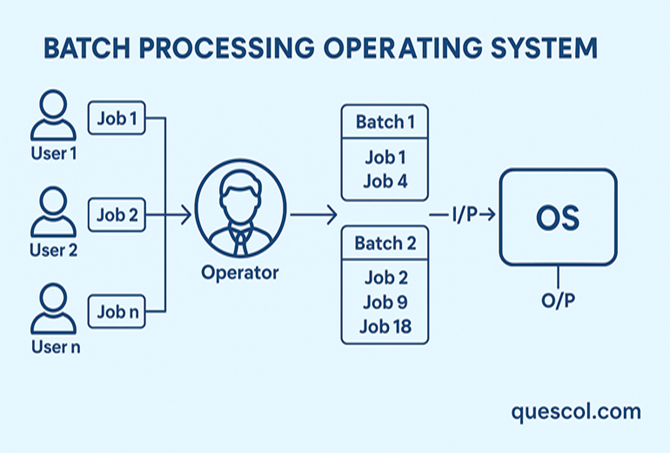
Working Procedure of Batch Processing
1. Job Preparation (By the User)
The first step is when a user gets their task ready. This task, nothing but “job,” might be a program to run or data that needs to be processed. Back in the day, this was done using punch cards or tapes. Think of it like writing down instructions on paper i.e , job has to be prepared before anything can be done.
2. Job Submission (To the Operator)
After preparing the job, the user hands it over to a computer operator. Users didn’t run the job themselves, instead they passed it on, just like submitting an assignment to a teacher.
3. Grouping Similar Jobs (Batching)
The operator reviews all submissions and groups similar jobs together ,like those needing the same input format or time length forming what’s called a “batch.
4. Feeding the Batch into the Computer
Once the batches are ready, the operator feeds them into the system one at a time. Each batch goes into the computer for processing in the order it was loaded.
5. Automatic Running
The computer processes each job in the batch one by one, without needing anything from you. It just runs through them in order
6. Getting the Output
When everything finishes, the operator gathers your output in the form of printouts or files and returns them to you.
7. Starting the Next Batch
Once one batch is completed, the operator moves on to the next one. The same steps are repeated: prepare the job, hand it over, group it, load it, and let the system run it.
Advantages of Batch Processing Operating System
- Saves Time and Resources
Similar tasks are grouped and done one after another, so the system keeps working without stopping or needing any help from the user. - Great for Handling Big Tasks
This system is very useful when dealing with big tasks like generating bills, calculating salaries, or updating records. It can handle a lot of data at once without needing help from the user. - Less Time Spent on Setup
Instead of setting up the system for each task again and again, many tasks can be prepared together and run at once. This makes the whole process faster and easier. - Perfect for Routine Work
If the work is the same every time like weekly reports or monthly summaries batch processing is the best option. It runs these jobs smoothly and saves effort.
Disadvantages of Batch Processing Operating System
- No Instant Results
Once a job is submitted, it may take time before you see the outcome. If something goes wrong, you’ll only find out after the whole batch has finished. - Error Handling is Difficult
If one job in the batch has a mistake, it could hold up the entire batch or cause problems with other jobs. Fixing the issue often means redoing the whole process. - Not Ideal for Tasks Needing Quick Responses
Systems like banking or online booking that need fast or real-time interaction don’t work well with batch processing. - Needs Skilled People to Operate
Sorting and managing jobs properly is important. If the operator doesn’t organize them correctly, it could lead to mistakes or slowdowns.
CONCLUSION
Batch processing was one of the first ways computers were used to run tasks. It helped finish repeated jobs without needing someone to sit in front of the computer. Even though it doesn’t give quick results and fixing mistakes can take time, it’s still useful today for tasks that run regularly , like billing, salary processing, and report generation. It’s a good choice when speed isn’t important, but doing the job correctly and in order is.