A Binary Search Tree (BST) is a tree where each node has a value, and it follows a simple rule: the left side has smaller values and the right side has bigger values. This rule makes it easy and fast to search, add, or remove values, especially when the tree is balanced.
To use a BST, we perform different operations:
- Search: To check if a value exists in the tree.
- Insert: To add a new value in the correct position.
- Delete: To remove a value from the tree.
- Traversal: To visit all nodes in a specific order (pre-order, in-order, post-order).
These operations help us efficiently manage, sort, and access data, making BSTs very useful in programming and managing applications like databases, searching, and organizing information.
Why operations are needed in BST ?
BST operations are needed to easily manage and use the data stored in the tree. Searching helps us quickly find if a value exists, inserting allows us to add new values in the correct position, and deleting help us remove values we don’t need. Traversal lets us visit all the values in a specific order. Without these operations, it would be difficult to organize, access, or update the data efficiently.
Example of BST
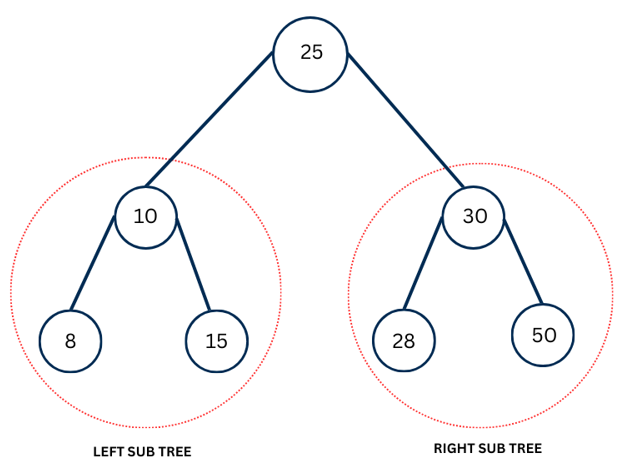
In the above figure, the tree is a Binary Search Tree (BST) because it follows the rule that all left children are smaller than their parent and all right children are larger. The root node is 25. Its left child is 10, which has children 8 and 15, both smaller than 25. The right child of the root is 30, which has children 28 and 50, both larger than 25.
Binary search tree operations
Search
Algorithm
- Start at the root node.
- If the root is NULL, the element is not found.
- If the root’s value equals the target element, the element is found.
- If the target element is smaller than the root, move to the left subtree and repeat the steps.
- If the target element is greater than the root, move to the right subtree and repeat the steps.
- Continue until the element is found or a leaf node is reached (NULL).
C Program
#include <stdio.h>
#include <stdlib.h>

// Define a BST node
struct Node {
    int data;
    struct Node* left;
    struct Node* right;
};

// Function to create a new node
struct Node* createNode(int data) {
    struct Node* newNode = (struct Node*)malloc(sizeof(struct Node));
    newNode->data = data;
    newNode->left = NULL;
    newNode->right = NULL;
    return newNode;
}

// Function to insert a new node in BST
struct Node* insert(struct Node* root, int data) {
    if (root == NULL) {
        return createNode(data);
    }
    if (data < root->data) {
        root->left = insert(root->left, data);
    } else if (data > root->data) {
        root->right = insert(root->right, data);
    }
    return root;
}

// Function to search an element in BST
struct Node* search(struct Node* root, int key) {
    if (root == NULL || root->data == key) {
        return root;  // Element found or tree is empty
    }
    if (key < root->data) {
        return search(root->left, key);  // Search in left subtree
    } else {
        return search(root->right, key); // Search in right subtree
    }
}

// Main function
int main() {
    struct Node* root = NULL;
    root = insert(root, 25);
    insert(root, 10);
    insert(root, 30);
    insert(root, 8);
    insert(root, 15);
    insert(root, 28);
    insert(root, 50);

    int key = 28;
    struct Node* result = search(root, key);
    if (result != NULL) {
        printf("Element %d found in BST.\n", key);
    } else {
        printf("Element %d not found in BST.\n", key);
    }

    return 0;
}
Output
Element 28 found in BST.
Explanation of code
1.Include Libraries
#include <stdio.h>
#include <stdlib.h>
The header file stdio.h is included because it is needed for input and output functions such as printf() and scanf(), which allow the program to display messages and take input from the user. The header file stdlib.h is included because it provides the malloc() function, which is used to allocate memory dynamically for new nodes in the tree. This allows the program to create nodes as needed while it runs.
2. Define the BST Node
struct Node {
    int data;
    struct Node* left;
    struct Node* right;
};
The struct Node defines a node in a Binary Search Tree (BST). It contains an integer data, which stores the value of the node. It also has two pointers: left, which points to the left child of the node, and right, which points to the right child of the node. This structure allows each node in a BST to have at most two children: one on the left and one on the right.
3. Create a New Node
struct Node* createNode(int data) {
    struct Node* newNode = (struct Node*)malloc(sizeof(struct Node));
    newNode->data = data;
    newNode->left = NULL;
    newNode->right = NULL;
    return newNode;
}
The createNode function is used to create a new node in a Binary Search Tree (BST). It takes an integer data as input and uses malloc() to allocate memory for a new node. The function sets the node’s data to the given value and initializes both the left and right pointers to NULL, meaning the new node does not have any children yet. Finally, it returns a pointer to the newly created node, which can then be added to the BST.
4. Insert a Node into BST
struct Node* insert(struct Node* root, int data) {
    if (root == NULL) {
        return createNode(data);
    }
    if (data < root->data) {
        root->left = insert(root->left, data);
    } else if (data > root->data) {
        root->right = insert(root->right, data);
    }
    return root;
}
The insert function is used to add a new node with a given data value into a Binary Search Tree (BST). It starts by checking if the root is NULL; if it is, the function creates a new node using createNode() and returns it as the new root. If the root is not NULL, the function compares the new data with the root’s data. If the new data is smaller, it is inserted into the left subtree recursively. If the new data is larger, it is inserted into the right subtree recursively. The function finally returns the root of the tree, keeping the BST structure intact.
5. Search for an Element
struct Node* search(struct Node* root, int key) {
    if (root == NULL || root->data == key) {
        return root;
    }
    if (key < root->data) {
        return search(root->left, key);
    } else {
        return search(root->right, key);
    }
}
The search function is used to find a node with a given key in a Binary Search Tree (BST). It starts by checking if the root is NULL or if the root’s data matches the key; in either case, it returns the root (or NULL if not found). If the key is smaller than the root’s data, the function searches recursively in the left subtree. If the key is larger, it searches recursively in the right subtree. This process continues until the node with the key is found or the search reaches a leaf node.
6. Main Function
int main() {
    struct Node* root = NULL;
    root = insert(root, 25);
    insert(root, 10);
    insert(root, 30);
    insert(root, 8);
    insert(root, 15);
    insert(root, 28);
    insert(root, 50);

    int key = 28;
    struct Node* result = search(root, key);
    if (result != NULL) {
        printf("Element %d found in BST.\n", key);
    } else {
        printf("Element %d not found in BST.\n", key);
    }

    return 0;
}
In the main function, a Binary Search Tree (BST) is first created with the root initialized to NULL. Several nodes are then inserted into the BST using the insert function, including values like 25, 10, 30, 8, 15, 28, and 50, which are organized according to BST rules. After building the tree, a key value (28 in this case) is searched in the BST using the search function. If the search returns a non-NULL result, it means the element is found, and a message is printed saying the element exists in the BST. If the result is NULL, it prints that the element is not found. Finally, the program ends by returning 0.
Time Complexity & Space Complexity
| Case | Time Complexity |
|---|---|
| Best Case | O(1) |
| Average Case | O(log n) |
| Worst Case | O(n) |
| Implementation | Space Complexity |
|---|---|
| Iterative | O(1) |
| Recursive | O(h) |
Insert
Algorithm
- Start at the root node.
- If the tree is empty, create a new node as the root.
- Compare the value to insert with the current node:
- If smaller, move to the left subtree.
- If larger, move to the right subtree.
- Repeat step 3 until a NULL position is found.
- Insert the new node at the NULL position.
C Program
#include <stdio.h>
#include <stdlib.h>

// Node structure
struct Node {
    int data;
    struct Node* left;
    struct Node* right;
};

// Function to create a new node
struct Node* createNode(int value) {
    struct Node* newNode = (struct Node*)malloc(sizeof(struct Node));
    newNode->data = value;
    newNode->left = NULL;
    newNode->right = NULL;
    return newNode;
}

// BST insertion function
struct Node* insert(struct Node* root, int value) {
    if (root == NULL) {
        return createNode(value);
    }
    if (value < root->data) {
        root->left = insert(root->left, value);
    } else if (value > root->data) {
        root->right = insert(root->right, value);
    }
    return root;
}

// In-order traversal to display tree
void inorder(struct Node* root) {
    if (root != NULL) {
        inorder(root->left);
        printf("%d ", root->data);
        inorder(root->right);
    }
}

int main() {
    struct Node* root = NULL;
    root = insert(root, 25);
    insert(root, 10);
    insert(root, 30);
    insert(root, 8);
    insert(root, 15);
    insert(root, 28);
    insert(root, 50);

    printf("In-order traversal of BST: ");
    inorder(root);
    return 0;
}
Output
In-order traversal of BST: 8 10 15 25 28 30 50 //To display the tree
Explanation of Code
1.Include Libraries
#include <stdio.h>
#include <stdlib.h>
The header file stdio.h is included because it is needed for input and output functions such as printf() and scanf(), which allow the program to display messages and take input from the user. The header file stdlib.h is included because it provides the malloc() function, which is used to allocate memory dynamically for new nodes in the tree. This allows the program to create nodes as needed while it runs.
2. Define the BST Node
struct Node {
    int data;
    struct Node* left;
    struct Node* right;
};
The struct Node defines a node in a Binary Search Tree (BST). It contains an integer data, which stores the value of the node. It also has two pointers: left, which points to the left child of the node, and right, which points to the right child of the node. This structure allows each node in a BST to have at most two children: one on the left and one on the right.
3. Create a New Node
struct Node* createNode(int data) {
    struct Node* newNode = (struct Node*)malloc(sizeof(struct Node));
    newNode->data = data;
    newNode->left = NULL;
    newNode->right = NULL;
    return newNode;
}
The createNode function is used to create a new node in a Binary Search Tree (BST). It takes an integer data as input and uses malloc() to allocate memory for a new node. The function sets the node’s data to the given value and initializes both the left and right pointers to NULL, meaning the new node does not have any children yet. Finally, it returns a pointer to the newly created node, which can then be added to the BST.
4. Insert a Node into BST
struct Node* insert(struct Node* root, int data) {
    if (root == NULL) {
        return createNode(data);
    }
    if (data < root->data) {
        root->left = insert(root->left, data);
    } else if (data > root->data) {
        root->right = insert(root->right, data);
    }
    return root;
}
The insert function is used to add a new node with a given data value into a Binary Search Tree (BST). It starts by checking if the root is NULL; if it is, the function creates a new node using createNode() and returns it as the new root. If the root is not NULL, the function compares the new data with the root’s data. If the new data is smaller, it is inserted into the left subtree recursively. If the new data is larger, it is inserted into the right subtree recursively. The function finally returns the root of the tree, keeping the BST structure intact.
5. Print the Node
void inorder(struct Node* root) {
    if (root != NULL) {
        inorder(root->left);
        printf("%d ", root->data);
        inorder(root->right);
The inorder function prints all the values in ascending order. It first goes to the left child, then prints the root, and finally goes to the right child. This way, all smaller values come before bigger values.
6. Main Function
int main() {
    struct Node* root = NULL;
    root = insert(root, 25);
    insert(root, 10);
    insert(root, 30);
    insert(root, 8);
    insert(root, 15);
    insert(root, 28);
    insert(root, 50);

    printf("In-order traversal of BST: ");
    inorder(root);
    return 0;
}
In this program, we first create an empty Binary Search Tree by setting the root to NULL. Then we insert nodes one by one: 25 becomes the root, 10 and 30 are added as children of 25, 8 and 15 are added under 10, and 28 and 50 are added under 30. After building the tree, we call the inorder function to print all the values in ascending order. Finally, the program ends and returns 0, showing the sorted sequence of the BST.
Time & Space Complexity
Time Complexity
| Case | Complexity |
|---|---|
| Best Case | O(log n) |
| Average Case | O(log n) |
| Worst Case | O(n) |
Space Complexity
| Tree Type | Space Complexity |
|---|---|
| Balanced Tree | O(log n) |
| Skewed Tree | O(n) |
Pre order Traversal
Traverse a tree in a pre-order manner means first to traverse the Root node, then the Left node, and at last Right node.
Traverse format : (Root, Left, Right)
Algorithm
- Start at the root node.
- Visit and print the value of the root.
- Recursively traverse the left subtree in pre-order.
- Recursively traverse the right subtree in pre-order.
C Program for Pre Order
void preorder(struct Node* root) {
    if(root != NULL) {
        printf("%d ", root->data);  // Visit root
        preorder(root->left);       // Traverse left subtree
        preorder(root->right);      // Traverse right subtree
    }
}
This function preorder is used to perform pre-order traversal of a binary search tree. It first checks if the current node exists. If the node is not NULL, it prints the value of that node, then it calls itself to go through the left child of the node, and after finishing that, it goes through the right child. In simple words, it visits the root first, then the left subtree, and finally the right subtree. This process continues for every node in the tree until all nodes are visited.
In order Traversal
Traverse a tree in an in-order manner means first to traverse the Left node, then the root node, and then at last Right node.
Traverse format : (Left, Root, Right)
Algorithm
- Start at the root node.
- Recursively traverse the left subtree in in-order.
- Visit and print the root node.
- Recursively traverse the right subtree in in-order.
C Program for In order
void inorder(struct Node* root) {
    if(root != NULL) {
        inorder(root->left);       // Traverse left subtree
        printf("%d ", root->data); // Visit root
        inorder(root->right);      // Traverse right subtree
    }
}
Explanation
This function inorder() is used to perform in-order traversal of a binary search tree. It first checks if the current node exists. If it is not NULL, the function goes to the left child and keeps moving left until it reaches the smallest value. Then it prints the current node’s value, and after that, it moves to the right child. In simple words, it visits the left subtree first, then the root, and finally the right subtree. In a BST, this traversal always prints the values in ascending order.
Post-order Traversal
Traverse a tree in a post-order manner means the first traverse left node, then the right node, and the last root node.
Traverse format : (Left, Right, Root)
Algorithm
- Start at the root node.
- Recursively traverse the left subtree in post-order.
- Recursively traverse the right subtree in post-order.
- Visit and print the root node.
C program for post order
void postorder(struct Node* root) {
    if(root != NULL) {
        postorder(root->left);     // Traverse left subtree
        postorder(root->right);    // Traverse right subtree
        printf("%d ", root->data); // Visit root
    }
}
Explanation
This function postorder is used to perform post-order traversal of a binary search tree. It first checks if the current node exists. If it is not NULL, the function goes to the left child and fully explores that subtree, then it goes to the right child and explores that subtree. After visiting both left and right subtrees, it finally prints the value of the root node.
Time & Space Complexity
Time Complexity
| Traversal Type | Best Case | Average Case | Worst Case |
|---|---|---|---|
| Pre-order | O(n) | O(n) | O(n) |
| In-order | O(n) | O(n) | O(n) |
| Post-order | O(n) | O(n) | O(n) |
Space Complexity
| Traversal Type | Balanced Tree | Skewed Tree |
|---|---|---|
| Pre-order | O(log n) | O(n) |
| In-order | O(log n) | O(n) |
| Post-order | O(log n) | O(n) |