A linear search or sequential search is a searching method to check a desired element or data in a given Array or List is present or not. In linear searching technique, each element of an Array or list is compared with the target value for which we perform the searching operation. If match is found, it will return the array index where the value is present. if the match is not found then a Custom message is displayed as output.
In best case after some traversals the target value must be found. In worst case the complete array or the list is traversed and the target value is not found.
Why Linear Search is Needed ?
Linear search is needed when we want to find a specific element in a collection of data stored in main memory. For example, if we have a list of student roll numbers and want to check if roll number 25 is there, linear search helps us do that. It works by checking each item one by one until it finds the target value or reaches the end of the list. The best thing about linear search is that it works for any kind of lists, whether it is sorted or not, so it is very easy and flexible to use.
Example of Linear Search
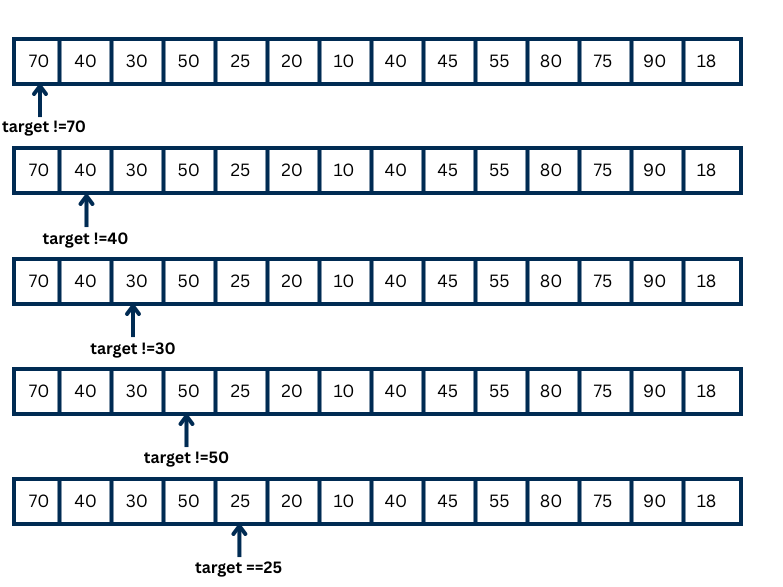
In the above figure, the target value is 25. First, we look at the first element, 70. It is not 25, so we move to the next element, 40. It is also not 25. Then we check 30 and 50, but they are not 25 either. Finally, we compare with the next element, and this time it is 25. So, we target value we were looking for in the list.
In the best case, the first element is 25, so we find it immediately. In the worst case, traverse the whole array and don’t find 25 at all.
Algorithm for Linear Search
Step 1 − Start from the first element (0th index) of the array. Compare the element with the target value (the key).
Step 2 − If the element matches the key, stop the search and return the position where it was found.
Step 3 − If the element does not match the key, move to the next element in the array.
Step 4 − Repeat Step 3 for each element in the array until a match is found.
Step 5 − If you reach the end of the array and do not find the key, print a message saying the “element is not present” and stop the search.
Pseudo code of Linear search technique
Below is a pseudo-code of Linear Search. This is not hardcoded. It can be change from developer to developer. It is just a overview how you we can implement a linear search where K is an array of the element, n is a total number of elements in the array, and X is a search value that we want to search in a given array.
LINEAR_SEARCH(K,n,X)
Step 1: [INITIALIZE SEARCH] SET I = 0
Step 2: repeat step 3 while I < n else Step 4
Step 3: [SEARCH FOR VALUE] if K[I] = X
Successful search
Return I and go to step 5
Otherwise
I = I+1
Go to Step 2
Step 4: unsuccessful search
Return -1
Go to step 5
Step 5: Exit
C Program to perform linear search
#include <stdio.h>
int main() {
    int n, i, key, found = 0;
    // Input array size
    printf("Enter the number of elements: ");
    scanf("%d", &n);
    int arr[n];
    // Input array elements
    printf("Enter %d elements:\n", n);
    for(i = 0; i < n; i++) {
        scanf("%d", &arr[i]);
    }
    // Input key to search
    printf("Enter the element to search: ");
    scanf("%d", &key);
    // Linear search
    for(i = 0; i < n; i++) {
        if(arr[i] == key) {
            printf("Element %d found at position %d\n", key, i + 1);
            found = 1;
            break;
        }
    }
    if(!found) {
        printf("Element %d not found in the array\n", key);
    }
    return 0;
}
Output
Enter the number of elements: 5
Enter 5 elements:
10
20
30
40
50
Enter the element to search: 30
Element 30 found at position 3
Another example (element not found):
Enter the number of elements: 5
Enter 5 elements:
10
20
30
40
50
Enter the element to search: 25
Element 25 not found in the array
Explanation
The above program starts by including the standard input/output library with #include <stdio.h> and defines the main() function. It declares variables: n for the number of elements in the array, i as a loop counter, key for the element to search, and found as a flag to check whether the element is present. First, the program asks the user to enter the number of elements and stores it in n. Then it declares an array arr[n] and asks the user to input n elements, which are stored in the array. After that, the program asks the user to enter the element to search in the array and stores it in key.
The program then performs a linear search using a for loop that checks each element of the array one by one. If an element matches the key, it prints the position of the element (using i + 1 for human-friendly indexing), sets the found flag to 1, and exits the loop. If the loop ends without finding the element (found remains 0), the program prints that the element is not present in the array. Finally, the program returns 0 to indicate successful execution.
Space and Time Complexity of Linear Search
Time Complexity
| Case | Time Complexity |
|---|---|
| Best Case | O(1) |
| Worst Case | O(n) |
| Average Case | O(n) |
Space Complexity
| Case | Space Complexity |
|---|---|
| All Cases | O(1) |
Some more explanation of linear search
- A sequential search or linear search is the simplest searching method where we start searching at the beginning of the array or list. To find the target value, we have to compare each element until we reach the end. If we found target value, then we record the index where we have found the value and if we have reached the end of the list and the value is not found, then return -1 means the search value is not present in the list or array.
- Linear search can be used for both sorted and unsorted lists. The time it takes does not really depend on whether the list is sorted or not because we have to check each element one by one. In a sorted list, the element we are looking for might be at the end, and in an unsorted list, it might be anywhere in the list or array. So we cannot skip any elements, and we have to go through the list until we find the target value or reach the end.
Efficiency of Linear search or sequential search
- The efficiency of linear search depends on the time taken and the number of comparisons, which vary based on the position of the target value. If the target is at the first position, only one comparison is needed. If it is at the last position or not present in the list, we need to check all n elements, making n comparisons. Therefore, the position of the target value directly affects how fast or slow the search is.
- Best case efficiency means if an element is found at a first position and it is denoted by O(1) and the worst case happens when the element is at the end of the list or not present, taking O(n) time.
Advantages of Linear search
- Linear search works on both sorted and unsorted arrays or lists, so we do not need to arrange or organize the data before searching.
- It is very simple and easy to understand, making it suitable for beginners who are learning about searching techniques.
- No special preparation or additional data structures are needed, so it can be applied directly to any list or array.
- It can be used effectively on small or medium-sized arrays where performance is not a major concern.
- In the best case, linear search can stop immediately when the element is found, saving time if the element is near the beginning of the array or list.
Disadvantages of Linear search
- Linear search is not efficient for large arrays or lists because it may have to check every element one by one, which can take a lot of time.
- Its time complexity in the worst and average cases is high (O(n)), so it is slower compared to other searching techniques like binary search for large sorted arrays or lists.
- It cannot take advantage of a sorted list to reduce the number of comparisons, so the order of the list does not help improve performance.
- Linear search requires checking each element individually, which can be time-consuming when the list contains a large number of elements.
- It is generally not suitable for applications where fast search is critical, especially when dealing with very large datasets.
Conclusion
Linear search is a simple and easy method to find an element in a list or array. It works for both sorted and unsorted lists. While it is easy to use and understand, it can be slow for large lists because it may have to check every element one by one. Despite its simplicity, linear search is useful for small or medium-sized lists and when a quick and straightforward solution is needed.