
Currently Empty: ₹0.00

- Functions of an Operating System
- 1. Process Management
- Key Activities:
- 2. Memory Management
- Key Activities:
- 3. File System Management
- Key Responsibilities:
- 4. Device Management (I/O Management)
- Key Components:
- 5. Protection and Security
- Key Mechanisms:
- 6. Additional Functions
- Frequently Asked Questions (FAQs)
- Q1. What is the most important function of an OS?
- Q2. Is the OS part of the hardware?
- Q3. What are examples of file management by OS?
- Q4. How does the OS prevent deadlocks?
- Q5. Can the OS prevent viruses?
- Final Words
An operating system (OS) is the core software that manages a computer’s hardware and software resources, ensuring they work together efficiently. It acts as an interface between the user and the hardware, making it possible to run applications without needing to understand the details of the underlying hardware.
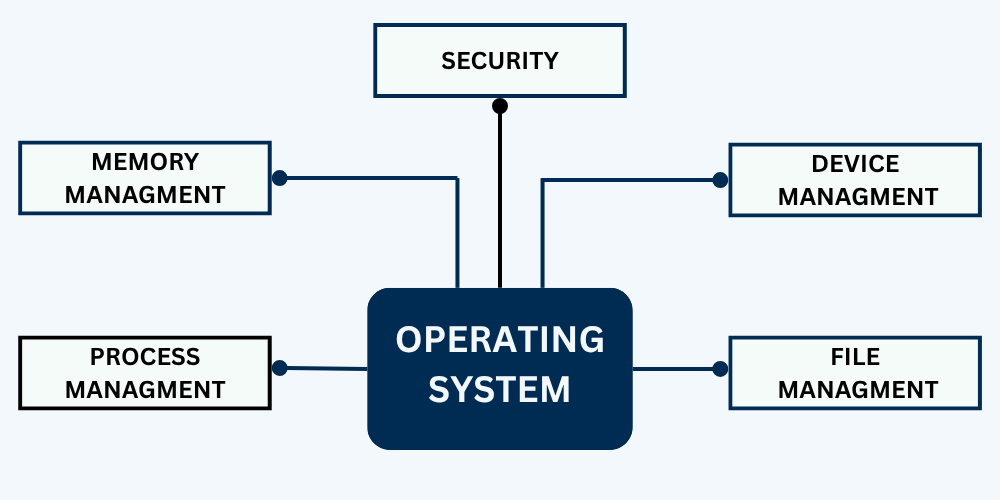
To achieve this, the operating system performs several essential functions, such as managing processes, handling memory, controlling input/output devices, maintaining file systems, and providing security. Understanding these functions helps us see how the OS keeps a computer system stable, secure, and user-friendly.
In this article, we will explore the major functions of an operating system and how they contribute to the smooth functioning of a computing environment.
Examples of popular operating systems are Windows, macOS, Linux, Android, and iOS.
Functions of an Operating System
1. Process Management
A process is a running program. Process management involves creating, scheduling, and terminating processes while ensuring efficient CPU usage.
Key Activities:
- Process Scheduling: Determines which process should get CPU time using algorithms like Round Robin, FCFS, and Priority Scheduling.
- Process Synchronization: Coordinates processes to prevent conflicts, especially when accessing shared resources.
- Inter-Process Communication (IPC): Enables processes to communicate via shared memory or message passing.
- Deadlock Handling: Prevents or resolves deadlocks where two or more processes are stuck waiting for resources.
Example:
In a multitasking environment like Windows, you might be browsing the web while downloading a file. The OS ensures both tasks run smoothly without interfering with each other.
2. Memory Management
Memory management deals with how memory (RAM) is allocated to various processes and applications, and how that memory is safely deallocated when no longer needed.
Key Activities:
- Memory Allocation & Deallocation: Ensures programs get enough memory and releases it after use.
- Memory Protection: Prevents one process from accessing memory allocated to another.
- Virtual Memory: Extends usable memory by using disk space to simulate RAM.
- Fragmentation Handling: Manages memory efficiently to reduce wasted space.
Example:
Opening a large Excel file that exceeds available RAM? Virtual memory kicks in, preventing crashes.
3. File System Management
File management handles data storage and retrieval on disk. It offers a logical structure (folders and files) while hiding complex hardware operations.
Key Responsibilities:
- File Operations: Create, open, read, write, rename, and delete files.
- File Access Methods: Sequential, direct, and indexed access.
- File Attributes: Manages file types, permissions, size, and timestamps.
- Directory Management: Organizes files in hierarchies for easy access.
Example:
When you save a document in Word, the OS ensures it’s stored on the disk with proper permissions and metadata.
4. Device Management (I/O Management)
The OS manages hardware devices like keyboards, printers, disks, and network cards via device drivers and input/output (I/O) control systems.
Key Components:
- Device Drivers: Software that allows the OS to interact with hardware devices.
- I/O Scheduling: Prioritizes and manages device requests efficiently.
- Buffering and Caching: Temporarily stores data to accommodate speed mismatches between devices.
- Spooling: Queues output tasks (like print jobs) to prevent system delays.
Example:
When you hit “Print,” your OS queues the print job and lets you continue working while the printer catches up.
5. Protection and Security
The OS ensures that users and processes only access resources they’re authorized to use and protects against threats like malware, unauthorized access, and system crashes.
Key Mechanisms:
- User Authentication: Username-password, biometric, or token-based authentication.
- Access Control: Limits read/write/execute permissions on files and devices.
- Resource Isolation: Prevents interference between user processes.
- Attack Prevention: Uses firewalls, encryption, and secure boot mechanisms.
Example:
Your phone’s fingerprint scanner is part of the OS’s security infrastructure to prevent unauthorized access.
6. Additional Functions
Beyond the major five, operating systems also offer:
- Performance Monitoring: Tracks CPU, RAM, and disk usage to optimize performance.
- Job Accounting: Records usage statistics for billing or analysis.
- Error Detection: Identifies bugs or hardware failures using logs, crash reports, and diagnostic tools.
- System Calls: Provides APIs for applications to interact with hardware.
Example:
If a game crashes, your OS may generate a “blue screen” or log error data to help developers fix the bug.
Frequently Asked Questions (FAQs)
Q1. What is the most important function of an OS?
All functions are essential, but process and memory management are foundational to multitasking and system stability.
Q2. Is the OS part of the hardware?
No, it’s software that manages hardware resources.
Q3. What are examples of file management by OS?
Organizing files in folders, setting read/write permissions, and managing disk space.
Q4. How does the OS prevent deadlocks?
It uses algorithms like resource allocation graphs or deadlock avoidance strategies.
Q5. Can the OS prevent viruses?
While not foolproof, modern OSes include firewalls, antivirus APIs, and sandboxing to reduce risks.
Final Words
The operating system is the backbone of modern computing. It manages everything from your apps to your files, and even the invisible communication between your software and hardware. Understanding its core functions not only demystifies how computers work but also empowers you to troubleshoot, optimize, and develop better applications.