Currently Empty: ₹0.00

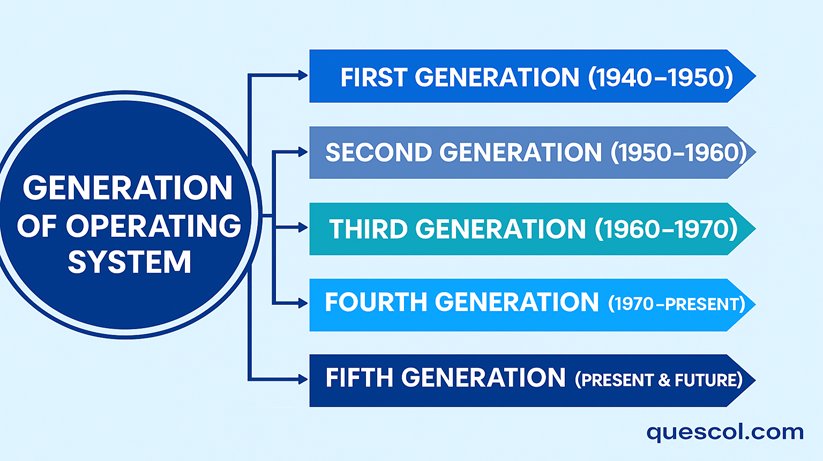
- 1. First Generation (1940s – 1950s) – No Operating System / Manual System
- Advantages:
- Disadvantages:
- 2. Second Generation(1950s – 1960s) – Batch Processing Systems
- Advantages:
- Disadvantages:
- 3. Third Generation (1960s – 1970s) – Multiprogramming & Time-Sharing
- Advantages:
- Disadvantages:
- 4. Fourth Generation (1980s – Present) – Personal Computers & GUI
- Advantages:
- Disadvantages:
- 5. Fifth Generation (Present & Future) – AI & Cloud-Based OS
- Advantages:
- Disadvantages:
The concept of “generation” in computer science helps us to understand how computers have changed and improved over the years. In the beginning, it mostly referred to the changes in hardware like moving from vacuum tubes to transistors, and so on. But nowadays, it includes both hardware and software, since both are equally important in making a computer work as a complete system.
Each generation brought many improvements by making computers faster, smaller, smarter, and more efficient. Not only did these changes make them faster; they also made them more user-friendly, dependable and powerful.
So far, we have seen five generations of computers, each one standing out for its special features and the time it came from. Those generations are going from big, huge machines that used vacuum tubes to the smart systems we have today that work on artificial intelligence.”
Now, let’s take a closer look at each generation to see how computers evolved and how operating systems grew smarter along with them.
1. First Generation (1940s – 1950s) – No Operating System / Manual System
In the first generation, there was no actual operating system. They were massive devices, and everything had to be done manually. People used punch cards or switches to give instructions, which made it a very slow and difficult process. Every program had to be set up by hand, and only trained experts could do it.
Advantages:
- Users had full control over the computer.
- The system didn’t waste any memory or power
- You could use all parts of the machine directly.
Disadvantages:
- Extremely time-consuming setup process
- High chance of human errors during operation
- Only one program could run at a time
- You had to be highly skilled to use the computer where as normal people couldn’t.
2. Second Generation(1950s – 1960s) – Batch Processing Systems
In this generation, computers started using Batch Processing Operating Systems. This means that programs that performed similar tasks were grouped together into batches, and the computer would run them one by one automatically, without needing someone to control it all the time.
Instead of doing each task one by one, people used punch cards to get their work ready, and the system took care of running them one after another. This made things faster and reduced the need for manual effort
Example Operating Systems: IBM 7094, FMS (Fortran Monitor System)
Advantages:
- The CPU was never idle
- There was no need for people to stand by the computer during processing.
- Made a lot of tasks easier to handle and organize
Disadvantages:
- Users were unable to interact with the system while their program was running.
- It was difficult to detect and fix issues because the entire collection of programs was already being processed simultaneously
- A single error could cause the entire batch to lag and cause all of the jobs to be delayed.
3. Third Generation (1960s – 1970s) – Multiprogramming & Time-Sharing
In the third generation, computers were able to handle many tasks at the same time and let multiple people use them together. This means they could hold several programs in memory at once, and the CPU could quickly move between them to get more done at the same time.Bottom of Form
Advantages:
- The CPU was used in a better way, without wasting time.
- The system allowed many users to use the computer together at the same time.
- The system was easier to use, making the user’s job more comfortable.
- Small tasks got done quickly without long delays.
Disadvantages:
- It became harder to look after and control the system.
- It needed stronger and more updated machines, especially for handling memory.
- Issues like security risks and users interfering with each other’s resources started to occur.
4. Fourth Generation (1980s – Present) – Personal Computers & GUI
In this generation, using computers became much simpler, and they could easily connect with one another.
People no longer had to type long commands. Instead, they could just click on pictures and menus on the screen (called a GUI). Computers could also connect through networks, which made it possible to share dataand even work from different locations.
Advantages:
- The use of pictures and buttons on the screen made it easier for everyone to work with computers, even without technical knowledge.
- Computers could link with one another and easily share things like documents and printers.
- You could run several programs at once without making the computer slow.
- It became easier to control who used the computer and to keep it protected from wrong use.
Disadvantages:
- Once computers were connected to the internet, they became more open to threats like viruses and online attacks.
- If the system stopped working or crashed, it could affect many users and pause their work.
- These computers needed faster performance and more memory space to run without issues.
5. Fifth Generation (Present & Future) – AI & Cloud-Based OS
Modern operating systems are now using smart technologies like Artificial Intelligence, Machine Learning, Cloud Computing, and Voice Recognition.
They are built to be more intelligent, understand user needs better, and keep learning by themselves over time.
Examples: Google Fuchsia (still being developed), cloud-based operating systems in smartphones, and voice helpers like Alexa and Siri.
Advantages:
- Communicates with users in an easier and smarter way by understanding voice instructions or hand gestures.
- Cloud features allow you to access your files and applications from anywhere, anytime.
- Can automatically solve minor problems and use system resources in a better and smarter way.
- It can fix small problems by itself and handle memory, battery, and other resources in a smart and balanced way.
Disadvantages:
- Built with a complex structure and can cost a lot to set up or take care of.
- Can cause concerns about protecting personal information and keeping data secure.
- Needs a strong internet connection and up-to-date devices to perform well.