
Currently Empty: ₹0.00

- Real-World Examples
- 1. Restaurant Kitchen Example
- 2. Printing System Example
- 3. Video Streaming Example
- Why the Producer–Consumer Problem is Important
- Possible Solutions for Producer–Consumer Problem
- 1. Semaphore-based Solution
- Why We Need Semaphores in Producer–Consumer Problem
- Types of Semaphores Used
- Pseudocode Example
- Step-by-Step Workflow
- Producer
- Consumer
- Real-World Analogy
- Why This Works
- 2. Monitor-based Solution
- Why Use a Monitor Instead of Semaphores?
- How This Works in the Producer–Consumer Problem
- Step-by-Step Logic of the Java Example:
- Key Points in This Implementation
- Example in Real Life
- Common Issues & How to Avoid Them
- Why Monitors Are Preferred in Java
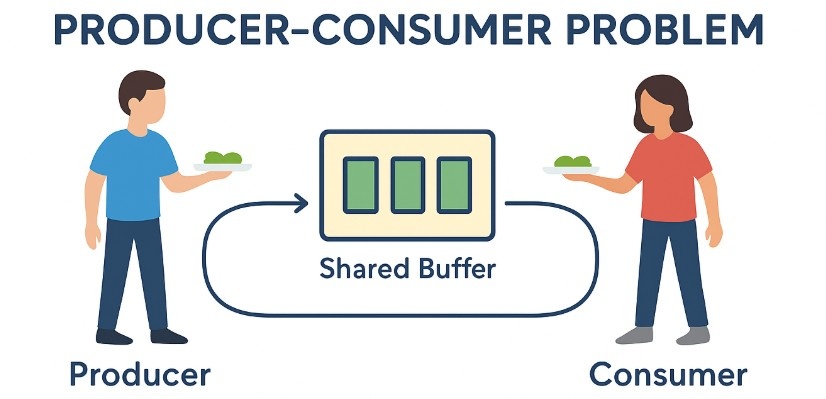
The Producer–Consumer Problem is a fundamental synchronization Problem in Operating Systems where two types of processes share a common, fixed-size buffer. The producer creates data and places it into the buffer, while the consumer removes data from the buffer for processing. The challenge arises when the buffer becomes either full or empty, the producer must wait if the buffer is full to avoid overwriting unconsumed data, and the consumer must wait if the buffer is empty to avoid reading invalid data.
Without proper coordination, both processes can run into race conditions or data inconsistency issues. For example, if the producer and consumer try to access the buffer at the same time without synchronization, the data might be corrupted or lost. To solve this, Operating Systems use synchronization mechanisms such as semaphores, mutex locks, or monitors to ensure that only one process accesses the buffer at a time, and that both follow the rules of waiting when the buffer is full or empty.
A real-world analogy would be a chef (producer) and a waiter (consumer) working with a limited-size counter (buffer). If the counter is full of plates, the chef must wait until the waiter serves some dishes. If the counter is empty, the waiter must wait for the chef to prepare more dishes. In both cases, only one person can place or take a plate at a time, ensuring smooth and error-free operation.
Real-World Examples
1. Restaurant Kitchen Example
Imagine a busy restaurant kitchen during lunch rush hour.
- Producer (Chef):
The chef continuously prepares dishes and places them on a serving counter. This counter acts as the temporary storage space before the food reaches the customers. - Consumer (Waiter):
The waiters pick up the prepared dishes from the counter and deliver them to the customers. - Shared Buffer (Serving Counter):
The counter has a limited number of slots to place dishes. If all slots are full (buffer full), the chef must pause cooking until space is available. If the counter is empty (buffer empty), the waiter must wait until a new dish is ready. - How This Reflects the Problem:
- If the chef works too fast, the counter fills up, and the chef must wait (producer waits).
- If the waiter works too fast, the counter becomes empty, and the waiter must wait for the chef to prepare more dishes (consumer waits).
This mirrors how data production and consumption must be balanced in computing systems.
2. Printing System Example
Think about sending multiple print jobs in an office environment.
- Producer (Application):
When you hit “Print” on your computer, your application sends a document to the print queue. - Consumer (Printer):
The printer processes each job in the queue and produces physical copies. - Shared Buffer (Print Queue):
The print queue temporarily stores jobs waiting to be printed. It has a limited capacity:- If the queue is full (e.g., too many pending print jobs), new jobs must wait until space is freed.
- If the queue is empty (no jobs left), the printer remains idle until a new job arrives.
- How This Reflects the Problem:
This is similar to a bounded buffer in programming, where new tasks must wait when storage is full, and consumers must wait when it’s empty.
3. Video Streaming Example
Consider watching a movie on an online streaming platform like Netflix.
- Producer (Internet/Data Source):
The streaming service continuously downloads small chunks of the video into a local buffer on your device. - Consumer (Media Player):
The media player reads frames from the buffer and displays them on your screen. - Shared Buffer (Playback Buffer):
This buffer has limited space:- If your internet connection is faster than playback, the buffer fills up, and downloading pauses temporarily (producer waits).
- If your internet is slow, the buffer may empty before playback finishes the current chunk, causing the video to pause for buffering (consumer waits).
- How This Reflects the Problem:
The balance between downloading (producing) and playing (consuming) data is exactly what the producer–consumer problem models.
Why the Producer–Consumer Problem is Important
- Avoids race conditions (unpredictable behavior due to concurrent access).
- Prevents deadlock (processes waiting forever for each other).
- Ensures data consistency in concurrent systems.
- Forms the basis of thread synchronization techniques in OS and multithreaded applications.
Possible Solutions for Producer–Consumer Problem
1. Semaphore-based Solution
A semaphore is a synchronization tool used to control access to shared resources in concurrent programming.
- Think of it as a counter with rules:
- The counter increases when a resource is released.
- The counter decreases when a resource is acquired.
- If the counter is zero, processes trying to acquire it must wait.
Why We Need Semaphores in Producer–Consumer Problem
In the Producer–Consumer Problem, the shared resource is the buffer.
We have three critical constraints:
- No buffer overflow – The producer must wait if the buffer is full.
- No buffer underflow – The consumer must wait if the buffer is empty.
- Mutual exclusion – Only one process should modify the buffer at a time.
Types of Semaphores Used
We typically use two counting semaphores and one binary semaphore (mutex):
emptySemaphore – Counts the number of empty slots in the buffer.- Initial value: size of buffer (e.g., 5 if buffer can hold 5 items).
- Producer decrements
emptywhen adding an item. - Consumer increments
emptywhen removing an item.
fullSemaphore – Counts the number of filled slots in the buffer.- Initial value: 0 (buffer starts empty).
- Producer increments
fullafter producing an item. - Consumer decrements
fullbefore consuming an item.
mutexSemaphore – Ensures mutual exclusion so that only one process accesses the buffer at a time.- Initial value: 1 (binary semaphore).
Pseudocode Example
// Producer
wait(empty);
wait(mutex);
add_item_to_buffer();
signal(mutex);
signal(full);

// Consumer
wait(full);
wait(mutex);
remove_item_from_buffer();
signal(mutex);
signal(empty);
Step-by-Step Workflow
Producer
wait(empty);      // Step 1: Check if there is at least one empty slot.
wait(mutex);      // Step 2: Lock the buffer so no other process can access it.
add_item_to_buffer(); // Step 3: Add the item to the buffer.
signal(mutex);    // Step 4: Unlock the buffer.
signal(full);     // Step 5: Increase the count of filled slots.
Explanation:
wait(empty)→ Ifemptyis 0, the producer must wait (buffer is full).wait(mutex)→ Prevents simultaneous access to the buffer (avoids race condition).add_item_to_buffer()→ Actual production step.signal(mutex)→ Releases the lock so other processes can access the buffer.signal(full)→ Indicates one more slot is now filled and available for consumption.
Consumer
wait(full);       // Step 1: Check if there is at least one filled slot.
wait(mutex);      // Step 2: Lock the buffer.
remove_item_from_buffer(); // Step 3: Take an item from the buffer.
signal(mutex);    // Step 4: Unlock the buffer.
signal(empty);    // Step 5: Increase the count of empty slots.
Explanation:
wait(full)→ Iffullis 0, the consumer must wait (buffer is empty).wait(mutex)→ Locks the buffer to prevent data corruption.remove_item_from_buffer()→ Actual consumption step.signal(mutex)→ Unlocks the buffer for other processes.signal(empty)→ Indicates one more empty slot is available for production.
Real-World Analogy
Think of a restaurant serving counter:
empty→ Number of empty spaces on the counter for new plates.full→ Number of plates ready to be served.mutex→ A kitchen door lock that only allows one person (chef or waiter) to enter the kitchen at a time to avoid bumping into each other.
Why This Works
- No Overflow: Producer checks
emptybefore producing. - No Underflow: Consumer checks
fullbefore consuming. - No Data Corruption:
mutexensures only one process modifies the buffer at a time. - Fairness: Both producer and consumer eventually get a turn because semaphores maintain proper waiting order.
2. Monitor-based Solution
A monitor is a high-level synchronization construct that:
- Automatically ensures mutual exclusion – Only one thread can execute inside the monitor at a time.
- Provides condition variables – Threads can wait for certain conditions to be true before proceeding.
In Java, a monitor can be implemented using:
synchronizedmethods or blocks (for mutual exclusion)wait()andnotify()/notifyAll()(for condition synchronization)
Why Use a Monitor Instead of Semaphores?
- Semaphores are low-level and error-prone (you must manually manage acquire/release logic).
- Monitors automatically handle locking and unlocking, reducing the risk of forgetting to release a lock.
- Code is cleaner, easier to maintain, and less prone to synchronization bugs.
How This Works in the Producer–Consumer Problem
The monitor ensures:
- Only one thread (producer or consumer) accesses the buffer at a time → prevents race conditions.
- Producers wait if the buffer is full.
- Consumers wait if the buffer is empty.
- When a change occurs, the waiting threads are notified so they can check the condition again.
Step-by-Step Logic of the Java Example:
class Buffer {
    private Queue<Integer> queue = new LinkedList<>();
    private int capacity = 5;

    public synchronized void produce(int value) throws InterruptedException {
        while (queue.size() == capacity) {
            wait();
        }
        queue.add(value);
        notifyAll();
    }

    public synchronized int consume() throws InterruptedException {
        while (queue.isEmpty()) {
            wait();
        }
        int value = queue.remove();
        notifyAll();
        return value;
    }
}
Key Points in This Implementation
synchronizedkeyword
Ensures mutual exclusion — only one thread can enterproduce()orconsume()at a time.wait()- Pauses the thread until it is notified.
- Releases the lock on the object so other threads can run.
- Used when a condition is not met (e.g., producer waits if buffer is full).
notifyAll()- Wakes up all threads waiting on the object.
- Only one of the woken threads will acquire the lock and proceed.
- Ensures fairness by giving all waiting threads a chance.
Example in Real Life
Think of a warehouse:
- Producer: Supplier delivering goods to the warehouse.
- Consumer: Retail store picking up goods from the warehouse.
- Monitor: A warehouse manager who:
- Locks the gate so only one truck (producer or consumer) can load/unload at a time.
- Tells suppliers to wait if the warehouse is full.
- Tells stores to wait if the warehouse is empty.
- Notifies the other side when space is freed or goods are available.
Common Issues & How to Avoid Them
- Race Conditions
- Use
synchronizedmethods or blocks to guarantee only one thread updates the buffer at a time.
- Use
- Deadlocks
- Avoid acquiring multiple locks in different orders.
- Always use
wait()inside awhileloop (notif) to re-check the condition after waking up.
- Starvation
- Use
notifyAll()instead ofnotify()to avoid a single thread monopolizing execution.
- Use
- Buffer Overflow / Underflow
- Always check conditions (
queue.size() == capacityorqueue.isEmpty()) before adding or removing items.
- Always check conditions (
Why Monitors Are Preferred in Java
- Easier to write and read compared to semaphores.
- Java’s built-in
synchronizedandwait/notifyAllmethods automatically integrate with object locks. - Reduces human error in lock management.