In operating systems like DOS and UNIX, layered architecture means dividing the system into different levels (layers), where each layer performs a specific task and talks to nearby layers only. This makes the system easier to understand, build, and manage. DOS uses a simple structure, while UNIX uses a more organized and powerful layered design to support multitasking and many users.
What is Layered Architecture in Operating Systems?
Layered architecture is a design approach where the operating system is divided into multiple layers, and each layer performs a specific function. Every layer only interacts with the layer directly above or below it. This structure helps in making the OS easier to understand, maintain, and debug. It also improves security and portability.
Example: In UNIX, user applications talk to the shell, the shell uses system calls to interact with the kernel, and the kernel accesses hardware.
DOS Layered Architecture
DOS (especially MS-DOS) is a single-user, single-tasking operating system developed for early IBM-compatible personal computers.
DOS does not follow a strictly layered design its architecture is more monolithic and less modular than UNIX. However, for educational purposes, we can visualize it in three approximate layers:
MS-DOS was developed by Microsoft in 1981 for IBM PCs by modifying 86-DOS. It was a simple, single-tasking OS with a command-line interface. Widely used in the 1980s–90s, it later became the base for early Windows versions.
Fun Fact: Modern Windows still includes a DOS-style command prompt
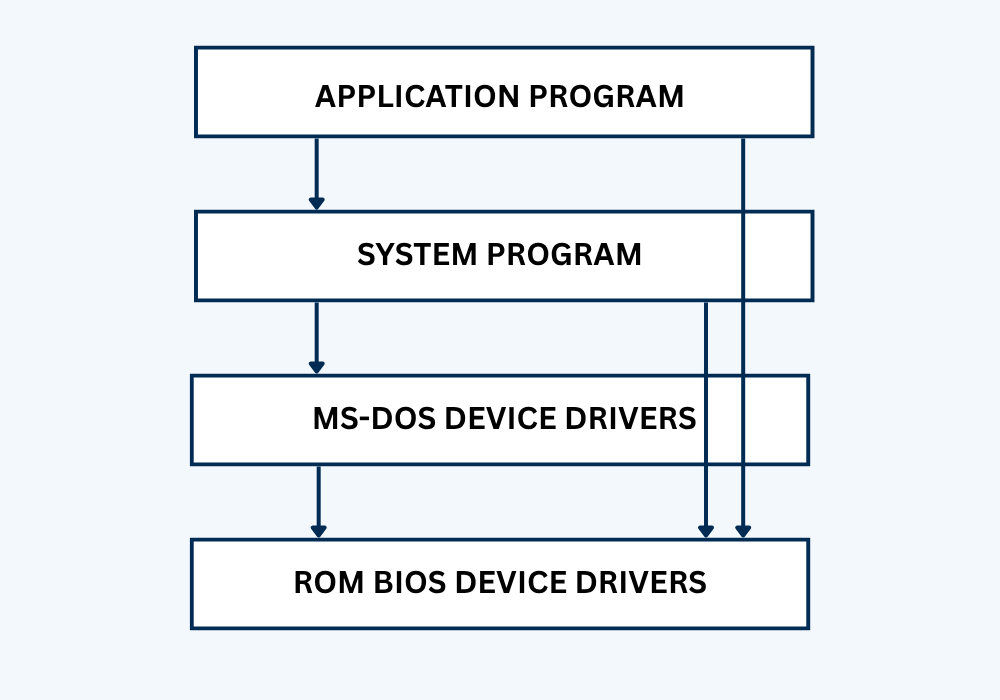
(Figure, DOS Layered Architecture)
Here’s a breakdown of DOS Layered Architecture:
1. BIOS Layer (Basic Input/Output System)
The BIOS is firmware stored in the computer’s ROM. It handles low-level hardware control, like reading keyboard input, displaying characters on screen, or accessing disks. Though not part of DOS itself, BIOS is crucial for booting the system and providing basic I/O services that DOS relies on to function.
2. DOS Kernel Layer (Core System)
This layer includes IO.SYS and MSDOS.SYS the main files that make DOS work. It handles memory management, controls the file system (FAT), and manages interrupts and device drivers. The kernel provides essential system functions like opening files, loading programs, or accessing hardware via software-level routines.
3. Command Interpreter (Shell)
Called COMMAND.COM, this is the part of DOS users see. It provides a command-line prompt where you type commands like DIR, COPY, or DEL. It translates user commands into instructions the system understands. It also includes basic batch file scripting, command execution, and simple utilities built into DOS.
How DOS Architecture Works?
DOS (Disk Operating System) follows a flat, loosely structured architecture. It has limited layering and all components interact more directly.
Step-by-step working of DOS:
- Power On → BIOS starts and performs POST (Power-On Self-Test).
- BIOS loads the DOS system files: IO.SYS, MSDOS.SYS.
- DOS Kernel initializes:
- Manages file I/O using FAT file system.
- Loads device drivers.
- Controls memory allocation (very basic).
- COMMAND.COM (Shell) is loaded:
- Accepts user input like DIR, COPY, etc.
- Directly interacts with hardware or kernel routines.
- Application or batch file executes:
- Gets full system control (no multitasking).
- Can directly access hardware and memory.
- When done, control returns to the shell or system halts.
In DOS, all programs run in real mode with full hardware access no process isolation or user/kernel separation.
Advantages of DOS
- DOS is simple and easy to learn, especially for beginners who want to understand basic operating system concepts.
- It requires very little memory and system resources, making it suitable for older or limited hardware.
- The command-line interface gives direct control over the system with simple commands.
- Booting time is fast due to its lightweight and minimalistic design.
- DOS is ideal for running legacy software or applications developed in the 1980s and early 1990s.
Disadvantages of DOS
- DOS does not support multitasking only one program can run at a time.
- It is a single-user system, so it cannot manage multiple user sessions.
- DOS lacks built-in security features such as user permissions and memory protection.
- It only supports basic FAT file systems, which are outdated and less secure.
- There is no graphical user interface (GUI), only a text-based command prompt.
- It is not portable and mostly restricted to old x86-based systems.
UNIX Layered Architecture
UNIX is a powerful, multi-user, multitasking operating system with a well-structured layered design that greatly influenced modern OS designs like Linux and macOS.
UNIX was created at Bell Labs in the late 1960s by Ken Thompson and Dennis Ritchie. It started as a simple OS for the PDP-7 and was rewritten in C in 1973, making it portable and widely adopted. Many versions like BSD, System V, and Solaris followed. UNIX inspired Linux and macOS and is known for its multitasking, security, and stability.
Fun Fact: UNIX’s creators also developed the C programming language.
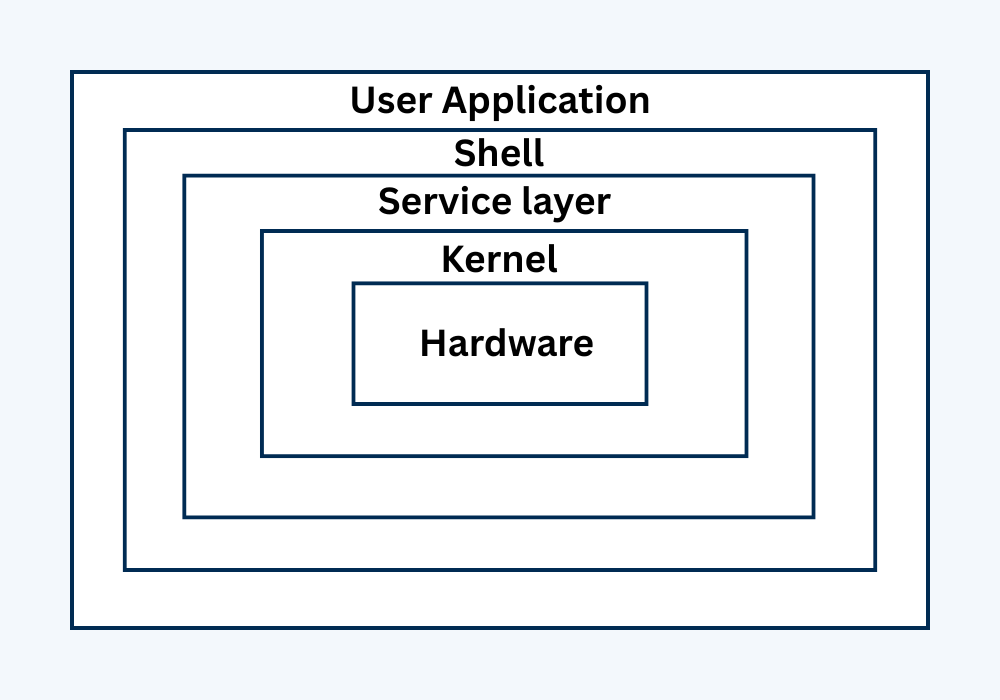
(Figure, The Layer of Unix operating system)
Here’s a breakdown of UNIX’s classic layered architecture:
1. Hardware Layer (Bottom Layer)
This is the physical part of the computer, including the CPU, RAM, keyboard, mouse, and hard drives. It performs all real tasks but cannot be accessed directly by user programs. Only the kernel can communicate with hardware to manage data processing, storage, and device operations.
2. Kernel Layer (Core of UNIX)
The kernel is the brain of UNIX. It sits between hardware and software and manages everything: memory, processes, files, and devices. It ensures multiple programs can run safely by sharing system resources. The kernel works in privileged mode and provides services only through system calls, ensuring stability and security.
3. System Call Interface (API for Programs)
User applications can’t directly access the kernel. Instead, they use system calls, which are predefined functions provided by the operating system. Examples include open(), read(), fork(), and exec(). This layer acts as a bridge between the shell/programs and the kernel, enabling controlled access to hardware and system resources.
4. Shell (Command Interpreter)
The shell is a program that lets users interact with the UNIX system. It takes input from the user (commands), interprets them, and passes them to the system using system calls. It supports both interactive use (like typing ls) and scripting (like .sh files for automation and batch jobs).
5. User Programs and Applications
These are tools and software that run in user space, like ls, cp, vi, and gcc. They don’t access hardware directly and use shell + system calls to work. These programs provide utilities for users to interact with files, compile code, edit documents, or manage system tasks.
How UNIX Architecture Works
- System Boot → Hardware initializes.
- UNIX Kernel loads:
- Handles memory management, process scheduling, device control.
- Starts the init process (PID 1).
- System Call Interface is ready:
- Allows user applications to request services like file access, creating processes, or memory allocation (e.g., fork(), exec(), read()).
- Shell (sh, bash, etc.) loads:
- Accepts commands from user (e.g., ls, mkdir).
- Executes user programs by sending system calls to the kernel.
- User programs run:
- Each process is isolated in memory.
- Can multitask efficiently with background jobs, signals, etc.
- When tasks complete:
- Kernel releases memory, closes files.
- Control returns to shell for next command.
In UNIX, the separation between user space and kernel space ensures better security, stability, and multitasking.
Advantages of UNIX
- UNIX supports multitasking, allowing multiple processes to run simultaneously without interference.
- It is a multi-user system, meaning several users can access and use system resources at the same time.
- The operating system is highly portable because it’s written in the C programming language.
- UNIX provides strong security features through file permissions, user management, and access control.
- It offers a modular and layered architecture, which makes it easy to update or replace components.
- Both command-line and graphical interfaces (like the X Window System) are available in UNIX.
- Many UNIX-based systems, such as Linux, are free and open source.
Disadvantages of UNIX
- UNIX can be complex to learn for beginners due to its powerful but technical command-line interface.
- System administration in UNIX requires more expertise compared to simpler OSes like DOS or Windows.
- Some hardware and software compatibility issues may occur, especially with commercial applications.
- GUI in UNIX is optional and not as user-friendly as modern desktop environments.
- Initial setup and configuration can be time-consuming for new users.
Frequently Asked Questions (FAQs)
Q1. What is the main difference between DOS and UNIX architecture?
DOS has a flat, monolithic architecture with limited modularity, while UNIX follows a structured layered design where the kernel, system calls, shell, and user programs are clearly separated. UNIX also supports multitasking and multi-user environments, whereas DOS does not.
Q2. Does DOS use a layered architecture?
Not exactly. DOS does not strictly follow a layered model like UNIX. However, it can be conceptually divided into three levels: BIOS, kernel, and command interpreter (COMMAND.COM). These layers are loosely defined and not as modular or isolated as in UNIX.
Q3. Why is UNIX considered more secure than DOS?
UNIX separates user space and kernel space, includes memory protection, and controls hardware access via the kernel. DOS allows direct access to hardware and lacks multitasking, making it more prone to crashes and security issues.
Q 4. What role does the shell play in UNIX architecture?
The shell in UNIX acts as a command interpreter and user interface. It accepts user input, interprets it, and communicates with the kernel via system calls. Advanced shells (like bash) also support scripting and automation.
Q5. Is UNIX still used today? What about DOS?
Yes, UNIX and UNIX-like systems (Linux, macOS) are widely used in servers, development, and enterprise environments. DOS, on the other hand, is obsolete and rarely used except in legacy systems or hobbyist environments like FreeDOS
Conclusion
OS has a simple, flat architecture with limited features good for early systems but not suitable for modern use. UNIX, with its layered and modular design, supports multitasking, user security, and system stability. Its architecture is the foundation of most modern operating systems like Linux and macOS. Overall, UNIX is more powerful, secure, and scalable than DOS.