An Operating System (OS) plays an important role in helping users to interact with a computer system. It serves as a link between the user and the systems hardware, making sure everything runs properly and resources are used effectively. The operating system starts working as soon as you turn on your computer, silently handling all of the backend tasks. It keeps your files organized, speeds up the opening of your apps, controls memory usage to prevent lag, and ensures that peripherals like your keyboard, mouse, and printer operate as intended. Additionally, it protects your personal information, ensuring that only you and no one else can access it.
The operating system is there to ensure that every component of your system functions flawlessly while you go about your daily activities, whether that includes typing documents, watching videos, connecting a USB drive, or browsing the internet. It intervenes to correct issues if they arise.
Here’s how the OS helps users through its functionalities
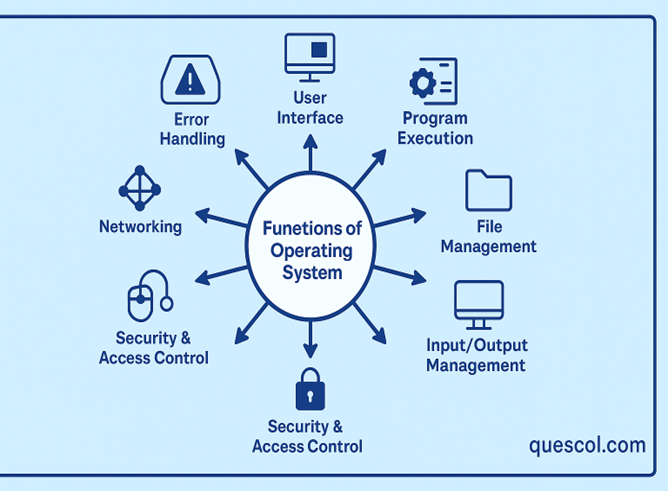
1. User Interface (UI)
The User Interface is allows people to interact with a computer. It provides a platform where users can give commands or make selections to perform tasks. There are mainly two types of interfaces: Graphical User Interface (GUI) and Command-Line Interface (CLI).
Let’s say you want to view a picture on your computer.
You can simply click on the picture to have it open automatically if you’re using a system like Windows. There is no typing required, and it is quick and simple.
However, on certain computers, such as Linux, you may need to type a brief command just like giving quick instruction to the system in order to open the picture.
Both methods accomplish the same goal, but most people find clicking easier, while computer-savvy people prefer typing.
2. Resource Management
The main parts of the computer, like the CPU, RAM, hard drive, and external devices such as the keyboard, mouse, and printer, are managed by the operating system. It make sure that all these parts are shared equally between the different programs that are running at the same time.
For instance, even when you are downloading a file, typing in a document, and playing music at once, the operating system keeps everything running smoothly. It manages how memory is used and when each task runs, helping to prevent your system from slowing down or crashing.
3. Program Execution
The operating system helps by opening apps and putting them into memory so they can work. It makes sure they run properly without any problems.
It also lets you use more than one app at a time like watching a video, writing something, and downloading a file all at once, without slowing down.
The OS also looks after each app from the time it starts, while it’s working, if it needs to pause, and when it closes.
4. File Management
The operating system helps you keep your data organized, much like sorting your things into labeled folders.
It allows you to create files, open them when needed, make changes, and get rid of the ones you no longer use.
It also keeps your work safe by deciding who can open or change your files, so no one else can mess with them without your okay
5. Input/Output Management
Input/ output operations involve communication between CPU and external devices like hard drives, keyboards and printers. These operations are managed by the operating system, device drivers and other system programs.
It ensures that all of your actions are swift and accurate so that the computer reacts appropriately.
Imagine you’re at a busy post office where people are waiting in line to send or collect packages. If the staff starts helping people without any order, some with quick tasks, and others with time consuming process. To fix this, the post office follows a system, it helps people one by one in a way that saves time and keeps things fair.
To fix this, the post office follows a system that it will helps people one by one in a way that saves time and keeps things fair.
- Work faster
- Cutting down waiting time
- Make sure every task gets attention
- Use devices like hard drives in a better way
6. Security and Access Control
The operating system helps keep your data safeby asking for ausername and password, so making sure only the right person can use the computer and It can also block harmful websites or apps, protect important files, and control who can use different parts of the system.
If it notices something unusual or harmful, like avirus, it can stop it from damaging your files or system.
7. Networking
The operating system helps people connect their computers to the internet or to other nearby devices, like printers or other computers. It handles how data moves from one place to another, which makes it easier to share files, use cloud storage, or even access another computer from a different location. It also follows standard communication rules, such as TCP/IP, to make sure the information being sent or received gets to the right destination without any issues.
8. Error Handling
An operating system’s error handling refers to how the computer detects and resolves issues when something goes wrong. These issues can be either short-term (such as a brief loss of connection) or long-term (such as hardware damage).
The operating system has special methods to deal with such unexpected problems or failures. These techniques enable the computer to function properly even in the event that something goes wrong..
Error handling’s primary goal is to prevent the system from abruptly stopping or crashing in the event that an issue arises during the execution or setup of a program
The operating system uses a variety of methods to handle errors, including:
- Exception handling – identifying and resolving issues as soon as they arise
- Error codes and messages – that inform the user or developer of the issue
- Retry methods – If a task doesn’t work the first time, try it again.
- Logging and debugging – preserving information about the issue for future resolution
With these tools, the operating system can quickly find and fix problems, so the computer keeps working properly even when errors occur
Conclusion
The operating system controls how the computer’s resources are used and facilitates the use of its hardware. It facilitates the smooth operation of programs, maintains file organization, controls input and output devices, safeguards your data, links your computer to networks, and resolves any issues that may arise. All of this takes place while providing you with an easy-to-use interface for interacting with the computer.