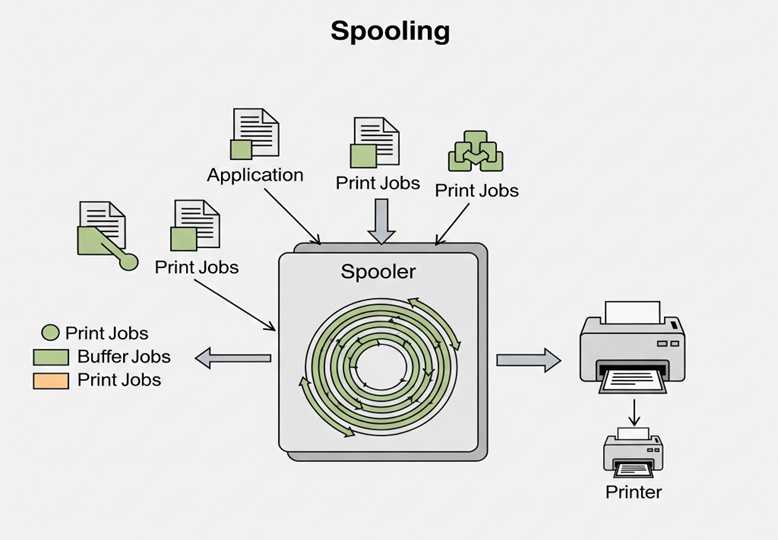
Spooling (Simultaneous Peripheral Operations Online) is an important concept in computer science. It refers to the method of managing data transfer between fast devices and slower devices. The key idea is that data is first stored temporarily in a buffer—usually in RAM or on a hard disk—before being sent to slower devices such as printers, plotters, or disk drives.
Since the CPU is much faster than these output devices, sending data directly would cause the CPU to wait, wasting processing time. Spooling solves this problem by queuing data as jobs in the buffer, allowing the CPU to continue working without delays. Meanwhile, the slower device reads data from the buffer at its own pace, processing one task at a time. This ensures efficient use of resources and smooth multitasking for better overall performance.
What is Spooling in Operating System?
Spooling (Simultaneous Peripheral Operations Online) is a technique used to temporarily hold data in a buffer (usually on disk), allowing devices or programs to process the data at different speeds. It enables efficient data transfer between the CPU and peripheral devices.
Example of Spooling
Imagine sending multiple print jobs in an office. Without spooling, you would have to wait for each print job to finish before starting another task. But with spooling:
- Your documents are saved in a print queue.
- The printer processes them one by one, even if it takes a while.
- Meanwhile, you continue using your computer without interruption.
This saves time and allows multiple users or applications to efficiently share the same device.
Advantages of Spooling
Spooling is widely used in various systems because it offers several benefits. Here are some key advantages:
- Enables Multitasking: The CPU doesn’t have to wait for a device to finish its task. It simply sends the data to the buffer and moves on to the next task.
- Reduces Idle Time: Devices and processors are used more efficiently, minimizing downtime and keeping operations running smoothly.
- Efficient Queue Management: Multiple jobs are lined up in the buffer and executed one at a time in an organized manner.
- Supports Multiple Users: In shared environments like offices or servers, spooling allows several users to access and use devices without conflicts.
- Boosts System Performance: The system’s overall efficiency and responsiveness improve because processes do not block each other.
- Error Handling: If a device fails, jobs can remain in the spool queue, reducing data loss and allowing for retry mechanisms.
Disadvantages of Spooling
Despite its usefulness, spooling comes with certain drawbacks that need to be considered, especially in large-scale or sensitive environments:
- Despite its usefulness, spooling has certain drawbacks to consider, especially in large-scale or sensitive settings:
- High Memory Usage: Spooling needs extra storage space for the buffer, which could lead to system overload if not managed properly.
- Security Risks: Spooled data remains in memory or on disk temporarily. If not protected, it might be vulnerable to unauthorized access.
- Delayed Execution: Since jobs are stored in a queue, real-time or urgent tasks might face delays based on the queue length.
- Configuration Complexity: Setting up and managing spoolers, particularly in enterprise-level systems, can be complicated and may need skilled administrators.
Areas where spooling is commonly used
1. Print Management Systems
- Purpose: Temporarily stores print jobs in a queue before sending them to the printer.
- Why: Printers are slower than CPUs; spooling allows users to continue working while printing happens in the background.
2. Email Queues
- Purpose: Holds outgoing or incoming emails temporarily.
- Why: Ensures that emails are sent/received even if the mail server or network is momentarily busy or down.
3. Batch Processing Applications
- Purpose: Manages jobs submitted in batches, especially in mainframes or large-scale systems.
- Why: Jobs can be queued and executed sequentially or as resources become available.
4. Disk Scheduling Systems
- Purpose: Buffers I/O requests (read/write) for efficient disk access.
- Why: Disk heads are mechanical and slow compared to processors; spooling helps optimize disk usage and avoid idle CPU time.
5. Banking and Ticketing Servers
- Purpose: Temporarily store requests (e.g., transactions, ticket bookings) when traffic is high.
- Why: Helps manage high loads by queuing operations, reducing response time issues during peak hours.
Conclusion
Spooling serves as a middleman between fast and slow devices, ensuring tasks are completed efficiently without slowing down the entire system. Whether it’s printing a document or handling multiple jobs at once, spooling enables computers to work smarter. Even though it needs supplementary resources and a proper configuration, the gain in productivity and multitasking capability render it an important technique in both personal and enterprise computing.