
Currently Empty: ₹0.00

- What Is a System Call?
- Why Are System Calls Important?
- Categories of System Calls
- 1. Process Control
- 2. File Management
- 3. Device Management
- 4. Information Maintenance
- 5. Communication
- How Are System Calls Handled by the System? (Step-by-Step)
- Key Features of System Calls in Operating Systems
- Advantages of System Calls
- Important FAQs About System Calls
- Q1. What is the difference between a function call and a system call?
- Q2. Are system calls slower than regular function calls?
- Q3. Can I write my own system calls?
- Q4. What is syscall number?
- Q5. Is printf() a system call?
- Conclusion
Whenever a user-level program (like a text editor, browser, or game) needs to perform a task that requires direct interaction with system resources such as reading a file, printing a document, or allocating memory, it cannot do so directly. That’s where a system call comes in.
A system call acts as a secure gateway for user-level programs to request services from the operating system kernel. It forms the critical interface between user processes and low-level OS functions.
In this article, we’ll explain what system calls are, the different categories they fall into, and how the OS handles these calls behind the scenes.
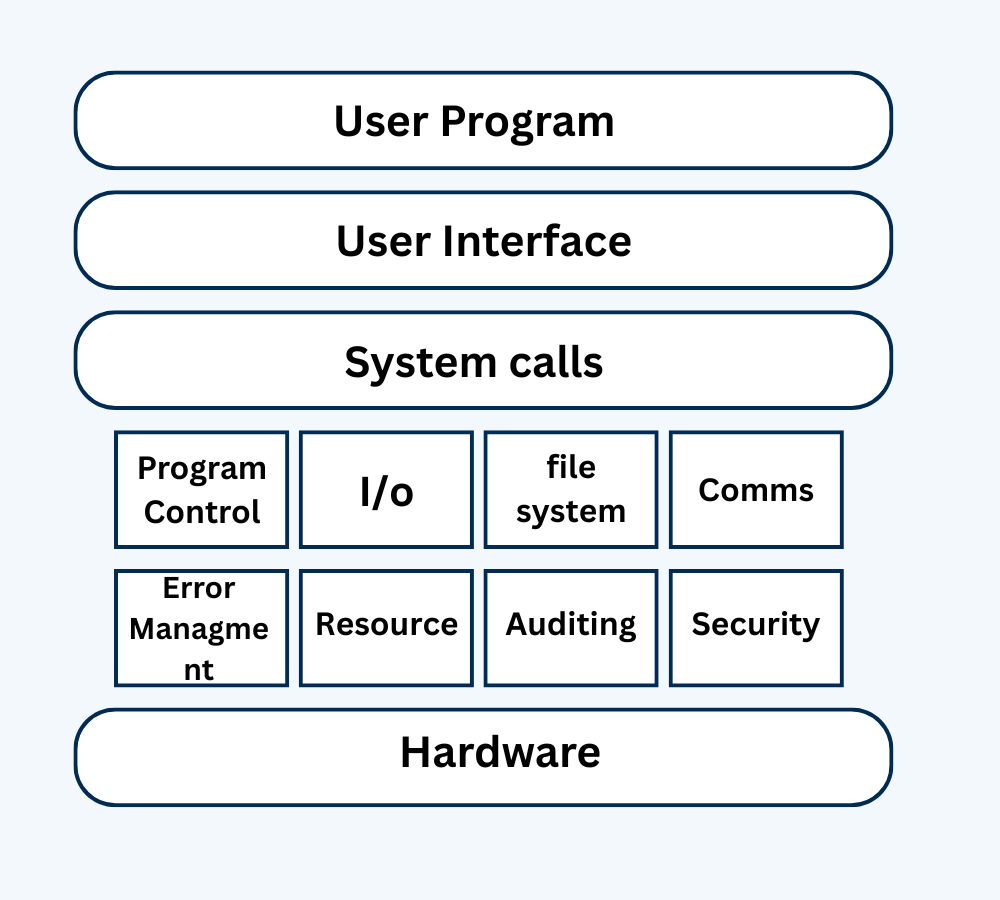
What Is a System Call?
A system call is a programmed request to the operating system for a service that the running program does not have direct permission to perform.
In other words, a system call provides a controlled entry point for programs to interact with the kernel. Since user applications run in user mode and the OS runs in kernel mode, direct access to sensitive operations (e.g., accessing I/O devices, writing to memory) is not allowed for security reasons. System calls act as intermediaries that allow safe communication between the two.
Why Are System Calls Important?
System calls are essential because:
- They provide a way for programs to request critical services like file access, memory management, or device control.
- They ensure protection and security by preventing user programs from directly accessing kernel space.
- They offer an abstraction layer, simplifying application development by hiding low-level hardware details.
Without system calls, every program would need to know the complex and hardware-specific instructions for tasks like reading a file or sending data over a network.
Categories of System Calls
System calls are broadly grouped into five categories based on the type of service they provide:
1. Process Control
These system calls deal with the creation, execution, termination, and control of processes.
Examples:
Real-World Analogy:
Think of each running application as a worker in a company. The HR department (OS) can:
- Hire a new worker (fork())
- Assign a worker a new task (exec())
- Fire a worker (exit())
- Ask a manager to wait for a worker to finish (wait())
Real OS Examples:
- fork(): create a new process
- exec(): replace current process memory with a new program
- exit(): terminate a process
- wait(): wait for a child process to finish
- getpid(): get process ID
2. File Management
These system calls manage file operations like reading, writing, and opening files.
Examples:
- open(): open a file
- read(): read data from a file
- write(): write data to a file
- close(): close a file
- lseek(): reposition file offset
- unlink(): delete a file
3. Device Management
Used for requesting and releasing hardware devices such as printers, hard drives, etc.
Examples:
- ioctl(): control device parameters
- read(): read from device
- write(): write to device
- open(), close(): open or close a device (same as file)
4. Information Maintenance
These calls provide system-related or process-related information.
Examples:
- gettimeofday(): get system time
- settimeofday(): set system time
- getuid(): get user ID
- alarm(): set a timer
5. Communication
These system calls enable inter-process communication (IPC), including message passing and shared memory.
Examples:
- pipe(): create communication pipe
- shmget(), shmat(): manage shared memory
- send(), recv(): socket-based communication
- socket(): create a communication endpoint
How Are System Calls Handled by the System? (Step-by-Step)
Here’s how a typical system call is handled internally by the operating system:
Step 1: Request Initiation
A user application makes a function call provided by the standard library (like printf or open). These functions internally invoke the corresponding system call.
Step 2: Mode Switch – User to Kernel
A special instruction called a software interrupt or trap (like int 0x80 in Linux or syscall instruction in modern processors) is executed. This causes a context switch from user mode to kernel mode.
Step 3: OS Identifies the Call
The system call number (a unique identifier) is passed to the OS, which uses a system call table to determine which kernel function to execute.
Step 4: Kernel Executes the Task
The OS executes the corresponding system-level operation (e.g., reading from disk, writing to memory, opening a file).
Step 5: Return to User Mode
After the operation is completed, the result (or error code) is returned to the user application, and the system switches back to user mode.
Step 6: User Program Continues
The user program receives the result and continues its execution.
Key Features of System Calls in Operating Systems
- Interface Between User and Kernel
System calls act as a bridge between user-level applications and the core of the operating system (kernel). This allows users to perform operations like file access, device control, or process creation without knowing low-level hardware details. - Abstraction from Hardware
System calls hide the complexities of hardware interaction. Developers don’t need to understand how disk sectors work to save a file — they just call write() and the OS handles the rest. - Controlled Access to Resources
System calls ensure that user applications can only access hardware and resources in a safe and controlled way. This prevents unauthorized or harmful operations, protecting the system from crashes or security breaches. - Mode Switching (User Mode to Kernel Mode)
When a system call is made, the processor switches from user mode to kernel mode to allow the OS to execute the privileged instruction safely. After execution, control returns to user mode. - Versatile Functionality
System calls support a wide range of tasks including:- Process control (fork, exec)
- File operations (open, read, write)
- Device management
- Network communication (socket, send, recv)
- Security checks (getuid, chmod)
- Platform Dependent (But Similar Concept)
While the concept of system calls is universal, their exact names and parameters may vary across OS platforms like Linux, Windows, macOS, or Android. However, their purpose remains consistent.
Advantages of System Calls
- Security: Restricts user programs from accessing critical hardware directly.
- Portability: Applications use generic calls; OS handles hardware-specific details.
- Abstraction: Simplifies programming by hiding kernel complexities.
- Controlled Access: Prevents accidental damage to system resources.
Important FAQs About System Calls
Q1. What is the difference between a function call and a system call?
A function call is a jump to code within the same program or library. A system call invokes kernel functions through a mode switch from user to kernel space.
Q2. Are system calls slower than regular function calls?
Yes. System calls require a context switch to kernel mode, which takes more time than function calls that remain in user mode.
Q3. Can I write my own system calls?
In Linux, you can write custom system calls by modifying the kernel source and recompiling it, but this requires deep knowledge of OS internals.
Q4. What is syscall number?
Each system call is assigned a unique ID number. The OS uses this number to find the correct function in the syscall table.
Q5. Is printf() a system call?
No, printf() is a library function. However, it eventually uses system calls like write() to display output to the terminal.
Conclusion
In conclusion, system calls are a important part of how computer program interact with the operating system. They provide a way for applications to request services from the OS, such as accessing files, managing memory, or communicating over networks.
System calls act as a bridge between user-level programs and the low-level operations handled by the operating system kernel. Understanding system calls is essential for developers to create efficient and functional software that can leverage the full capabilities of the underlying operating system.