
Currently Empty: ₹0.00

Time Sharing Operating System: Definition, Advantage & Disadvantage
Updated on August 11, 2025
- What is Time-Sharing Operating System (TSOS)?
- How Time-Sharing Operating Systems Work?
- Core Concept: Time Slice (Quantum)
- Step-by-Step Working of a Time-Sharing OS
- Time-Sharing OS key components
- A. Time Slices (Quantums)
- B. Context Switching
- C. Scheduling Algorithms
- D. Memory Management
- Example Scenario of Time Sharing OS
- Step-by-step explanation (with a concrete timeline)
- Key Features of Time-Sharing OS
- Advantages of Time-Sharing Operating Systems
- 1. Efficient CPU Utilization
- 2. Reduced Response Time
- 3. Cost-Effective Resource Sharing
- 4. Improved User Productivity
- 5. Fair Allocation of Resources
- 6. Supports Multi-User Environments
- Disadvantages of Time-Sharing Operating Systems
- 1. Overhead Due to Context Switching
- 2. Security and Privacy Risks
- 3. Complex Scheduling Requirements
- 4. Performance Degradation Under Heavy Load
- 5. Dependency on a Centralized System
- 6. Higher Initial Setup Cost
- Examples of Time-Sharing Operating Systems
- 1. UNIX & Linux
- 2. Multics (Precursor to UNIX)
- 3. Windows Terminal Services
- 4. IBM’s TSS/360
- Conclusion
A Time-Sharing Operating System (TSOS) is a computing model that allows multiple users to access a single computer system at the same time. It works by dividing the CPU’s processing time into small intervals, called time slices or quanta, and assigning each user a fair share of resources. This creates the illusion that all tasks are running simultaneously, even though the CPU is rapidly switching between them.
Time-sharing systems became revolutionary in the 1960s and 1970s, helping universities, businesses, and research institutions maximize computing efficiency. Unlike batch processing systems, where jobs were executed one after another, time-sharing enabled interactive computing, allowing real-time input and output.
Today, modern operating systems like Linux and UNIX still use time-sharing principles in multi-user environments, cloud computing, and server-based applications.
Example: Imagine several people chatting online at once. The server handles each message so quickly that everyone feels they are getting instant responses. Similarly, in time-sharing, the CPU divides its processing time into small parts and shares them among all users for smooth and fair performance.
What is Time-Sharing Operating System (TSOS)?
A Time-Sharing Operating System (TSOS) is a type of operating system that allows multiple users or processes to share the CPU and other system resources simultaneously by rapidly switching between them.
Each user or task gets a small time slice of CPU time, making it appear as if all processes are running at the same time.
This improves CPU utilization, response time, and supports interactive computing for multiple users.
Lets see an image for better understanding
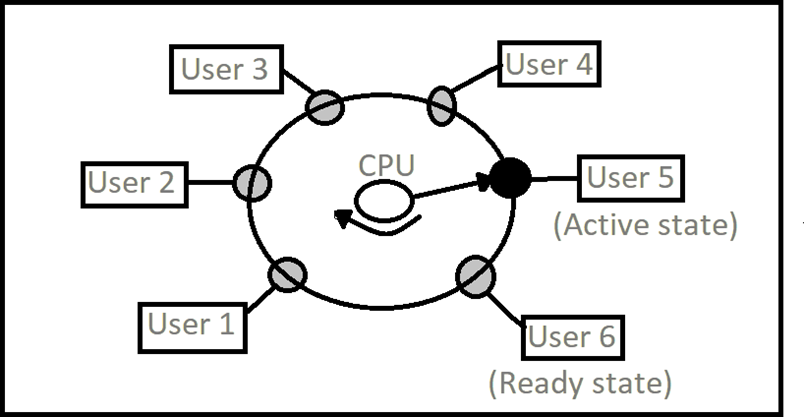
This diagram visually represents how a time-sharing operating system manages multiple users. Here’s a simple explanation:
- CPU Core: The center shows the CPU actively processing one user’s task (User 5 in “Active state”).
- User Queue: Other users (1, 2, 3, 4, 6) wait in a “Ready state” for their turn.
- Time-Slicing: The CPU rapidly switches between users, giving each a small time slice before moving to the next.
How Time-Sharing Operating Systems Work?
Core Concept: Time Slice (Quantum)
- The CPU time is divided into small units, called time slices or quanta (typically 10-100 milliseconds).
- Each active process/user gets a turn to use the CPU for one slice.
- After its time is up, the CPU switches to the next task in the queue — a process called context switching.
Step-by-Step Working of a Time-Sharing OS
- Multiple Processes Are in Ready Queue
The OS keeps all active processes (from users or programs) in a ready queue. - CPU Scheduler Picks a Process
A component called the scheduler selects one process to run next based on a scheduling algorithm like Round Robin or Priority Scheduling. - Process Runs for a Time Slice
The selected process runs for a short, fixed duration (time slice). - Context Switching
After the slice, the OS saves the state of the current process (context) and loads the state of the next one. This ensures the previous process can resume later. - Repeat the Cycle
The CPU continues this cycle rapidly, switching between tasks so fast that users believe all tasks are running simultaneously.
Time-Sharing OS key components
A. Time Slices (Quantums)
- Each user or process is allocated a small, fixed time interval (e.g., 10–100 milliseconds).
- The CPU switches between tasks so quickly that users perceive near-instantaneous responses.
B. Context Switching
- When a time slice expires, the OS saves the current process’s state (context) and loads the next one.
- This ensures smooth transitions between tasks but introduces some overhead.
C. Scheduling Algorithms
- Round-Robin Scheduling – Each process is assigned an equal time slice and executed in a rotating (cyclic) order.
- Priority-Based Scheduling – Processes are executed based on priority, with higher-priority tasks getting CPU time first.
- Multilevel Queue Scheduling – Processes are grouped into separate queues based on priority or type, each with its own scheduling policy.
D. Memory Management
Since multiple users run programs simultaneously, memory must be efficiently allocated. Techniques like paging and virtual memory help manage memory demands.
Example Scenario of Time Sharing OS
Imagine three users working on the same shared mainframe:
- User A runs a Python script
- User B compiles Java code
- User C executes a database query
In a time-sharing system, each user’s task gets 20 milliseconds of CPU time in turn:
Time: | A | B | C | A | B | C | ...The CPU rotates between them so quickly that all users feel like their tasks are happening in real time.

Step-by-step explanation (with a concrete timeline)
Below is a clear, student-friendly breakdown of how the time-sharing example (Users A, B, C; 20 ms quantum) works — step by step.
- Jobs arrive
- At time 0 ms, Users A, B and C each submit a task to the system. All three tasks enter the ready queue.
- Scheduler chooses first task
- The CPU scheduler picks the first process (say A) and gives it a time slice = 20 ms.
- CPU executes A (first slice)
- A runs from 0 ms to 20 ms.
- Context switch to B
- The system performs a context switch (saving A’s state, loading B’s state). Assume a context switch cost of 2 ms (example). So the wall time after A’s slice becomes 20 ms + 2 ms = 22 ms before B actually starts.
- CPU executes B (first slice)
- B runs from 22 ms to 42 ms (that is 22 + 20 = 42).
- Context switch to C
- Add another 2 ms for context switch: 42 ms + 2 ms = 44 ms.
- CPU executes C (first slice)
- C runs from 44 ms to 64 ms.
- Cycle continues
- After C, context switch back to A (2 ms → 66 ms), then A gets its second slice 66–86 ms, and so on. The repeating sequence (task slices + context switches) is:
A: 0–20 | CS 20–22 | B: 22–42 | CS 42–44 | C: 44–64 | CS 64–66 | A: 66–86 | ...
- After C, context switch back to A (2 ms → 66 ms), then A gets its second slice 66–86 ms, and so on. The repeating sequence (task slices + context switches) is:
- Response time example (first response)
- If all three submit at time 0 and A is first, their first-turn waiting times are:
- A waits 0 ms (it starts immediately).
- B waits 20 ms before its first slice.
- C waits 40 ms before its first slice.
- Average time to first response = (0 + 20 + 40) = 60; 60 ÷ 3 = 20 ms.
(Step-by-step arithmetic: 0 + 20 = 20; 20 + 40 = 60; 60 ÷ 3 = 20.)
- If all three submit at time 0 and A is first, their first-turn waiting times are:
- CPU utilization and overhead (example numbers)
- Work done per cycle (useful CPU time): 3 processes × 20 ms = 60 ms.
(3 × 20 = 60.) - Context-switch overhead per cycle: 3 switches × 2 ms = 6 ms.
(3 × 2 = 6.) - Total wall time per cycle = 60 + 6 = 66 ms.
(60 + 6 = 66.) - CPU utilization for user work = 60 ÷ 66 = 10 ÷ 11 ≈ 0.90909 → 90.91%.
(Divide numerator and denominator by 6 → 60/66 = 10/11 ≈ 0.9090909 → ×100 = 90.90909% → round to 90.91%.)
- Work done per cycle (useful CPU time): 3 processes × 20 ms = 60 ms.
- Effect of quantum size (trade-off)
- If quantum is smaller (e.g., 5 ms): useful work = 3×5 = 15 ms; overhead still 6 ms; total 21 ms → utilization = 15/21 = 5/7 ≈ 71.43%.
(3×5=15; 15+6=21; 15/21 reduce by 3 → 5/7 ≈ 0.7142857 → 71.42857% → 71.43%.) - Smaller quantum → better responsiveness but more context-switch overhead → lower CPU utilization.
- Larger quantum → less overhead and higher utilization but worse response time for interactive users.
- If quantum is smaller (e.g., 5 ms): useful work = 3×5 = 15 ms; overhead still 6 ms; total 21 ms → utilization = 15/21 = 5/7 ≈ 71.43%.
- What happens if a process blocks (I/O)
- If a process does I/O during its slice, it becomes blocked and leaves the CPU before its time slice ends. The scheduler immediately dispatches the next ready process — this can raise throughput (because the CPU does not idle waiting for I/O).
- Preemption & fairness
- When a process’s time slice ends, the scheduler preempts it (if it’s still running) and moves it to the back of the ready queue so others get their fair turn. This ensures fairness and keeps response times predictable.
- Practical takeaway
- Time-sharing makes many users feel they have immediate access. Key knobs the OS uses are the time slice length and the scheduling policy (round-robin, priority, etc.). Choosing quantum and handling context-switch cost are the main trade-offs between responsiveness and efficiency.
Key Features of Time-Sharing OS
| Feature | Description |
|---|---|
| Multitasking | Multiple processes run “at once” (logically). |
| Context Switching | Saves and loads process states to share CPU effectively. |
| Fair Scheduling | All users get equal or prioritized CPU access. |
| Interactive Use | Supports real-time typing and response (terminals). |
Advantages of Time-Sharing Operating Systems
1. Efficient CPU Utilization
- The CPU is rarely idle since it continuously switches between tasks.
- Maximizes resource usage compared to batch systems.
2. Reduced Response Time
- Users experience quick responses due to short time slices.
- Ideal for interactive applications like programming, banking, and online transactions.
3. Cost-Effective Resource Sharing
- Multiple users share the same hardware, reducing per-user costs.
- Eliminates the need for individual machines for each user.
4. Improved User Productivity
- Users can interact with the system in real-time, making debugging and development easier.
- Enables collaborative work environments.
5. Fair Allocation of Resources
- No single user can monopolize the CPU for too long.
- Ensures equal opportunity for all active processes.
6. Supports Multi-User Environments
- Used in universities, corporate networks, and cloud computing.
- Allows remote access via terminals (e.g., SSH in Linux).
Disadvantages of Time-Sharing Operating Systems
1. Overhead Due to Context Switching
- Frequent switching between processes consumes CPU cycles.
- Can degrade performance if not managed properly.
2. Security and Privacy Risks
- Multiple users accessing the same system increases the risk of data breaches.
- Requires strict access controls and authentication mechanisms.
3. Complex Scheduling Requirements
- The OS must balance fairness and efficiency.
- Poor scheduling can lead to starvation (some processes getting less CPU time).
4. Performance Degradation Under Heavy Load
- Too many active users can slow down the system.
- Requires powerful hardware for optimal performance.
5. Dependency on a Centralized System
- If the main server fails, all connected users are affected.
- Requires reliable backup and fault-tolerance mechanisms.
6. Higher Initial Setup Cost
- Requires robust hardware (fast CPU, large memory, and storage).
- Maintenance costs can be higher than single-user systems.
Examples of Time-Sharing Operating Systems
1. UNIX & Linux
- Designed with multi-user support from the beginning.
- Uses time-sharing principles in terminal-based and server environments.
2. Multics (Precursor to UNIX)
- One of the earliest time-sharing systems developed at MIT.
- Influenced modern operating systems.
3. Windows Terminal Services
- Allows multiple users to connect remotely to a Windows server.
- Used in enterprise environments.
4. IBM’s TSS/360
- Early mainframe time-sharing system.
- Supported interactive computing for multiple users.
Conclusion
Time-sharing operating systems revolutionized computing by enabling multi-user access, interactive processing, and efficient CPU utilization. While they offer significant advantages like reduced response time, cost savings, and fair resource allocation, they also face challenges such as overhead, security risks, and performance issues under heavy loads.
Today, time-sharing principles are embedded in modern OS designs, particularly in server- based and cloud computing environments. Understanding these systems helps in optimizing performance, security, and user experience in shared computing infrastructures.