Work Breakdown Structure (WBS) is an important project management tool used to divide a software project into smaller and manageable parts. It helps in organizing project work in a structured and systematic way so that planning, scheduling, and monitoring can be done easily. WBS provides a clear understanding of project tasks, responsibilities, and deliverables, which improves coordination among team members and ensures successful project completion.
There are mainly two types of WBS used in software projects: Process-Based WBS and Product-Based WBS. Process-Based WBS focuses on software development phases such as requirement analysis, design, coding, testing, and maintenance, while Product-Based WBS focuses on software components like modules and features such as login, payment, and database system. Both types help in better project planning, management, and control, ensuring efficient software development and high-quality product delivery.
What is WBS?
Work Breakdown Structure (WBS) is a hierarchical decomposition of a software project or product into smaller, manageable tasks or components. It divides the entire project work into smaller units so that each task can be planned, scheduled, and controlled easily. WBS helps project managers organize work, assign responsibilities, estimate time and cost, and monitor progress effectively. It provides a clear structure of the project and ensures that all required activities are properly completed in a systematic manner.
For example, an Online Shopping System Software can be divided using Work Breakdown Structure (WBS) into smaller tasks like requirement analysis, system design, development, testing, deployment, and maintenance. Each phase is further divided into sub-tasks such as login module, product module, payment module, and database design. This makes the software project easy to manage and organize. WBS helps in proper planning, task assignment, and timely completion of the software product.
Types of WBS
There are mainly two types of Work Breakdown Structure (WBS) used in software project management:
- Process-Based WBS (Software Project WBS)
- Product-Based WBS (Software Product WBS)
Let’s see the explanation,
What is Process-Based WBS (Software Project WBS)?
Process-Based Work Breakdown Structure (Software Project WBS) is a type of WBS in which a software project is divided based on development processes or phases such as requirement analysis, design, coding, testing, and maintenance. It focuses on the activities and steps involved in developing the software rather than the final product components. This structure helps in organizing project work according to the software development lifecycle and ensures systematic project execution.
For example, in a bank management software project, planning includes requirement analysis and scheduling. Design includes system and database design for account management. Development includes coding and module integration, while testing checks bugs and system errors. Finally, deployment installs the software and trains users.
Workflow Diagram for Software Project WBS
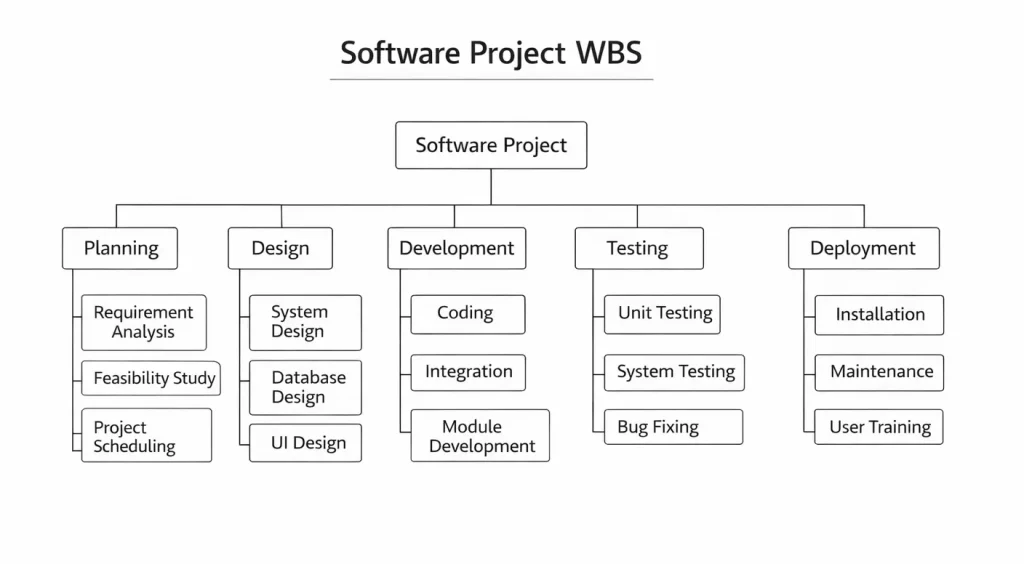
Figure: Software Project WBS
Following are the explanation of workflow diagram Software Project WBS:-
The Software Project WBS (Work Breakdown Structure) diagram shows how a software project is divided into smaller and manageable tasks. First, the main Software Project is placed at the top, and then it is divided into five major phases: Planning, Design, Development, Testing, and Deployment. This structure helps project managers understand the complete workflow clearly and organize tasks step by step. As a result, the project becomes easy to manage, track, and complete on time.
1. Planning
In this phase, the project team collects requirements and studies the project feasibility. It includes Requirement Analysis, Feasibility Study, and Project Scheduling. Moreover, this stage helps in understanding project goals and timeline. Therefore, planning builds a strong foundation for the project.
2. Design
The design phase focuses on creating the structure of the software system. It includes System Design, Database Design, and UI Design. Furthermore, this phase defines how the software will look and work. As a result, developers get a clear blueprint before coding starts.
3. Development
In this phase, actual coding and software creation take place. It includes Coding, Integration, and Module Development. Moreover, developers write programs and connect different modules together. Therefore, this phase converts design into a working software system.
4. Testing
The testing phase checks the software for errors and bugs. It includes Unit Testing, System Testing, and Bug Fixing. In addition, testers ensure that the software works correctly and meets requirements. As a result, software quality improves before release.
5. Deployment
This is the final phase where software is delivered to users. It includes Installation, Maintenance, and User Training. Moreover, the software is installed and users are trained to use it properly. Therefore, the project is successfully completed and maintained.
Objectives of Software Project WBS
The main objective of Process-Based WBS is to organize project activities in a structured way. Moreover, it helps in scheduling tasks and assigning responsibilities to team members. It also improves project monitoring and time management. Therefore, it supports smooth and systematic project execution.
Following are the objectives of Software Project WBS:-
1. To Organize Software Development Process
The main objective of Process-Based WBS is to organize the software development activities in a structured way. It divides the project into phases like analysis, design, coding, and testing. This helps in managing the development process systematically. It reduces confusion in project execution. This ensures smooth software development.
2. To Improve Project Planning
Process-Based WBS helps in planning each stage of the software project properly. It provides a clear sequence of development activities. Proper planning ensures efficient use of time and resources. It reduces delays and errors. This improves project performance.
3. To Assign Responsibilities Clearly
It helps in assigning tasks to developers, testers, and managers according to project phases. Each team member understands their role in the development process. This improves coordination and teamwork. It reduces misunderstandings. This leads to better project management.
4. To Control Time and Cost
Process-Based WBS helps in estimating time and cost for each development phase. It allows project managers to monitor expenses and schedules. This ensures that the project stays within budget and timeline. It reduces unnecessary spending. This improves financial control.
5. To Monitor Project Progress
It allows managers to track the progress of each development phase. Problems can be identified and solved early. Regular monitoring improves project performance. It ensures timely completion of tasks. This increases project success.
6. To Reduce Software Development Risks
Process-Based WBS helps in identifying risks in different development stages. Proper planning reduces technical and management risks. It improves system stability and safety. Risk management ensures smooth project execution. This supports successful software delivery.
7. To Maintain Software Quality
It ensures that each phase of the software development process follows quality standards. Testing and verification are included in the structure. This reduces errors and defects in the software. It improves reliability and performance. This ensures high-quality output.
Characteristics of Process-Based WBS
1. Process-Oriented Structure
Process-Based WBS focuses on software development processes rather than product components. It divides the project into phases like requirement analysis and testing. This helps in organizing development activities clearly. It ensures systematic execution. This improves project management.
2. Follows Software Development Life Cycle
It is closely related to the Software Development Life Cycle (SDLC). Each phase of SDLC becomes a part of WBS. This makes project planning easier and more structured. It ensures proper flow of activities. This supports systematic development.
3. Hierarchical in Nature
Process-Based WBS follows a hierarchical structure with phases and sub-phases. Each phase is divided into smaller tasks and activities. This makes project management easier. It improves understanding of project work. This ensures better coordination.
4. Easy to Monitor and Control
Each process stage can be tracked and monitored separately. Managers can easily identify delays or errors in any phase. This improves project control and performance. It ensures timely completion. This increases efficiency.
5. Clear Task Division
Process-Based WBS clearly divides project work into development phases. Each phase has specific tasks and responsibilities. This reduces confusion and improves teamwork. It ensures proper task management. This supports smooth execution.
6. Flexible and Scalable
It can be modified according to project requirements and size. New processes or phases can be added if needed. This makes it suitable for different types of software projects. It supports project changes. This improves adaptability.
7. Focus on Development Activities
Process-Based WBS mainly focuses on activities like coding, testing, and deployment. It ensures that all development steps are completed properly. This improves project quality and performance. It helps in systematic software development.
Components of Process-Based WBS (Software Project WBS)
1. Requirement Analysis Phase
This is the first component of Process-Based WBS where software requirements are collected and analyzed. It includes understanding user needs, system requirements, and project goals. Proper requirement analysis helps in defining the project scope clearly. It reduces confusion in later stages. This ensures a strong foundation for software development.
2. System Design Phase
The system design phase focuses on creating the structure of the software project. It includes architecture design, database design, and user interface design. This phase defines how the software will be developed and structured. Proper design improves system performance and efficiency. It ensures smooth development in the next phase.
3. Development (Coding) Phase
In this phase, the actual coding of the software is done. Developers create different modules and functions according to the design. It includes frontend and backend development. Proper coding ensures correct implementation of software features. This helps in building a functional software system.
4. Testing Phase
Testing is an important component of Process-Based WBS. It involves checking the software for errors and defects. Different types of testing like unit testing, integration testing, and system testing are performed. This ensures software reliability and quality. It helps in delivering error-free software.
5. Deployment Phase
Deployment phase involves installing and launching the software system. The software is made available to users or clients. It includes system configuration and installation. Proper deployment ensures smooth operation of the software. This makes the system ready for use.
6. Maintenance Phase
Maintenance is the final component of Process-Based WBS. It includes fixing bugs, updating features, and improving system performance. Continuous monitoring ensures software stability. Maintenance helps in keeping the system up to date. This supports long-term software performance.
7. Project Management and Documentation
This component includes project planning, monitoring, and documentation activities. It ensures proper coordination between team members and stakeholders. Documentation helps in maintaining project records and reports. It improves communication and control. This ensures successful project execution.
Advantages of Process-Based WBS
1. Improves Software Development Planning
Process-Based WBS helps in planning each phase of the software development process. It provides a clear structure of activities. This reduces confusion and improves organization. Proper planning ensures smooth project execution. This increases efficiency.
2. Easy Monitoring of Project Phases
Each development phase can be monitored and controlled separately. Managers can track progress and identify problems easily. This helps in timely decision-making. It reduces project delays. This improves project control.
3. Better Time and Cost Management
It helps in estimating time and cost for each development process. This ensures proper budget and schedule control. It reduces unnecessary expenses and delays. Proper management improves project stability. This supports successful completion.
4. Clear Responsibility Assignment
Process-Based WBS allows clear task allocation to team members. Developers and testers know their responsibilities. This improves coordination and teamwork. It reduces confusion in project execution. This increases productivity.
5. Reduces Development Risks
It helps in identifying risks in different software development stages. Proper planning reduces technical and management risks. This improves system reliability and safety. It ensures smooth execution. This increases project success.
6. Supports SDLC Implementation
Process-Based WBS aligns with Software Development Life Cycle phases. It ensures systematic execution of development activities. This improves software quality and performance. It supports structured development. This leads to better results.
7. Improves Software Quality
Each development phase includes quality checks and testing. This reduces errors and defects in the software. It improves reliability and performance. Proper quality control ensures better output. This increases customer satisfaction.
Disadvantages of Software Project WBS
1. Less Focus on Final Product
Process-Based WBS focuses more on development processes than the final software product. Sometimes product components may be ignored. This may affect product structure. It reduces clarity of deliverables. This creates limitations in project planning.
2. Difficult for Complex Projects
For large and complex software projects, process-based WBS becomes difficult to manage. Too many processes and tasks increase complexity. It becomes hard to maintain structure. This may create confusion. Managing large projects requires extra effort.
3. Requires Skilled Project Managers
Proper implementation of process-based WBS needs experienced project managers. Lack of knowledge may lead to incorrect planning. Poor management affects project performance. Skilled professionals are necessary. This increases dependency on experts.
4. Time-Consuming to Create
Developing process-based WBS requires detailed analysis of development phases. This takes time and effort. It may delay the start of the project. Proper planning requires continuous updates. This increases workload.
5. Less Flexibility in Changing Processes
Changing development processes in WBS is difficult once it is prepared. Any change requires restructuring the whole plan. This consumes time and resources. It reduces flexibility. This affects project progress.
6. Risk of Over-Planning
Too much focus on processes may lead to over-planning. This can slow down project execution. Excessive documentation may increase workload. It reduces development speed. This affects efficiency.
7. Communication Issues
If processes are not clearly explained, team members may misunderstand tasks. Poor communication can create confusion in development stages. This may lead to delays and errors. Proper coordination is necessary. Otherwise, project performance may suffer.
Applications of Software Project WBS
1. Software Development Projects
Process-Based WBS is widely used in software development projects. It helps in organizing phases like requirement analysis, design, coding, and testing. Proper structure improves development efficiency. It ensures timely software delivery. This supports project success.
2. IT System Development
It is used in IT system and application development projects. It helps in managing system design, implementation, and testing processes. Proper planning improves system performance. It reduces technical risks. This ensures efficient project execution.
3. Web and Mobile Application Development
Process-Based WBS is applied in web and mobile app development. It divides development into UI design, coding, testing, and deployment. This improves project organization and quality. It ensures smooth application development. This supports successful delivery.
4. Agile and SDLC-Based Projects
It is useful in projects that follow SDLC or Agile methodologies. Each development phase is clearly structured in WBS. This improves coordination and monitoring. It ensures systematic development. This increases project efficiency.
5. Software Maintenance Projects
Process-Based WBS is used in software maintenance and update projects. It helps in managing bug fixing, updates, and performance improvements. Proper planning improves system reliability. It ensures smooth maintenance. This supports long-term software performance.
6. Educational Software Projects
It is used in academic software projects and student assignments. It helps students organize development tasks properly. This improves project understanding and execution. It ensures timely completion. This supports learning.
7. Enterprise Software Development
Large organizations use process-based WBS for enterprise software projects. It helps in managing complex development processes. Proper structure improves coordination and control. It ensures high-quality software delivery. This supports business operations.
What is Product-Based WBS (Software Product WBS)?
Product-Based Work Breakdown Structure (Software Product WBS) is a type of WBS in which the software project is divided based on the final product components or deliverables such as modules, features, and system parts. It focuses on the software product structure rather than development processes. Each component of the software product is broken down into smaller deliverable units to ensure proper design, development, and testing. This approach helps in clearly understanding what needs to be built in the software system.
For example, in an online shopping application, the user module handles login and registration. The product module manages product list and search features. The cart module manages selected items and payment module completes transactions. Finally, the admin module controls users, products, and reports.
Workflow Diagram for Software Product WBS
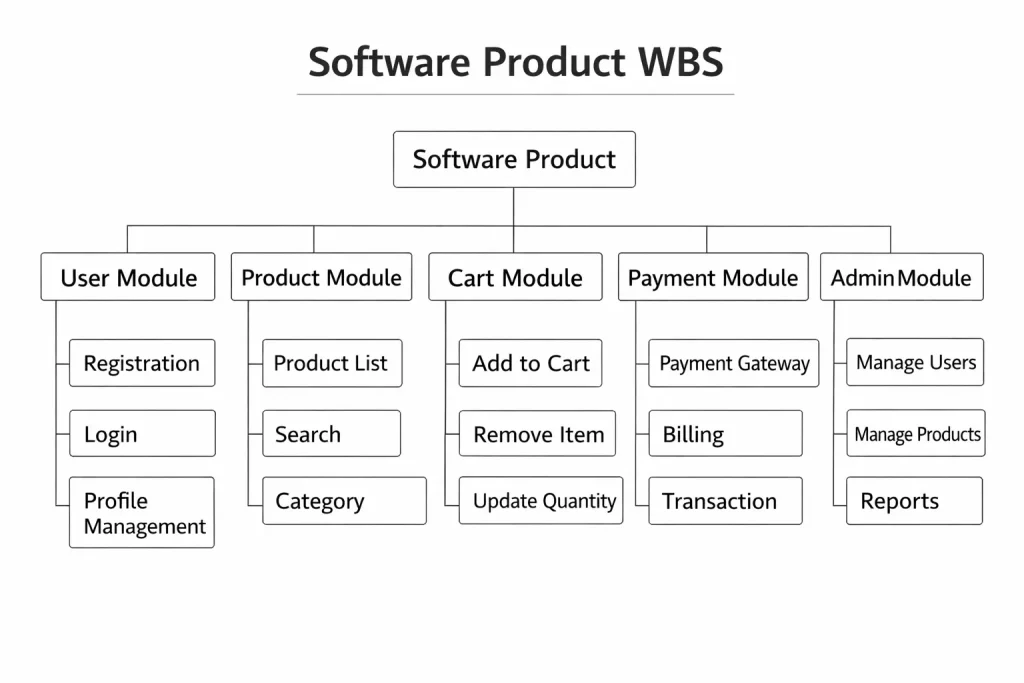
Figure: Software Product WBS
Following are the explanation of workflow diagram Software Project WBS:-
The Software Product WBS (Work Breakdown Structure) diagram shows how a software product is divided into different modules and sub-modules. First, the main Software Product is placed at the top, and then it is divided into five important modules: User Module, Product Module, Cart Module, Payment Module, and Admin Module. Moreover, each module is further divided into smaller functions to clearly show the structure of the product. As a result, developers and project managers can easily understand the features and components of the software.
1. User Module
The User Module handles all user-related activities in the software product. It includes Registration, Login, and Profile Management features. Moreover, this module helps users create accounts and manage their personal information. Therefore, it improves user interaction and system accessibility.
2. Product Module
The Product Module manages product-related information in the system. It includes Product List, Search, and Category features. Furthermore, users can view and search products easily through this module. As a result, it helps in organizing and displaying product data efficiently.
3. Cart Module
The Cart Module controls shopping cart operations in the software product. It includes Add to Cart, Remove Item, and Update Quantity features. Moreover, it allows users to manage selected products before purchase. Therefore, it supports smooth shopping and order management.
4. Payment Module
The Payment Module handles all payment-related processes in the system. It includes Payment Gateway, Billing, and Transaction features. In addition, this module ensures secure payment and order completion. As a result, users can make safe and quick payments.
5. Admin Module
The Admin Module manages system control and monitoring. It includes Manage Users, Manage Products, and Reports features. Moreover, the admin can control product data and user activities. Therefore, it helps in maintaining the overall system efficiently.
Objectives Software Product WBS
The main objective of Product-Based WBS is to organize software features and modules properly. Moreover, it helps in designing product structure and functionality. It also improves development planning and system understanding. Therefore, it supports effective software product development.
Following are the objectives of Software Product WBS:-
1. To Focus on Software Product Components
Product-Based WBS aims to divide the software into different modules and components. This helps in clearly identifying product features and deliverables. It ensures that each part of the software is properly developed. The focus remains on the final output of the system. This improves product clarity and structure.
2. To Improve Product Planning
It helps in planning the software product by organizing its components systematically. Each module is planned and developed separately. This reduces confusion in product development. It ensures proper organization of features. This leads to efficient software development.
3. To Ensure Clear Deliverables
Product-Based WBS provides clear deliverables for each part of the software. Every module has a specific function and output. This helps in understanding what needs to be delivered at each stage. It improves project transparency. This ensures successful product completion.
4. To Enhance Quality Control
It ensures that each software component is tested and verified properly. Quality checks are applied to every module. This reduces errors and defects in the software. It improves reliability and performance. This ensures high-quality product output.
5. To Support Better Resource Allocation
Product-Based WBS helps in assigning resources to different product modules. Developers and testers can work on specific components. This improves resource utilization and productivity. It ensures proper task distribution. This supports efficient development.
6. To Simplify Product Monitoring
It allows project managers to monitor each software component separately. Progress of each module can be tracked easily. Problems can be identified and solved quickly. This improves project control. This ensures timely completion.
7. To Reduce Development Complexity
Breaking the software into smaller product components reduces complexity. Each module becomes easier to design and develop. This improves understanding of the software system. It ensures smooth development. This increases project efficiency.
Characteristics of Product-Based WBS
1. Product-Oriented Structure
Product-Based WBS focuses on software product components and deliverables. It divides the system into modules and sub-modules. This helps in understanding the final product structure clearly. It ensures proper organization. This improves project clarity.
2. Deliverable-Focused Approach
It mainly focuses on the deliverables of the software project. Each part of the WBS represents a product component. This ensures that all features are properly developed. It improves product management. This leads to better output.
3. Hierarchical Structure
Product-Based WBS follows a hierarchical structure of modules and sub-modules. Each level represents a part of the software product. This makes project planning and control easier. It improves organization. This ensures systematic development.
4. Clear Module Division
Software is divided into modules like login, payment, and database systems. Each module has a specific function. This reduces confusion and improves coordination. It ensures proper development of components. This supports better project management.
5. Easy Monitoring of Deliverables
Managers can track each product component separately. Progress and quality of modules can be checked easily. This improves monitoring and control. It ensures timely delivery of components. This increases efficiency.
6. Suitable for Large Software Systems
Product-Based WBS is useful for large and complex software systems. It helps in organizing multiple modules properly. This reduces complexity in development. It improves coordination among teams. This ensures smooth execution.
7. Focus on Final Output
It emphasizes the final software product and its features. Each component contributes to the final system. This improves product quality and performance. It ensures successful product development. This supports project success.
Components of Product-Based WBS (Software Product WBS)
1. Final Software Product
The final software product is the top-level component of Product-Based WBS. It represents the complete software system that needs to be developed. All modules and sub-components are part of this final product. It defines the overall deliverable of the project. This provides a clear view of the software structure.
2. Major Product Modules
Major product modules are the main functional parts of the software system. These include modules like login system, payment system, database system, and user interface. Each module performs a specific function in the software. Dividing the product into modules makes development easier. This improves organization and clarity.
3. Sub-Modules
Sub-modules are smaller parts of major modules. For example, the login module may include user registration, authentication, and password recovery. These smaller components help in detailed planning and development. It reduces complexity in the software system. This ensures proper task management.
4. Features and Functions
Features and functions define what each module will perform. They include operations like add to cart, search product, make payment, and generate reports. These features describe the working of the software product. Proper definition improves system performance. This ensures clear deliverables.
5. Deliverables
Deliverables are the outputs of each product component. These include completed modules, working features, and tested software parts. Deliverables help in tracking project progress and performance. They ensure that each part of the software is completed properly. This improves project control.
6. Integration Components
Integration components combine different modules of the software product. They ensure that all parts of the system work together properly. Integration helps in building a complete software system. It reduces system errors and conflicts. This ensures smooth functioning of the product.
7. Documentation and Support Components
Documentation and support components include user manuals, technical documents, and maintenance guides. These components help users and developers understand the software. Proper documentation improves system usability and maintenance. It ensures long-term support. This enhances software reliability.
Advantages of Product-Based WBS
1. Clear Product Structure
Product-Based WBS provides a clear structure of the software product. Each module and component is defined properly. This improves understanding of the system. It reduces confusion in development. This ensures organized project execution.
2. Better Quality Control
Each software component is tested and verified separately. This reduces errors and defects in the system. Quality checks improve reliability and performance. It ensures high-quality software output. This increases customer satisfaction.
3. Easy Task Allocation
Developers can work on specific modules of the software. Responsibilities are clearly assigned to team members. This improves coordination and teamwork. It increases productivity. This ensures efficient development.
4. Improved Monitoring and Control
Project managers can monitor progress of each module easily. Problems can be identified and fixed quickly. This improves project control and performance. It ensures timely delivery. This increases project success.
5. Suitable for Complex Software Projects
Product-Based WBS is useful for large and complex systems. It divides software into manageable components. This reduces development complexity. It improves organization. This supports efficient project management.
6. Focus on Deliverables
It ensures that all software deliverables are clearly defined. Each module contributes to the final product. This improves project transparency. It ensures proper completion of tasks. This leads to better results.
7. Enhances Team Coordination
Different teams can work on different modules simultaneously. This improves coordination and communication. It reduces delays in development. It increases efficiency. This ensures smooth project execution.
Disadvantages of Product-Based WBS
1. Less Focus on Development Process
Product-Based WBS mainly focuses on software components rather than development activities. Important process steps may be ignored. This may affect project planning. It reduces control over development phases. This creates management challenges.
2. Difficult to Estimate Time and Cost
Estimating time and cost for product components can be difficult. Some modules may require more effort than expected. This may affect project schedule and budget. Proper estimation becomes challenging. This increases project risk.
3. Requires Detailed Product Knowledge
Product-Based WBS needs clear understanding of software structure. Lack of product knowledge may lead to incorrect breakdown. This affects project planning and execution. Skilled professionals are required. This increases dependency on experts.
4. Complex for Small Projects
For small software projects, product-based WBS may be unnecessary. It may create extra planning work. This increases documentation and effort. It reduces efficiency. This makes it less suitable for small projects.
5. Difficult to Handle Changes
If software features change, the WBS structure must be updated. This requires time and effort. Frequent changes may disturb project planning. It reduces flexibility. This affects project progress.
6. Risk of Overlapping Modules
Sometimes product components may overlap with each other. This creates confusion in responsibilities. It may lead to duplication of work. Proper coordination is needed. Otherwise, project performance may suffer.
7. Communication Issues
Poor communication between teams may affect module development. Misunderstanding of product components can cause delays. This may reduce project efficiency. Proper coordination is required. This ensures smooth execution.
Applications of Product-Based WBS
1. Software Product Development
Product-Based WBS is widely used in software product development projects. It helps in dividing software into modules and features. This improves planning and organization. It ensures high-quality product delivery. This supports project success.
2. Web and Mobile Application Development
It is used in web and mobile app development to divide applications into modules like login, dashboard, and payment system. This improves development efficiency. It ensures proper module management. This leads to successful application development.
3. Enterprise Software Systems
Large organizations use product-based WBS for enterprise software systems. It helps in managing complex modules and features. Proper structure improves coordination and control. It ensures high-quality output. This supports business operations.
4. Banking and Financial Software
Product-Based WBS is used in banking software development for modules like account management, transactions, and security. This improves system organization and reliability. It ensures secure and efficient operations. This supports financial services.
5. E-Commerce Software Development
It is applied in e-commerce systems like online shopping platforms. Modules such as product catalog, cart, and payment are divided clearly. This improves system performance and quality. It ensures smooth development. This supports online business.
6. Educational Software Systems
Product-Based WBS is used in educational software development like learning management systems. It divides modules like student management and course management. This improves system organization. It ensures proper development. This supports education systems.
7. Government Software Projects
Government software systems use product-based WBS to manage different modules and services. It helps in organizing large software systems effectively. Proper structure improves transparency and control. This ensures efficient project execution. This benefits public services.
Difference Between Process-Based WBS and Product-Based WBS
| S. No | Basis | Process-Based WBS (Software Project WBS) | Product-Based WBS (Software Product WBS) |
|---|---|---|---|
| 1 | Focus | Focuses on software development processes and phases | Focuses on software product components and deliverables |
| 2 | Division | Divides project into activities like requirement, design, coding, testing | Divides project into modules like login, payment, database |
| 3 | Approach | Process-oriented approach | Product-oriented approach |
| 4 | SDLC Relation | Based on Software Development Life Cycle phases | Based on software product structure |
| 5 | Main Objective | Explains how the software is developed | Explains what software is developed |
| 6 | Monitoring | Easy to monitor project progress phase by phase | Easy to monitor product modules and deliverables |
| 7 | Usage | Used for project planning and management | Used for product design and development |
| 8 | Time and Cost Estimation | Helps estimate time and cost for development processes | Helps manage cost and effort for product modules |
| 9 | Responsibility | Responsibilities assigned according to project phases | Responsibilities assigned according to product modules |
| 10 | Example | Requirement → Design → Coding → Testing | Login Module → Cart Module → Payment Module |
Conclusion
Work Breakdown Structure is an important tool in software project management because it organizes project tasks and product modules clearly. Process-Based WBS focuses on project activities, while Product-Based WBS focuses on software features. Moreover, both types help in planning, development, and monitoring. Therefore, using both WBS types ensures successful and efficient software project completion.