Are you struggling to find the right Java interview questions that are actually asked in top MNCs? If yes, you’re at the right place.
After attending 100+ interviews across leading companies like TCS, Wipro, Cognizant, Accenture, IBM, Amazon, and KPMG, I’ve handpicked and curated a list of 200+ topic-wise Java interview questions that are most frequently asked for experienced roles. Whether you’re a 2 years, 3 years, 5 years or even more experienced Java developer, this guide will help you prepare efficiently and confidently.
👉 If you want to start with the Core Java questions, check out this detailed list:
Core Java Interview Questions for Experienced.
The questions cover Core Java, Java 8 features, Spring Boot, Microservices, Hibernate, Kafka, and even topics from the latest Java versions – everything you need to crack your next interview.
👉 This list is regularly updated every week to include the latest trends and questions from real-time interviews, ensuring you stay ahead in your preparation.
🔥 Don’t just read—start preparing now! Bookmark this page and revisit it weekly as we keep adding new real-time questions from top MNC interviews. Whether you’re aiming for your first MNC job or planning a switch, these questions can be your shortcut to success.
✅ Ready to level up your Java interview prep?
Scroll down and start mastering the most asked questions now!
Java interview Questions for Experienced MNCs
1. Java Basics & Miscellaneous Topics
1.1. What is the purpose of the static keyword in Java?
The static keyword in Java is used to declare members (variables, methods, blocks, or nested classes) that belong to the class itself rather than to any specific object. This means they are shared across all objects of that class and can be accessed directly using the class name, without creating an object. It helps save memory and is commonly used for utility methods and constants.
Example:
class Demo {
    static int count = 0;
    static void showCount() {
        System.out.println("Count is: " + count);
    }
}
public class Main {
    public static void main(String[] args) {
        Demo.count = 5;         // Accessing static variable without object
        Demo.showCount();       // Calling static method without object
    }
}
Output:
Count is: 5✅count and showCount() belong to the Demo class itself, not to an object.
Even if you use an object to access them, Java still resolves them using the class, not the object. But always prefer accessing static members using the class name.
1.2. What is the purpose of the static block in Java?
A static block in Java is used to initialize static variables or perform one-time setup logic for the class. It runs automatically when the class is loaded into memory, before any object is created and even before any static method is called. This makes it useful for initializing complex static data or performing configuration tasks that must happen only once.
Example
class Main {
    static int count;
    static {
        count = 10;
        System.out.println("Static block executed");
    }
    public static void main(String[] args) {
        System.out.println("Count: " + count);
    }
};
Output:
Static block executed
Count: 10
The static block runs first, initializing count.
1.3. What are the different access modifiers in Java? Explain their significance.
Access modifiers in Java define the visibility and accessibility of classes, methods, and variables. It control who can access them. They are a core part of encapsulation and help enforce proper access control, data hiding, and clean API design.
Types of Access Modifiers and Their Significance
1. Public
- Accessible from anywhere in the project, across all packages and classes.
- Used when you want your class or members to be available globally.
- Represents no restriction in access.
2. Protected
- Accessible within the same package and also by subclasses in other packages.
- Mainly used in inheritance scenarios where a superclass wants to expose certain behavior to child classes.
3. Default (no modifier)
- Accessible only within the same package.
- Provides package-level security. It is suitable when classes should not be exposed outside the package.
- Commonly used for internal framework or module design.
4. Private
- Accessible only within the same class where it is declared.
- Provides the highest level of restriction; used to protect internal data and maintain encapsulation.
Example:
public class Car {
    private int year;        // Only accessible inside Car
    protected String model;  // Accessible in same package or subclass
    String brand;            // Default: accessible in same package
    public void drive() {    // Accessible from anywhere
        System.out.println("Driving...");
    }
}
✅ Use access modifiers to protect data and control visibility.
1.4. How does Java handle memory management and garbage collection?
Java manages memory automatically using Garbage Collection, which tracks and removes objects that are no longer reachable in the program. This helps prevent memory leaks and avoids the need for manual memory deallocation.
Types of Garbage Collectors in Java
1. Serial Garbage Collector
This collector uses a single thread to perform garbage collection. It works well for small applications or systems that have limited CPU power. It is mainly suitable when your application is simple and runs in a single-threaded environment.
2. Parallel Garbage Collector (Throughput Collector)
The parallel collector uses multiple threads to perform garbage collection. This increases the overall throughput of the application. It is a good choice for medium to large applications that run on multi-core machines.
3. G1 (Garbage-First) Collector
G1 (Garbage First) is a server-oriented, low-pause garbage collector introduced in Java 7 and name the default GC from Java 9 onwards. It is designed to give short and predictable pause times, which means your application does not stop for long during garbage collection.
It works best for applications that use a large amount of memory (large heap). Unlike old collectors, G1 does not divide heap into fixed Young & Old Spaces. Instead, heap is split into equal-sized regions. It always cleans the regions with the most garbage first. This makes GC faster and more efficient because it collects memory in small chunks instead of scanning the entire heap at once.
Developers don’t manually free memory, Java does it in the background.
1.5. What is the difference between String, StringBuilder, and StringBuffer?
1. String
- Immutable (Cannot be changed once created)
- Every time you modify a String (e.g., concatenation), Java creates a new object.
- Good for read-only or fixed text like messages, constants, configuration keys.
Example 1:
String s = "Hello";
String modified = s.concat(" Java");
System.out.println(s);         // Output: Hello
System.out.println(modified); // Output: Hello Java- When
s.concat(" Java")is called, it does not change the original strings. Instead, it returns a newStringobject which is pointed to bymodified. - The original string
sremains unchanged as “Hello”, demonstrating its immutabilit.
Example 2:
String s = "Hello";
s = s + " World"; // creates a new String object
When you write:
String s = “Hello”;
A String object containing “Hello” is created, and s refers to it.
Then you write:
s = s + ” World”;
Strings in Java are immutable, meaning they cannot be changed once created. So instead of adding to the same object, Java creates a new String object: “Hello World”. The variable s now points to this new object. The old “Hello” object stays in memory until garbage collected.
2. StringBuilder
- Mutable (Can be changed/modified ) + NOT Thread-Safe
- Best choice when working in single-threaded applications.
- Designed for faster performance when doing many modifications (append, delete, insert).
- Does NOT synchronize methods, so it’s not safe for multi-threaded use.
Example
StringBuilder sb = new StringBuilder("Hello");
sb.append(" Java");
System.out.println(sb); // Output: Hello Java
Here, StringBuilder allows appending strings without creating new objects, making it more memory efficient for frequently modified strings in a non-concurrent scenario.
Use when performance matters and no threading involved.
3. StringBuffer
- Mutable (Can be changed/modified ) + Thread-Safe
- Use it when multiple threads are modifying the same string.
- Similar to StringBuilder but synchronized, meaning all methods are thread-safe.
- Slightly slower than StringBuilder because of synchronization overhead.
Example
StringBuffer sbf = new StringBuffer("Hello");
sbf.append(" Java");
System.out.println(sbf); // Output: Hello Java
In this example, StringBuffer is used like StringBuilder, but it is synchronized to avoid issues in a multi-threaded environment. This synchronization, however, comes at the cost of performance compared to StringBuilder.
1.6. Explain the concept of reflection in Java.
Reflection allows Java programs to inspect and manipulate the behavior of classes, methods, fields, and constructors at runtime, even if their names are unknown at compile time. It is part of the java.lang.reflect package.
Reflection is commonly used in frameworks, libraries, and tools where dynamic behavior is needed.
Using reflection, you can:
- Identify the class of an object at runtime
- Retrieve metadata such as methods, fields, and constructors
- Invoke methods or access fields dynamically, including private members
Example
Class<?> clazz = Class.forName("java.util.ArrayList");
System.out.println("Class Name: " + clazz.getName());
It prints:
java.util.ArrayList
Explanation:
Class.forName("java.util.ArrayList")dynamically loads theArrayListclass into memory at runtime using its fully qualified name.- It returns a
Classobject that represents the metadata of theArrayListclass. - The
Class<?>reference holds this runtime class information. clazz.getName()retrieves the fully qualified name of the loaded class and prints it.
This loads the ArrayList class and prints its name.
Reflection is powerful but should be used carefully due to performance and security risks.
1.7. Explain the concept of a design pattern. Give examples of commonly used design patterns in Java.
A design pattern is a reusable, proven solution to a commonly occurring problem in software design.
It is not actual code, but a template or blueprint that helps developers write clean, flexible, and maintainable software.
In Java, design patterns provide standard approaches for designing flexible, maintainable, and scalable object-oriented systems by following best practices instead of reinventing solutions.
They describe how classes and objects should be structured and interact, rather than providing direct code implementations.
Why Use Design Patterns?
- Solve problems in a standard way
- Reduce code duplication
- Improve code structure
- Make the system more scalable and easy to modify
Few commonly used Design Patterns
- Singleton Pattern: Ensures a class has only one instance.
- Observer Pattern: Allows a class to observe and react to changes in another class.
- Factory Pattern: Creates objects without exposing the creation logic.
- Builder: Builds complex objects step by step.
- Prototype: Creates objects by cloning an existing object.
1.8. Explain the concept of inner classes in Java. What are the different types of inner classes?
Inner classes, also called nested classes, are classes defined inside another class. They help group related logic together, improve encapsulation, and enhance code readability.
Benefits of Inner Classes
1. Better encapsulation: Inner classes can access private members of the outer class, which helps keep related logic together and reduces exposure of internal details.
2. Logical grouping of classes: If a class is useful only for one specific outer class, keeping it inside avoids unnecessary clutter in the package.
3. Increased readability: It keeps small helper classes close to the code they support, making the project easier to understand and maintain.
4. More concise code: Callbacks, event handlers, and small utilities can be implemented quickly using inner or anonymous classes.
Types of inner class
- Member Inner Class: Non-static and can access the member variables of the outer class.
- Static Inner Class: Static and cannot access instance variables of the outer class directly.
- Local Inner Class: Defined within a block, typically inside a method.
- Anonymous Inner Class: Local inner class without a name, often used for implementing interface methods on the fly.
Example of Inner Class
class Outer {
    private String msg = "Hello";
    // Member Inner Class
    class Inner {
        void show() {
            System.out.println("Message: " + msg);
        }
    }
}
public class Demo {
    public static void main(String[] args) {
        Outer o = new Outer();
        Outer.Inner in = o.new Inner();
        in.show();
    }
}
Output
Message: Hello1.9. Explain the concept of Generics in Java. How does it provide type safety?
Generics allow you to write code that works with any data type while maintaining type safety at compile time. They make your code more reusable, reliable, and easy to maintain.
Why use Generics?
1. Ensures Type Safety (Type Consistency)
Generics make sure that only the correct type of data is stored in a collection or method.
This prevents accidental type mismatches.
2. Avoids ClassCastException at Runtime
Without generics, you must cast objects manually, which can fail at runtime. Generics ensure such errors are caught during compile time, not at runtime.
3. Improves Code Readability and Reusability
Generics allow you to write flexible, reusable code that works with any data type while still maintaining safety.
Example
class Box<T> {      // T is a placeholder type
    T value;
    void set(T value) { this.value = value; }
    T get() { return value; }
}
public class Main {
    public static void main(String[] args) {
        Box<String> strBox = new Box<>();
        strBox.set("Hello");
        System.out.println(strBox.get());  // Output: Hello
        Box<Integer> intBox = new Box<>();
        intBox.set(100);
        System.out.println(intBox.get());  // Output: 100
    }
}Box<T>is a generic class that can store any data type, andTacts as a placeholder for that type.- By using
Box<String>orBox<Integer>, we ensure type safety and avoid casting, while using the same class for different data types.
1.10. How does Java handle memory leaks? Explain strong and weak references.
Java uses Garbage Collection (GC) to automatically free memory taken by objects no longer in use.
However, if your code still holds references to unused objects (especially strong ones), the GC can’t remove them and this causes a memory leak.
What is a Memory Leak?
A memory leak happens when:
- Objects are no longer needed but
- Still have references, so GC won’t remove them
- Over time, this fills up memory and slows down or crashes the app
Strong Reference (Default Type)
- This is the normal reference you create.
- As long as a strong reference exists, the object is not garbage collected.
String name = new String("John"); // Strong referenceEven if the object isn’t used anymore, it stays in memory unless name = null is set.
Weak Reference
- A weak reference doesn’t prevent GC from cleaning up the object.
- Even if a weak reference is still pointing to the object, Java will delete that object when GC runs.
- Used when you want the object to be cleared if it’s not used elsewhere.
import java.lang.ref.WeakReference;
public class Main {
    public static void main(String[] args) {
        String strong = new String("Hello");
        WeakReference<String> weak = new WeakReference<>(strong);
        strong = null; // Remove strong reference
        System.gc(); // Suggest GC to run
        System.out.println("Weak Ref: " + weak.get()); // May return null if GC ran
    }
}
Above program demonstrates the use of a WeakReference in Java.
First, a normal (strong) reference to the string "Hello" is created, then a weak reference is created pointing to the same object. When the strong reference is set to null, the object becomes eligible for garbage collection.
After calling System.gc(), the garbage collector may remove the object, so weak.get() may return null, showing that weakly referenced objects can be reclaimed by GC.
Weak references are designed for cases where you want the GC to freely remove the object when memory is needed.
Weak references = “You may delete this object anytime.”
Strong references = “Do not delete this object.”
1.11. Explain the concept of annotations in Java. How can you create and use custom annotations?
Annotations in Java are special markers (starting with @) that you attach to classes, methods, variables, or other code elements to give extra information about them.
This information is not part of the main logic, it is a metadata that helps the compiler, development tools, or frameworks understand how to treat that code.
In Simple word, Annotations are instructions written in the form of tags that tell Java or a framework how to treat a particular piece of code.
Custom Annotations: You can create your own annotation using @interface.
Example: Creating and Using a Custom Annotation
Step 1: Create a Custom Annotation
import java.lang.annotation.*;</p>
<p>@Retention(RetentionPolicy.RUNTIME)   // Available at runtime
@Target(ElementType.TYPE)              // Used on classes
@interface Info {
    String author();
}
Step 2: Use the Annotation
@Info(author = "Prakash")
class Demo {
    void show() {
        System.out.println("Hello from Demo");
    }
}
Step 3: Read the Annotation
public class Main {
    public static void main(String[] args) {
        Info info = Demo.class.getAnnotation(Info.class);
        System.out.println("Author: " + info.author());
    }
}
Output
Author: Prakash1.12. Explain the concept of immutable objects in Java. Why are they important?
Immutable objects are objects whose values cannot change after they are created. Once an immutable object is made, its data always stays the same.
You can read the data using methods (like getters), but you cannot modify it because the class does not provide any method to change its fields. If you try to “change” the value, Java creates a new object instead of modifying the old one.
Immutable classes in Java, like String, Integer, LocalDate, and BigDecimal, are designed so that every operation that “changes” the value actually creates a new object instead of updating the existing one.
How immutability is usually achieved?
- Fields are made
privateandfinal. - Values are set in the constructor (most common way).
- No setter methods are provided.
- Only getter methods are allowed.
- If the object contains mutable fields (like List), defensive copies are used.
Important point
- Constructor is the typical way to set values, but not the only way.
- Static factory methods can also initialize immutable objects.
Immutable Class Example
final class Person {
  private final String name;
  private final int age;
  // Constructor to set values once
  public Person(String name, int age) {
    this.name = name;
    this.age = age;
  }
  // Only getter methods, no setters
  public String getName() {
    return name;
  }
  public int getAge() {
    return age;
  }
}
How it works:
- You cannot change the
nameorageonce the object is created. - There are no setter methods.
- Fields are
privateandfinal. - The class is
final(cannot be extended).
1.13. What are the principles of SOLID design in Java? Explain each principle.
SOLID principles help develop software that is easier to maintain and extend:
- Single Responsibility Principle: Each class should have one reason to change. A class should do only one job. If you need to change the class, it should be for only one specific reason.
- Open/Closed Principle: Classes should be open for extension but closed for modification. You should be able to add new features to a class without changing its existing code.
- Liskov Substitution Principle: Objects of a superclass should be replaceable with objects of subclasses without affecting the application. A subclass should work everywhere its parent class is expected, without breaking the program.
- Interface Segregation Principle: A class should not be forced to implement methods it doesn’t need. Make smaller, specific interfaces instead of one large interface.
- Dependency Inversion Principle: High-level code should depend on abstractions (interfaces), not on concrete classes. This makes the system flexible and easier to change.
1.14. What is the difference between System.out.println() and System.err.println()?
System.out.println() is used for general output, while System.err.println() is used for outputting error messages. Although both output to the console, System.err is typically used to log error messages and can be redirected separately from System.out.
| Feature | System.out.println() | System.err.println() |
|---|---|---|
| Purpose | For normal program output | For printing errors and warnings |
| Stream Type | Standard Output (stdout) | Standard Error (stderr) |
| Usage | Display regular messages, results, logs | Display error messages, exceptions, debugging info |
| Redirection | Can be redirected independently | Can be redirected separately from stdout |
| Console Appearance | Usually normal text | Often appears in red (in IDEs/terminals) |
| Behavior | Not meant for error handling | Helps separate errors from normal output |
1.15. What are the different types of class loaders in Java?
ClassLoader in Java is a part of the Java Runtime Environment (JRE) responsible for loading .class files (which contain bytecode) into the Java Virtual Machine (JVM) at runtime. It reads the bytecode from the class files, loads it into JVM memory, and makes the classes available for execution.
Types of class loaders
- Bootstrap Class Loader: Loads core Java API classes.
- Extension Class Loader: Loads classes from the extensions directories.
- System Class Loader: Loads classes from the system classpath.
Class Loader Hierarchy
Bootstrap ClassLoader
       ↓
Extension ClassLoader
       ↓
System (Application) ClassLoader
       ↓
Custom ClassLoader (optional)
What this hierarchy means?
- Bootstrap ClassLoader is the top-level loader. It loads the core Java classes needed by the JVM.
- Extension (Platform) ClassLoader is the child of Bootstrap. It loads standard extension or platform classes.
- System (Application) ClassLoader is the child of Extension. It loads your application classes from the classpath.
- Custom ClassLoader is created by the developer and is the child of the System ClassLoader.
1.16. Explain the concept of caching in Java. How can you implement caching mechanisms?
Caching in Java means temporarily storing frequently used or expensive-to-retrieve data (such as database results, API responses, or computed values) in fast memory so that future requests can be served quickly without repeating the same heavy work.
This reduces processing time, avoids unnecessary database/API calls, decreases system load, and significantly improves application performance.
Caching can be implemented using various data structures like HashMaps, LinkedHashMap or third-party libraries such as EhCache, Caffeine, Guava which provide advanced features like eviction policies, statistics, and disk overflow.
Example with Caffeine
Cache<String, String> cache = Caffeine.newBuilder()
    .maximumSize(100)
    .expireAfterWrite(10, TimeUnit.MINUTES)
    .build();
1.17. Explain the concept of AOP (Aspect-Oriented Programming) in Java. How can you use AOP frameworks like AspectJ?
Aspect-Oriented Programming (AOP) is a programming paradigm that aims to increase modularity by allowing the separation of cross-cutting concerns.
In simple word, Aspect-Oriented Programming (AOP) is a way to separate common tasks (like logging, security checks, or transactions) from your main business code. It helps you avoid writing the same code in multiple places and instead, you define it once and apply it where needed automatically. That’s how AOP works. You define common functionality once and it gets automatically inserted wherever needed in your app.
Key Concepts of Aspect-Oriented Programming (In Simple Terms)
| Term | Simple Meaning |
|---|---|
| Aspect | The common thing you want to apply (e.g., logging, security, transactions) |
| Join Point | A point in your program where extra code can be added (like before/after a method runs) |
| Pointcut | A rule that selects which methods or classes should get the aspect |
| Advice | The actual code that runs (e.g., what should happen before or after the method) |
| Weaving | The process of adding the advice into your main code (can happen during compile or runtime) |
Example: Logging with AOP (Without changing the main logic!)
Imagine you have this class:
public class PaymentService {
    public void processPayment() {
        System.out.println("Processing payment...");
    }
}
Instead of writing System.out.println("Logging...") inside every method manually, you write an Aspect like this:
@Aspect
public class LoggingAspect {
    @Before("execution(* PaymentService.*(..))")
    public void logBefore() {
        System.out.println("Logging: Method is about to execute...");
    }
}
So now, every time any method in PaymentService runs, the log will automatically appear without changing your original method!
2. Java Oops
2.1. What is the difference between method overloading and method overriding?
Method Overloading is a feature in Java where multiple methods in the same class share the same name but differ in their parameter list (type, number, or order). It allows the same method name to handle different types of inputs.
Method Overloading occurs when:
- Methods have the same name.
- Methods are in the same class.
- Parameter list must be different (type, number, or order).
- Return type may be same or different (it does not matter).
Method Overriding is a feature in Java where a subclass provides a new implementation for a method already defined in its superclass, using the same method name and parameters. It enables runtime polymorphism by allowing the subclass version to be executed instead of the parent version.
Method Overriding occurs when:
- Methods have the same name.
- Methods have the same parameters.
- Methods are in a subclass–superclass relationship.
- Return type must be the same or covariant (subtype).
- Method in subclass replaces the method in the superclass at runtime.
Example of Overloading and Overriding
// Method Overloading
class Display {
    void show(int a) {
        System.out.println(a);
    }
    void show(String a) {
        System.out.println(a);
    }
} //show method overloaded
// Method Overriding
class Animal {
    void eat() {
        System.out.println("This animal eats food.");
    }
}
class Cat extends Animal {
    void eat() {
        System.out.println("Cat eats fish.");
    }
}
//eat() method overridden
2.2. Explain the concept of Polymorphism in Java.
Polymorphism comes from the words poly (meaning “many”) and morphism (meaning “forms”).
In Java, it means one method or action can exist in many forms. The same method name can behave differently depending on which object calls it.
Java supports polymorphism through:
- Method Overloading (decided at compile time)
- method Overriding (runtime polymorphism)
2.3. What is the difference between an abstract class and an interface? How have these concepts evolved in Java 8?
Abstract Class
An abstract class is a class that is declared using the abstract keyword and is intended to be inherited by other classes. This class cannot be instantiated (you can’t create objects of it directly). It serves as a base class for other classes and can have both concrete (methods with a body) and abstract (methods without a body) methods. Abstract classes in Java can have constructors. But we can’t create objects of an abstract class.
The abstract class constructor runs first and Then the child class constructor runs.
Example of Abstract Class
abstract class Parent {
    Parent() {
        System.out.println("Parent (abstract class) constructor");
    }
}
class Child extends Parent {
    Child() {
        System.out.println("Child class constructor");
    }
}
public class Test {
    public static void main(String[] args) {
        Child obj = new Child();
    }
}
Output
Parent (abstract class) constructor
Child class constructor
Interface
An interface is like a blueprint of a class. It defines a set of methods that any class can implement. It helps to define behavior without specifying how it should be done.
In simple words: An interface says “what needs to be done”, but not “how it will be done.”
Earlier (before Java 8), interfaces could only have:
- Abstract methods (no body)
- Constants (
public static finalvariables)
What Changed in Java 8?
In Java 8, interfaces were upgraded to support:
- Default methods (with body)
- Static methods (with body)
This allowed:
- Adding new methods to interfaces without breaking existing implementations
- Writing shared logic directly in the interface
Example of Interface with Default Method:
interface Animal {
    void makeSound();  // Abstract method
    default void sleep() {
        System.out.println("Sleeping...");
    }
}
class Dog implements Animal {
    public void makeSound() {
        System.out.println("Dog barks");
    }
}
public class Main {
    public static void main(String[] args) {
        Dog d = new Dog();
        d.makeSound(); // Dog barks
        d.sleep();     // Sleeping...
    }
}
Why It’s Useful:
Before Java 8: If you added a new method to an interface, all implementing classes had to update.
After Java 8: You can add default methods, and existing classes won’t break.
2.4. What is the purpose of the this keyword in Java?
this is a reference variable that points to the current object, the object whose method or constructor is currently being executed. It is used to:
- Invoke other methods or constructors within the same class (e.g., calling one constructor from another using
this()). - Distinguish between instance variables and parameters when they have the same name.
- Refer to the current object when passing it as an argument to methods or constructors.
Example of this keyword:
class Point {
    int a, b;
    Point(int a, int b) {
        this.a = a;
        this.b = b;
    }
    void display() {
        System.out.println("Point: (" + this.a + ", " + this.b + ")");
    }
}
In Above program:
- The
thiskeyword is used in the constructor to refer to the current object’s instance variablesaandb. - It ensures that the values passed as parameters are correctly assigned to the current object’s fields.
2.5. How does Java handle static and dynamic binding? Explain the concept of virtual method invocation.
Static Binding: Static binding occurs when the method call is resolved at compile time. It applies to private, final, and static methods, which cannot be overridden, so the compiler knows exactly which method to call.
Dynamic Binding: Dynamic binding occurs when the method call is resolved at runtime. Java uses this for overridden methods, enabling runtime polymorphism. The method executed depends on the actual (runtime) object type, not the reference type.
Virtual Method Invocation: In Java, all non-static, non-final methods are virtual by default. This means the JVM invokes the version of the method that belongs to the runtime type of the object, enabling dynamic method dispatch.
2.6. Cohesion vs Coupling in Java
Cohesion
Cohesion is the degree to which the elements (methods and variables) inside a class or module are closely related and work together to perform a single, well-defined responsibility. In simple word, Cohesion refers to how closely related and focused the responsibilities of a class or module are toward performing a single task.
- High cohesion = good design
- Low cohesion = poor design
High Cohesion
A highly cohesive class has:
- A single, clear responsibility
- Related methods and fields
- Easier maintenance, testing, and reuse
Example:
A UserService class that only handles:
- Create user
- Update user
- Delete user
and does NOT handle payments or product logic.
Low Cohesion
A low cohesive class:
- Handles many unrelated tasks
- Is hard to understand, modify, and maintain
Example: One class managing users, orders, payments, and logging together.
Coupling
Coupling is the degree of dependency between two or more classes or modules. It measures how strongly one class is connected to or relies on another class.
- Low coupling = good design
- High coupling = poor design
Low Coupling
Loosely coupled classes:
- Are more independent
- Communicate using interfaces or abstractions
- Are easier to change, test, and extend
Example:OrderService depends on a PaymentService interface, not a concrete class. Dependency Injection is used to provide the implementation.
High Coupling
Tightly coupled classes:
- Directly depend on the internal logic of other classes
- Break easily when one class changes
Example:
OrderService directly creates and uses a specific PaymentService class with new PaymentService().
2.7. What is the use of Clone Method and implementation in Java?
The clone() method is used to create a copy (duplicate) of an object in Java. It performs a field-by-field copy of the object. It is defined in the Object class and must be overridden for custom classes.
Important Points:
- The class must implement
Cloneableinterface to avoidCloneNotSupportedException. - The
clone()method should be overridden aspublicin your class. - It returns a shallow copy by default (deep copy must be manually implemented).
Clone Example
class Student implements Cloneable {
    int id;
    String name;
    Student(int id, String name) {
        this.id = id;
        this.name = name;
    }
    @Override
    public Object clone() throws CloneNotSupportedException {
        return super.clone(); // shallow copy
    }
}
public class Main {
    public static void main(String[] args) throws CloneNotSupportedException {
        Student s1 = new Student(1, "John");
        Student s2 = (Student) s1.clone();
        System.out.println(s1.name); // John
        System.out.println(s2.name); // John
    }
}
2.8. List of Object methods in Java.
| Method Signature | Description |
|---|---|
protected Object clone() | Creates and returns a copy of the object (requires Cloneable) |
boolean equals(Object obj) | Compares this object with another for equality |
protected void finalize() | Called by GC before object is removed (deprecated since Java 9) |
Class<?> getClass() | Returns the runtime class of the object |
int hashCode() | Returns the object’s hash code |
String toString() | Returns a string representation of the object |
void notify() | Wakes up a single thread waiting on this object’s monitor |
void notifyAll() | Wakes up all threads waiting on this object’s monitor |
void wait() | Causes current thread to wait until notify() or notifyAll() is called |
void wait(long timeout) | Waits for the specified time or until notified |
void wait(long timeout, int nanos) | Waits for the specified time in millis and nanos |
Object clone() | Returns a shallow copy of this object (used with Cloneable) |
All classes in Java implicitly inherit these methods from Object unless overridden.
2.9. What is Data hiding and Method hiding?
1. Data Hiding (Encapsulation)
Data Hiding is the principle of restricting direct access to a class’s internal data by making variables private and providing controlled access through public methods.
It ensures that the internal state of an object cannot be modified directly from outside the class.
Purpose:
- To control access through public methods like getters and setters, ensuring safe and valid updates.
- To protect data from accidental or unauthorized changes.
Example:
class Person {
    private String name; // Data is hidden
    public String getName() { return name; }
    public void setName(String name) { this.name = name; }
}
2. Method Hiding
Method Hiding occurs when a static method in a child class has the same method signature as a static method in the parent class.
In this case, the child method hides the parent method instead of overriding it.
It is not method overriding, because static methods belong to the class, not to objects. Instead of runtime polymorphism, it results in compile-time binding, the method call depends on the reference type, not the object type.
Example:
class Parent {
    static void show() {
        System.out.println("Parent");
    }
}
class Child extends Parent {
    static void show() { // Method hiding
        System.out.println("Child");
    }
}
public class Main {
    public static void main(String[] args) {
        Parent p = new Child();
        p.show(); // Output: Parent (not Child)
    }
}
2.10. What is “Has-a” and “Is-a” Relationships?
1. “Is-a” Relationship (Inheritance)
It represents inheritance between classes. An is-a relationship means one class inherits from another class because it is a type of that class.
Keyword Used: extends (for classes) or implements (for interfaces)
Example of Is-a:
class Animal {
    void eat() {}
}
class Dog extends Animal {
    void bark() {}
}
Dog is an Animal → “Is-a” relationship
2. “Has-a” Relationship (Composition/Aggregation)
A has-a relationship means one class contains or owns another class as a member. Used by simply creating an object reference inside the class (no keyword).
Keyword Used: Just use the object reference as a member (no specific keyword)
Example of Has-a:
class Engine {
    void start() {}
}
class Car {
    Engine engine = new Engine(); // Car has-a Engine
}
Car has an Engine → “Has-a” relationship
Key Differences
| Feature | “Is-a” Relationship | “Has-a” Relationship |
|---|---|---|
| Concept | Inheritance | Composition/Aggregation |
| Example | Dog is-a Animal | Car has-a Engine |
| Implementation | extends / implements | Create object reference inside class |
| Usage | Reuse methods and polymorphism | Code modularity and reuse |
2.11. What is Association , Aggregation and Composition in Java?
1. Association – “Uses-a” relationship
Association means two independent classes are connected so they can use each other’s functionality, but neither class controls, owns, or depends on the lifecycle of the other. They simply interact when needed.
Example:
class Person {
    void use(Car car) {
        car.drive();
    }
}
class Car {
    void drive() {
        System.out.println("Car is driving");
    }
}
A Person uses a Car → This is Association. But Both can also exist without each other.
2. Aggregation – “Has-a” relationship (Weak Ownership)
Aggregation is a special type of association where one class has-a reference to another class, but both objects can exist independently.
It represents weak ownership, meaning the lifetime of the contained object does not depend on the container object.
Example:
class Department {
    String name;
}
class University {
    Department department; // Aggregation
};
A University has-a Department, but if University is deleted, Department can still exist independently.
3. Composition – “Owns-a” relationship (Strong Ownership)
Composition is a stronger form of aggregation where one class owns the lifecycle of another.
The child object cannot exist without the parent object.
If the parent is destroyed, the child is automatically destroyed as well.
Example:
class Heart {
    void beat() {
        System.out.println("Heart beats...");
    }
}
class Human {
    private Heart heart = new Heart(); // Composition
}
A Human has-a Heart, but a Heart doesn’t exist independently from the Human → This is Composition.
2.12. Does Java support multiple inheritance? If not then why?
Multiple inheritance means a class inherits from more than one class.
Java supports multiple inheritance through:
- Interfaces
- Not via classes (to avoid complexity like the Diamond Problem)
Java Doesn’t Support Multiple Inheritance with Classes Because of the Diamond Problem.
2.13. What is the Diamond Problem?
The Diamond Problem is a problem that occurs in multiple inheritance, where a class inherits from two classes that both inherit from a common superclass.
     A
    / \
   B   C
    \ /
     D
Class BandClass Cinherit fromClass A.Class Dinherits from bothBandC
Now, the confusion arises:
If Class A has a method display(), and Class D calls display(), which version should it inherit, B’s or C’s (which both got it from A)? This ambiguity is known as the diamond problem.
Java does not allow multiple inheritance with classes (i.e., a class cannot extend more than one class) to avoid the diamond problem.
// Not allowed in Java
class D extends B, C { } // ❌ Compile-time error
Java disallows multiple inheritance with classes to avoid ambiguity. Java allows multiple inheritance via interfaces. If a class implements multiple interfaces with the same default method, the class must override the method to resolve the conflict. You can use InterfaceName.super.methodName() to specify which interface’s method to use.
2.14. Can class be abstract and final both?
No, a class cannot be both abstract and final in Java.
abstract means:
The class is incomplete and meant to be extended. It may contain abstract methods that must be implemented by child classes.
final means:
The class cannot be extended no other class can inherit from it.
If you write:
final abstract class MyClass {
    // Compilation error
}
Compile-time Error:
“Illegal combination of modifiers: ‘abstract’ and ‘final'”.
2.15. What happens if two interfaces have default methods with same signature?
Java will throw a compile-time error unless the implementing class overrides the method and explicitly resolves the conflict. Java doesn’t know which default implementation to use, so it forces you to resolve the ambiguity manually.
Example
interface A {
    default void show() {
        System.out.println("A's show");
    }
}
interface B {
    default void show() {
        System.out.println("B's show");
    }
}
class C implements A, B {
    // Must override to resolve the conflict
    public void show() {
        System.out.println("C's own show method");
    }
}
Output
C's own show methodWhat if you don’t override?
class C implements A, B {
    // No override here!
}
Compiler Error:
class C inherits unrelated defaults for show() from types A and BHow to Call a Specific Interface’s Default Method:
If needed, you can call a specific interface’s method inside your override.
class C implements A, B {
    public void show() {
        A.super.show(); // or B.super.show();
    }
}
3. Java Collection Interview Questions
3.1. Collections VS Collection
Collection: An interface that represents a group of objects (like List, Set, Queue) and defines common operations for them.
Collections: A utility class that provides static helper methods (like sort, reverse, shuffle, min, max) to operate on objects of Collection types.
Collection (Interface)
Collectionis a root interface in the Java Collection Framework.- It represents a group of objects (called elements).
- Subinterfaces:
List,Set,Queue, etc.
Example
Collection<String> names = new ArrayList<>();
names.add("John");
names.add("Alice");
Collections (Utility Class)
Collections is a helper/utility class in java.util package. It provides static methods to perform common operations on collection objects, such as:
- Sorting
- Searching
- Reversing
- Shuffling
Example
List<String> names = new ArrayList<>();
names.add("Z");
names.add("A");
Collections.sort(names);  // sorts the list
3.2. Tell me something about HashMap in Java.
A HashMap is a part of Java’s Collection Framework and is used to store data in key–value pairs. It internally uses a hash table data structure to store and retrieve values efficiently.
HashMap class extends AbstractMap class and AbstractMap class implements the Map interface.
Some Important points about Hashmap:
- HashMap allows only one null key and multiple null values.
- HashMap does not maintain the order of insertion into the map.
- The initial size of the hashmap bucket is 16 which grows to 32 when the map entries cross 75%.
- HashMap uses hashCode() and equals() methods on keys to perform put and get operations. It internally checks whether the key already exists or not.
- Hashmap is not a thread-safe. This is the reason it won’t use in a multithreaded environment.
3.3. What are load Factor, Threshold, Rehashing, and Collision in hashmap?
Load factor: Load factor is the measure to decide when to increase the size of the Map. By default, the load factor is 75% of the capacity. Initial capacity of HashMap is 16.
Threshold: The threshold can be calculated by multiplying the current capacity and load factor.
Rehashing: Rehashing means, re-calculating the hash code of already stored entries. When entries in the hash table exceed the threshold, the Map is rehashed and increases the size of buckets.
Collision: Collision is a condition when a hash function returns the same bucket location for two different keys.
For example:
Suppose Our HashMap has an initial capacity is 16 and a load factor is 0.75.
Threshold will be 16 * 0.75 = 12,
It means after the 12th entry in the hashmap, the capacity of the hashmap will increase from 16 to 32. Its getting just double.
3.4. How does HashMap Internally work in Java?
A HashMap in Java is a data structure that stores data in key–value pairs. It provides fast insertion and retrieval because values are accessed using their keys. Internally, it uses an array of buckets, where each bucket holds entries with the same hash value.
Every key produces only one hash value (one key → one hash). However, different keys can produce the same hash value, this is called a hash collision. Even if two keys have the same hash value, the HashMap still keeps them separate using techniques like linked lists or balanced trees in the buckets.
General steps for how a HashMap works internally?
Hashing: When you insert a key-value pair into a HashMap, the hash code of the key is computed using the hashCode() method of the key object. This hash code is used to determine the index or bucket in the array where the entry will be stored.
Example
For Large Key :- hashcode(key) = key % m
For String key :- Weighted sum
Suppose key is “cat” then hashcode() will be (s[0]*x^0 + s[1]*x^1 + s[2]*x^2)%m
Indexing: The computed hash code is then used to find the index within the array of buckets. The index is typically obtained by performing a modulo operation on the hash code to ensure it fits within the array size.
Suppose if we have a hashtable of size 7 then
hashcode(key) = key%7
Collisions: Collisions occur when two or more keys produce the same hash code and hence map to the same bucket. To handle collisions, Java’s HashMap uses a concept called chaining. Each bucket contains a linked list (or a balanced tree in later Java 8 versions) of key-value pairs that have the same hash code.
Insertion and Retrieval: When you insert a key-value pair, the HashMap checks if there is already an entry in the bucket corresponding to the computed index or not. If there is not entry then add a new entry to the bucket. If collision occurs, the newly given entry will be added to the existing linked list (or tree) within the bucket. When you retrieve a value by its key, the HashMap uses the hash code to find the correct bucket. If bucket found then it searches through the linked list (or tree) within that bucket to locate the desired key-value pair.
Resizing: To maintain efficiency, the HashMap dynamically resizes its array of buckets when the number of entries crosses a certain threshold. This helps prevent too many collisions and ensures that the average number of entries per bucket remains relatively low.
Example of Hashmap
import java.util.HashMap;
public class HashMapExample {
    public static void main(String[] args) {
        HashMap<String, Integer> hashMap = new HashMap<>();
        hashMap.put("java", 1);
        hashMap.put("python", 2);
        hashMap.put("html", 3);
        int javaValue = hashMap.get("java");
        System.out.println("Value of 'java': " + javaValue);
        boolean containsKey = hashMap.containsKey("python");
        System.out.println("Contains 'python': " + containsKey);
        hashMap.remove("html");
        System.out.println("Size of HashMap: " + hashMap.size());
    }
}
Output
Value of 'java': 1
Contains 'python': true
Size of HashMap: 2
3.5. Explain how hashcode will be calculated for String Key.
Hashmap has hashCode() method. This method is used to calculate the hashcode value of the String as an Integer.
Syntax of hascode
public int hashCode()Hashcode calculation code
import java.io.*;
class Main {
    public static void main(String[] args) {
        String str = "Name";
        System.out.println(str);
        int hashCode = str.hashCode();
        System.out.println(hashCode);
    }
}
Output
Name
2420395
Here we got Output 2420395 for String “Name”. Below is the way to calculate the hashcode of the string.
How hashcode is calculated for string key?
Below is the formula to calculate the hashcode value of a String:
s[0]*31^(n-1) + s[1]*31^(n-2) + ... + s[n-1]
Here:
- s[i] is the ith character of the string
- ^ is a the exponential operator
- n shows the length of the string
Here is an Steps to calculate Hashcode:
Characters and their Unicode values:
- ‘N’ = 78
- ‘a’ = 97
- ‘m’ = 109
- ‘e’ = 101
Step-by-Step Calculation
Start: hash = 0
- For ‘N’
hash = 31 * 0 + 78 = 78 - For ‘a’
hash = 31 * 78 + 97
= 2418 + 97
= 2515 - For ‘m’
hash = 31 * 2515 + 109
= 77965 + 109
= 78074 - For ‘e’
hash = 31 * 78074 + 101
= (78074 × 30) + 78074 + 101
= 2,342,220 + 78,074 + 101
= 2,420,395
Final HashCode for “Name” = 2,420,395
3.6. What is the Difference between HashMap and LinkedHashMap?
- The difference between HashMap and LinkedHashMap is that LinkedHashMap maintains the insertion order of keys but HashMap doesn’t maintain the insertion order of keys.
- LinkedHashMap requires more memory than HashMap to keep the record of the insertion order. Basically, LinkedHashMap uses doubly LinkedList to keep track of the insertion order of keys.
- LinkedHashMap extends HashMap and implements the Map interface and Hashmap extends AbstractMap class and implements the Map interface.
- Hashmap was introduced in JDK 2.0 but LinkedHashMap was introduced in JDK 4.0.
Here is the Program of HashMap and LinkedHashMap.
Program of HashMap
import java.util.HashMap;
public class Main {
    public static void main(String[] args) {
        HashMap < String, String > map = new HashMap < > ();
        map.put("firstName", "Interview");
        map.put("lastName", "Expert");
        map.put("rollNo", "1");
        System.out.println(map.size());
        if (map.containsKey("firstName")) {
            System.out.println(map.get("firstName"));
        }
        if (Integer.parseInt(map.get("rollNo")) < 20) {
            System.out.println(map.get("lastName"));
        }
    }
}
Output
3
Interview
Expert
Program Of LinkedHashMap
import java.util.LinkedHashMap;
public class Main {
    public static void main(String[] args) {
        LinkedHashMap < String, String > map = new LinkedHashMap < > ();
        map.put("firstName", "Interview");
        map.put("lastName", "Expert");
        map.put("rollNo", "1");
        System.out.println(map.size());
        if (map.containsKey("firstName")) {
            System.out.println(map.get("firstName"));
        }
        if (Integer.parseInt(map.get("rollNo")) < 10) {
            System.out.println(map.get("lastName"));
        }
    }
}
Output
3
Interview
Expert
3.7. What is Concurrent HashMap?
ConcurrentHashMap is a thread-safe implementation of the Map interface. It provides a highly concurrent version of HashMap, allowing multiple threads to access and modify the map efficiently without blocking each other unnecessarily.
Concurrency Behavior
- Read operations:
Multiple threads can read from the map simultaneously without any locking. - Write/Update operations:
In earlier Java versions (Java 7), writes used segment-level locking, where only the segment being modified was locked.
In Java 8 and later, segments were removed and replaced with:- CAS operations (Compare-And-Swap)
- Fine-grained synchronization on individual bins (buckets)
Internal Data Structure
ConcurrentHashMap uses:
- Array of Nodes (similar to HashMap)
- LinkedList + TreeNodes (Red-Black Tree) for collision handling
- CAS + synchronized blocks for safe concurrent updates
ConcurrentHashMap Example
import java.util.concurrent.ConcurrentHashMap;
import java.util.Map;
public class Main {
    public static void main(String[] args) {
        Map < String, String > chm = new ConcurrentHashMap < > ();
        chm.put(null, null);
    }
}
Output
Exception in thread "main" java.lang.NullPointerException
at java.base/java.util.concurrent.ConcurrentHashMap.putVal(ConcurrentHashMap.java:1011)
at java.base/java.util.concurrent.ConcurrentHashMap.put(ConcurrentHashMap.java:1006)
at Main.main(Main.java:7)
Here we will get a NullPointerException because we are trying to insert a null key value in the concurrent hashmap which is not allowed.
3.8. What is the Time Complexity of HashMap?
Usually, Time complexity of the Hashmap operations (get(), put(), remove()) is O(1). This is because HashMap uses the hashCode() of the key to compute an index and directly access the bucket.
When Time Complexity Degrades?
HashMap performance can drop from O(1) to O(n) in the worst-case scenario.
Worst Case Example
Suppose we have keys that all produce the same hashCode().
For example:
"FB".hashCode() == "Ea".hashCode()If many such keys map to the same bucket, the HashMap will store them in a LinkedList inside that bucket.
Bucket (index x):
(FB -> value1) → (Ea -> value2) → (Key3 -> value3) → ...
Now, to find a value, HashMap must traverse every node in this list:
❌ Time Complexity becomes: O(n)
Java 8 Improvement: LinkedList → Balanced Tree
Before Java 8:
- Collisions were handled using a LinkedList → O(n) lookup time.
From Java 8 onward:
- If a bucket contains more than 8 nodes, HashMap converts the LinkedList into a Red-Black Tree.
- A Red-Black Tree provides:
O(log n) lookup time (much faster than O(n))
3.9. Tell me some differences between ArrayList and LinkedList.
- ArrayList → Best for fast access (because it uses array indexing).
- LinkedList → Best for frequent add/remove operations (because no shifting is needed).
| Feature | ArrayList | LinkedList |
|---|---|---|
| Internal Data Structure | Dynamic array (contiguous memory) | Doubly Linked List (non-contiguous memory) |
| Memory Allocation | Contiguous memory block | Each node stored separately with references to next & previous |
| Access Time (get/indexed access) | O(1) – Fast (direct indexing) | O(n) – Slow (must traverse from head/tail) |
| Insertion (at end) | O(1) amortized | O(1) |
| Insertion (at specific index) | O(n) – shifting required | O(n) to reach position, but O(1) insertion after reaching |
| Deletion (at specific index) | O(n) – shifting required | O(n) to reach position, but O(1) deletion after reaching |
| Best Use Case | Fast access, random reads | Frequent insertions/deletions |
| Worst Use Case | Frequent insertions/deletions in the middle | Random access (get by index) |
| Cache Performance | Good (array is cache-friendly) | Poor (nodes are scattered in memory) |
| Memory Usage | Lower (stores only data) | Higher (each node stores prev & next references) |
| Iterator Removal Performance | Moderate | Very fast (direct node unlinking) |
| Thread Safety | Not synchronized | Not synchronized |
| Shifting Operation | Required when manipulating elements | Not required (just change node links) |
3.10. When you will prefer ArrayList and when LinkedList in your RealTime projects?
1. Prefer ArrayList when you need
Fast Random Access (O(1))
ArrayList stores elements in a contiguous array, allowing direct indexing.
This is ideal in scenarios like:
- Reading elements frequently
- Iterating large datasets
- Search-heavy operations
- Caching data
- Pagination or batch processing
- Lookup-based algorithms
Example (Real-Time Use Cases):
- Storing user profiles in memory for quick reads
- Maintaining a list of products for UI rendering
- Handling autocomplete suggestions
- Caching frequently accessed configurations
- Implementing stacks, queues (when random access is required)
2. Prefer LinkedList when you need
Frequent Insertions/Deletions (especially in middle or start)
LinkedList uses a doubly linked structure, so add/remove operations only require pointer changes:
- No element shifting
- No reallocation like ArrayList’s internal resizing
However, locating a position still costs O(n) because traversal is required.
Example (Real-Time Use Cases):
- Implementing LRU Cache (LinkedList + HashMap)
- Maintaining task queues where items are inserted/removed frequently
- Undo/redo operations in editors
- Moving elements around in workflow pipelines
- Event processing pipelines where order changes dynamically
3.11. What is the difference between HashSet and LinkedHashSet?
- HashSet → HashSet stores unique elements with the best performance for add, remove, and search operations. It does not maintain any order of elements.
- LinkedHashSet → LinkedHashSet stores unique elements and also preserves the insertion order.
It is useful when you need predictable iteration order along with fast access.
| Feature | HashSet | LinkedHashSet |
|---|---|---|
| Internal Data Structure | Hash table (HashMap internally) | Hash table + Doubly Linked List |
| Order of Elements | ❌ No order maintained (unpredictable iteration order) | ✔ Maintains insertion order |
| Class Hierarchy | Extends AbstractSet | Extends HashSet |
| Storage Mechanism | Uses hashing only | Uses hashing + linked list for ordering |
| Performance (add / remove / contains) | Slightly faster due to no ordering overhead | Slightly slower because it maintains order |
| Memory Usage | Lower memory footprint | Higher memory (stores extra pointers for linked list) |
| Use Case | Best when ordering is not required and performance is priority | Best when you need both fast operations and predictable iteration order |
| Null Elements | Allows one null element | Allows one null element |
| Iteration Speed | Faster (no linked list traversal) | Slower (maintains linked list structure) |
| Time Complexity (avg. case) | O(1) for add, remove, contains | O(1) for add, remove, contains |
| When to Use | High-performance set operations with no order | When order matters + good performance |
3.12. Differences between HashMap and HashSet.
- HashMap → Use when you need key–value storage.
- HashSet → Use when you need a collection of unique elements only.
| Feature | HashMap | HashSet |
|---|---|---|
| Interface Implemented | Implements Map<K, V> | Implements Set |
| Internal Implementation | Backed by a hash table | Internally uses a HashMap (elements stored as keys with dummy values) |
| Data Stored | Stores key–value pairs | Stores unique objects only (values stored as keys in internal map) |
| Method Used to Add Elements | put(key, value) | add(element) (internally put(element, PRESENT)) |
| Duplicates Allowed | Keys → ❌ Not allowedValues → ✔ Allowed | ❌ Duplicates NOT allowed |
| Null Handling | ✔ One null key, multiple null values | ✔ One null value only |
| Ordering | No guaranteed order | No guaranteed order |
| Performance (avg. case) | O(1) for put, get | O(1) for add, contains |
| Primary Purpose | Fast lookup via keys | Maintain a collection of unique items |
| Typical Use Cases | Dictionaries, key-value caching, indexing records | Unique collections (IDs, tags, categories) |
| Class Hierarchy | Extends AbstractMap | Extends AbstractSet |
3.13. What is the purpose of the equals() and hashCode() methods? Why should they be overridden together?
In Java, the equals() method is used to determine if two objects are equal based on their content, not their reference.
hashCode() method returns an integer value (hash code) that represents the object. This value is used by hash-based collections like HashMap, HashSet, and Hashtable to store and quickly locate objects.
When you override equals(), you should also override hashCode() because objects considered equal (by equals()) must produce the same hash code. If they don’t, it can cause problems when using hash-based collections like HashMap or HashSet.
Example
class Student {
    String name;
    int age;
    // Constructor
    public Student(String name, int age) {
        this.name = name;
        this.age = age;
    }
    // Override equals method
    @Override
    public boolean equals(Object obj) {
        if (this == obj) return true; // Check for reference equality
        if (obj == null || getClass() != obj.getClass()) return false; // Check for null and ensure exact class match
        Student student = (Student) obj; // Cast the object to Student
        return age == student.age && Objects.equals(name, student.name); // Check if values are equal
    }
    // Override hashCode method
    @Override
    public int hashCode() {
        return Objects.hash(name, age); // Calculate hash code based on name and age
    }
}
Why Override Both?
It is important to override both equals() and hashCode() to ensure correct behavior in hash-based collections such as HashMap, HashSet, and Hashtable.
According to Java’s rule:
If two objects are equal according to equals(), they must return the same hash code.
If this rule is not followed:
- Two objects may be considered equal by
equals() - But if they return different hash codes, they will be stored in different buckets
- As a result:
- A
HashSetmay allow duplicate objects - A
HashMapmay fail to find an existing key usingget()orcontainsKey()
- A
This breaks the basic contract of these collections and leads to incorrect and unpredictable behavior.
In simple word we can say that, We override both equals() and hashCode() because equal objects must produce the same hash code, otherwise hash-based collections may store duplicates or fail to retrieve objects correctly.
3.14. What is the difference between a shallow copy and a deep copy?
Shallow Copy
- A shallow copy creates a new object but copies only the field values.
- If the object has references, both original and copy share the same inner objects.
Deep Copy
- A deep copy creates a new object and also creates new copies of all referenced objects.
- The original and the copy are completely independent.
Example
class Rectangle {
    Point origin;
    int width;
    int height;
    // Shallow copy constructor
    Rectangle(Rectangle other) {
        this.origin = other.origin; // copies the reference
        this.width = other.width;
        this.height = other.height;
    }
    // Deep copy method
    Rectangle deepCopy() {
        Rectangle newRect = new Rectangle();
        newRect.origin = new Point(this.origin.x, this.origin.y); // copies the object
        newRect.width = this.width;
        newRect.height = this.height;
        return newRect;
    }
}
3.15. What is the difference between a HashSet and a TreeSet?
HashSet → Use when you need a collection of unique elements with fast (O(1)) operations and ordering does not matter.
TreeSet → Use when you need unique elements in sorted order with logarithmic (O(log n)) performance and require operations like first(), last(), headSet(), or tailSet().
| Feature | HashSet | TreeSet |
|---|---|---|
| Underlying Data Structure | Hash table | Red-Black Tree (self-balancing binary search tree) |
| Ordering | No ordering; elements are stored based on hash value | Maintains elements in sorted order (natural or via Comparator) |
| Performance (Time Complexity) | add/remove/contains → O(1) average | add/remove/contains → O(log n) |
| Element Lookup Mechanism | Uses hashCode() and equals() for locating elements | Uses compareTo() or Comparator for ordering and comparisons |
| Null Handling | Allows one null element | Does not allow null (throws NullPointerException for comparisons) |
| Duplicates | Not allowed | Not allowed |
| Use Cases | Fast search, insert, delete where ordering is not required | When a sorted set or range-based operations are needed |
| Additional Methods | Basic Set operations only | Offers sorted-specific methods: first(), last(), headSet(), tailSet() |
Example of HashSet and a TreeSet
#HashSet Example
Set<Integer> hashSet = new HashSet<>();
hashSet.add(2);
hashSet.add(3);
hashSet.add(1);
System.out.println(hashSet); // Outputs [1, 2, 3] it could be in any order
#TreeSet Example
Set<Integer> treeSet = new TreeSet<>();
treeSet.add(2);
treeSet.add(3);
treeSet.add(1);
System.out.println(treeSet); // Outputs [1, 2, 3] in sorted order
3.16. How does Java handle concurrent modification exceptions? Explain the use of iterators and ConcurrentModificationException.
A ConcurrentModificationException occurs when a collection is modified while it is being iterated, in a way that the iterator does not expect.
In simple words, If you change a collection (add or remove elements) while looping through it using an iterator or for-each loop, Java throws this exception.
To safely modify a collection while iterating, must use the iterator’s remove() method (or use concurrent collections like CopyOnWriteArrayList or ConcurrentHashMap).
Example 1: It will give ConcurrentModificationException
import java.util.*;
class Main {
    public static void main(String[] args) {
        List<String> list = new ArrayList<>(Arrays.asList("a", "b", "c", "d"));
        Iterator<String> it = list.iterator();
         while (it.hasNext()) {
            String item = it.next();
            System.out.println(item);
            if (item.equals("b")) {
                // Trying to modify the collection directly while iterating over it
                list.remove(item); // This line will throw ConcurrentModificationException
            }
        }
        System.out.println(list);
    }
}
Output
a
b
Exception in thread "main" java.util.ConcurrentModificationException
        at java.base/java.util.ArrayList$Itr.checkForComodification(ArrayList.java:1042)
        at java.base/java.util.ArrayList$Itr.next(ArrayList.java:996)
        at Main.main(Main.java:7)
Why Error?
You created an Iterator first:
Iterator<String> it = list.iterator();Then, inside the iteration, you modify the list directly:
list.remove(item);This is a structural modification outside of the iterator, so the iterator’s internal modification count (modCount) and expected count (expectedModCount) become different. At the next it.next() or it.hasNext(), Java detects this mismatch and throws a ConcurrentModificationException.
Example 2: It will not give ConcurrentModificationException
import java.util.*;
class Main {
    public static void main(String[] args) {
        List<String> list = new ArrayList<>(Arrays.asList("a", "b", "c", "d"));
        Iterator<String> it = list.iterator();
        while (it.hasNext()) {
            String value = it.next();
            if ("c".equals(value)) {
                it.remove(); // It will not give any error
            }
        }
        System.out.println(list);
    }
}
Output
[a, b, d]Why it.remove() is safe?
When you iterate a collection, Java’s iterator stores an internal counter called expectedModCount.
The collection (ArrayList) also has a modCount, which increases whenever the list structure changes.
When you remove using iterator.remove()?
iterator.remove()removes the element- And updates both:
- the list’s
modCount - the iterator’s
expectedModCount
- the list’s
So both counters remain in sync, meaning no ConcurrentModificationException.
3.17. What is the difference between HashMap and HashTable?
- HashMap → Use when you need fast key-value storage and thread safety is not required.
- HashTable → Use only when you need thread-safe key-value storage without external synchronization.
| Feature | HashMap | HashTable |
|---|---|---|
| Introduced In | Java 1.2 (part of Collections Framework) | Java 1.0 (legacy class) |
| Data Structure | Hash table | Hash table |
| Thread Safety | Not synchronized (not thread-safe) | Synchronized (thread-safe) |
| Performance | Faster (no synchronization overhead) | Slower (synchronization on every method) |
| Null Handling | Allows one null key and multiple null values | Does not allow null keys or null values |
| Use in Modern Code | Preferred for non-threaded environments | Considered legacy; generally avoided unless thread safety is required |
| Concurrent Access | Requires external synchronization | Safe for concurrent access without additional synchronization |
| Part of Collections Framework | Yes | No (legacy, but retained for backward compatibility) |
Example
Map<String, String> hashMap = new HashMap<>();
hashMap.put(null, "value");  // allowed
Map<String, String> hashTable = new Hashtable<>();
hashTable.put(null, "value");  // It will Throws NullPointerException
3.18. What is the equals() and hashCode() contract?
In Java, the equals() and hashCode() methods are used to compare objects and store them efficiently in collections like HashMap, HashSet, etc. The equals() and hashCode() contract in Java states that if two objects are considered equal by the equals() method, they must return the same value from hashCode().
This contract ensures correct behavior in hash-based collections like HashMap and HashSet, preventing issues such as incorrect lookups, misplaced entries, or duplicate keys.
Contract Rules:
- If two objects are equal according to
equals(), then they must have the samehashCode().a.equals(b)→a.hashCode() == b.hashCode()
- If two objects have the same
hashCode(), they may or may not be equal.- (same
hashCode⇏equals() == true)
- (same
hashCode()must consistently return the same value as long as the object’s state used inequals()comparisons does not change.- If
equals()is overridden,hashCode()must also be overridden to maintain the contract.
If the contract is violated:
- You may face unexpected behavior in collections like
HashMap,HashSet. - Equal objects may end up in different hash buckets, breaking search logic.
3.19. Synchronized vs Concurrent Collections
Synchronized collections use a single lock on the entire data structure, meaning only one thread can access or modify the collection at a time, which reduces performance under heavy concurrency.
Concurrent collections use fine-grained locking or lock-free algorithms, allowing multiple threads to operate on different parts of the collection simultaneously, providing much better performance in multithreaded environments.
Synchronized Collections
- These are legacy thread-safe collections.
- Only one thread can access them at a time.
- Use synchronized blocks internally → slower performance under heavy load.
Examples of Synchronized Collections
- Collections.synchronizedList(new ArrayList<>())
- Vector
- Hashtable
Concurrent Collections
- Designed for high-performance multi-threaded environments.
- Allow concurrent reads and controlled writes without full locking.
- More scalable and efficient.
Examples of Concurrent Collections
- ConcurrentHashMap
- CopyOnWriteArrayList
- ConcurrentLinkedQueue
3.20. Do you know about the Unmodifiable collections?
Unmodifiable collections are read-only versions of existing collections. They do not allow any modification such as adding, removing, or updating elements. If you try to modify them, Java throws UnsupportedOperationException.
These collections are useful when you want to protect data from accidental changes and ensure immutability in your application.
Unmodifiable collections Properties
- You can’t add, remove, or modify elements.
- They are read-only views of existing collections.
3.21. How to Create Unmodifiable Collections?
Using Collections.unmodifiableX() (Java 8 and below):
List<String> list = new ArrayList<>();
list.add("Java");
list.add("Python");
List<String> unmodifiableList = Collections.unmodifiableList(list);
unmodifiableList.add("C++");  // ❌ Throws UnsupportedOperationException
Using List.of() or Set.of() (Java 9+):
List<String> list = List.of("Java", "Python");  // Immutable list
list.add("C++");  // ❌ Throws UnsupportedOperationException
3.22. How can covert a given collection to synchronized collection.
You can convert a normal collection into a synchronized (thread-safe) collection using the Collections.synchronizedXXX() methods provided by the Java Collections utility class.
Examples include:
- Collections.synchronizedList(list)
- Collections.synchronizedSet(set)
- Collections.synchronizedMap(map)
These methods wrap your existing collection and ensure that all operations are synchronized using an internal lock, making them safe to use in multi-threaded environments.
Example of Synchronized List
List<String> list = new ArrayList<>();
List<String> syncList = Collections.synchronizedList(list);
3.23. Collision Handling in Java (HashMap), Chaining via LinkedList or Tree.
When two different keys generate the same hash value and map to the same bucket, a collision occurs.
Java handles this using chaining, meaning multiple entries can be stored in the same bucket.
HashMap handles collisions using chaining. Initially, it uses a LinkedList, but from Java 8 onward, if collisions in a bucket exceed a threshold, it switches to a Red-Black Tree to maintain O(log n) performance.
1. Chaining with LinkedList (Before Java 8)
- Each bucket stores a LinkedList of entries (
Map.Entryobjects). - On collision, new entries are simply added to the list.
- Drawback: If too many collisions happen, the list becomes long → performance degrades to O(n).
Bucket 5 → [Entry1] → [Entry2] → [Entry3]2. Chaining with Tree (Java 8 and above)
- From Java 8 onwards, if the number of entries in a bucket exceeds a threshold (usually 8), the LinkedList is converted to a balanced Red-Black Tree.
- This improves lookup time from O(n) to O(log n).
Bucket 5 → Red-Black Tree (sorted by hash & equals)4. Multi-threading Questions
4.1. What is the lifecycle of Thread?
The lifecycle of a thread in Java consists of five main states:
- New – When a thread is created using the
Threadclass but not started yet. - Runnable – After calling
start(), the thread is ready to run and waiting for CPU time. - Running – The thread is currently executing.
- Blocked/Waiting – The thread is paused, either waiting for a resource or waiting for another thread’s action.
- Terminated (Dead) – The thread has finished execution or has been stopped.
What this shows
- When object created → NEW
- After
start()→ RUNNABLE - Inside
run()→ RUNNING Thread.sleep()→ TIMED WAITING- After finishing run() → TERMINATED
4.2. What are the Different ways to create threads in Java?
There are two ways to create threads in Java:
- By extending the Thread class.
- By implementing a Runnable interface.
1. By Extending the Thread Class
class Main extends Thread{
    public void run(){
        System.out.println("thread is running");
    }
    public static void main(String args[]){
        Main thread1 = new Main();
        thread1.start();
    }
}
Output:
Thread is running2. By implementing a Runnable interface
class Main implements Runnable {
    public void run() {
        System.out.println("thread is running");
    }
    public static void main(String args[])
        Main obj = new Main(); // Here we are Using the constructor Thread(Runnable r)
        Thread tobj = new Thread(obj);
        tobj.start();
    }
}
Output:
Thread is running4.3. Difference between Thread and Runnable.
Thread: Thread is a class that represents a thread of execution and provides built-in thread control methods. It is used when you want to create and directly manage a new thread.
Runnable: Runnable is a functional interface that represents a task to be executed by a thread. It is preferred because it supports better design and allows the class to extend another class.
| Aspect | Thread Class | Runnable Interface |
| Type | It’s a class (extends java.lang.Thread) | It’s a functional interface (has a single method run()) |
| Inheritance | Cannot extend another class if you extend Thread (Java supports only single inheritance) | Allows extending another class as it only implements an interface |
| Memory Usage | Each Thread object creates a separate memory stack | Less memory as multiple threads can share a single Runnable object |
| Object Sharing | Each thread has its own object | Same Runnable object can be shared across multiple threads |
| Method Availability | Inherits methods like start(), sleep(), join(), getName(), etc. | Only the run() method is defined — you must pass it to a Thread object to start execution |
| Preferred Use | Suitable for small, simple applications with limited inheritance needs | Preferred for large applications and when working with thread pools or shared resources |
| Thread Creation | Subclass Thread and override run() method | Implement Runnable and pass it to a Thread object |
| Java 8 Support | Not functional interface — cannot use lambda expressions | Is a functional interface — supports lambda syntax for cleaner code |
Summary:
- Use Runnable when your class needs to extend something else or you want to use thread pooling.
- Use Thread when you need full control over thread behavior and you don’t need to extend any other class.
4.4. Tell some Differences between Callable & Runnable in Java.
Runnable : Runnable does not return any result and cannot throw checked exceptions. It is used for simple tasks where no result is required.
Callable : Callable returns a result and can throw checked exceptions. It is used when a task needs to produce a value
| Aspect | Callable Interface | Runnable Interface |
| Package | java.util.concurrent | java.lang |
| Method | Has call() method | Has run() method |
| Return Type | Returns a result (V) from call() | run() returns void (no result) |
| Exception Handling | Can throw checked exceptions | Cannot throw checked exceptions (only unchecked) |
| Thread Creation | Cannot directly pass to Thread constructor | Can be passed directly to Thread constructor |
| Use With ExecutorService | Used with ExecutorService.submit() to get a Future object | Used with Executor.execute() for fire-and-forget tasks |
| Result Retrieval | Returns result via Future.get() | No result returned |
| Bulk Execution Support | Supports bulk execution using invokeAll() | Not supported for bulk execution via ExecutorService |
| Java Version | Introduced in Java 5 | Available since Java 1.0 |
4.5. What is the difference between sleep() & wait() methods in Java.
- sleep() method belongs to the Thread class whereas Wait() method belongs to the Object class.
- sleep() method will not release the lock on the object during Synchronization but Wait() method can release the lock on the object during Synchronization.
- sleep() method is used to pause the execution of the current thread for a given time in Milliseconds. But the wait() method tells the thread to wait until another thread invoke’s the notify() or notifyAll() method for this object.
- sleep() is a static method but wait() is not a static method.
- sleep() has two overloaded methods sleep(long millis) and sleep(long millis, int nanos), Whereas wait() has Three Overloaded methods wait(), wait(long timeout), wait(long timeout, int nanos).
Example of sleep() method
import java.lang.Thread;
class Main {
    public static void main(String[] args)
    {
        try {
            for (int i = 1; i <=10; i++) {
                Thread.sleep(1000);
                System.out.println(i);
            }
        }
        catch (Exception e) {
            System.out.println(e);
        }
    }
}
Output
1
2
3
4
5
6
7
8
9
10
Example of wait() method
class WaitDemo {
    public static void main(String[] args) throws Exception {
        Object lock = new Object();
        Thread t1 = new Thread(() -> {
            synchronized (lock) {
                System.out.println("Waiting...");
                try { lock.wait(); } catch (Exception e) {}
                System.out.println("Resumed!");
            }
        });
        t1.start();
        Thread.sleep(500);
        synchronized (lock) {
            System.out.println("Notifying...");
            lock.notify();
        }
    }
}
Output
Waiting...
Notifying...
Resumed!wait()→ thread pausesnotify()→ thread wakes up
4.6. What is the difference between the final, finally, and finalize keywords in Java?
final
The final keyword can be used with classes, methods, or variables. When used with a variable, it means the variable cannot be changed once initialized. When used with a method, it prevents the method from being overridden in a subclass. When used with a class, it prevents the class from being subclassed.
Example:
final int NUMBER = 9;
// NUMBER = 10; // This would cause a compiler error because NUMBER is fina
finally
The finally block is part of Java’s exception handling. It always executes when the try block exits, regardless of whether an exception was thrown or caught. It’s typically used to close or release resources like files or databases.
Example:
try {
    // code that might throw an exception
} catch (Exception e) {
    // handle exception
} finally {
    // code that will always run
}
finalize()
The finalize method is called by the garbage collector on an object when garbage collection determines that there are no more references to the object. It’s generally used to clean up resources before the object is destroyed, though its use is discouraged in favor of other resource-management techniques.
Example:
protected void finalize() {
    // cleanup code before garbage collection
}
4.7. Explain Synchronization mechanisms, thread pools, and the ForkJoinPool framework.
Synchronization mechanisms
Synchronization in Java means controlling how multiple threads access the same resource (like a variable, object, or method). It ensures that only one thread runs a specific piece of code at a time.
If two or more threads try to update or use the same data at the same time, that can lead to wrong results, corrupted values, or unpredictable behavior. By allowing only one thread at a time to access the critical code, synchronization keeps the data safe and consistent.
The synchronized keyword is used to protect code that should not be executed by more than one thread at once, preventing issues like wrong results or inconsistent data.
Example:
public synchronized void accessResource() {
    // only one thread can execute this at a time
}
Thread pools
A Thread Pool is a collection of already created, reusable threads that are ready to do work. Instead of making a new thread every time a task comes (which takes time and uses more memory), the task is simply assigned to one of the existing threads in the pool. This makes the application faster, reduces overhead, and manages multiple tasks efficiently.
Java provides ExecutorService, a high-level API for creating and managing thread pools.
It allows you to:
- Submit tasks easily without manually creating threads.
- Track task progress using
Futureobjects, which help handle asynchronous operations and get results later. - Shut down threads properly, ensuring all tasks finish safely before the pool closes.
Example:
ExecutorService executor = Executors.newFixedThreadPool(3);
executor.submit(() -> {
    System.out.println("Running in a thread pool!");
});
executor.shutdown();
ForkJoinPool framework
ForkJoinPool is a special implementation of ExecutorService in Java designed to make better use of multi-core processors. It works by:
- Forking – breaking a large task into many smaller, independent subtasks
- Processing those subtasks in parallel using multiple threads
- Joining – combining the results of all subtasks to produce the final output
This approach is ideal for tasks that can be split into smaller parts and processed at the same time (like recursive algorithms or large data processing).
Example:
ForkJoinPool forkJoinPool = new ForkJoinPool();
forkJoinPool.submit(() -> {
    // perform some parallel computation
});
forkJoinPool.shutdown();
4.8. What is the purpose of the volatile keyword in Java?
The volatile keyword in Java is used to mark a variable as shared between multiple threads. It tells the JVM that the value of this variable can change unexpectedly, so threads must always read the most recent value from the main memory (not the thread’s local cache).
When a variable is declared volatile:
- Every read happens from the main memory, not from a thread’s cache.
- Every write is immediately stored in main memory.
- This prevents threads from using old or cached values.
- It guarantees visibility of changes across threads, but not atomicity, meaning it doesn’t make compound operations (like
count++) thread-safe.
Example:
volatile boolean running = true;
public void stopRunning() {
    running = false; // Changes made here will be visible to other threads immediately
}
4.9. Explain the concept of Serialization and Deserialization in Java.
Serialization is the process of converting an object’s state to a byte stream.
These bytes represent the object’s:
- Data (fields/variables)
- Type (its class)
- Information needed to recreate it later
Once an object is converted into a byte stream, it can be:
- Saved to a file (e.g., storing user session data)
- Transferred over a network (e.g., sending objects in distributed systems)
- Stored in a database in binary form
- Cached for later use
Deserialization is the reverse process where the byte stream is converted back into a original object.
Example:
import java.io.*;
public class SerializeExample {
    // Serialize an object to a file
    public static void serialize(Object obj, String filename) throws IOException {
        try (FileOutputStream fileOut = new FileOutputStream(filename);
             ObjectOutputStream out = new ObjectOutputStream(fileOut)) {
            out.writeObject(obj);
        }
    }
    // Deserialize an object from a file
    public static Object deserialize(String filename) throws IOException, ClassNotFoundException {
        try (FileInputStream fileIn = new FileInputStream(filename);
             ObjectInputStream in = new ObjectInputStream(fileIn)) {
            return in.readObject();
        }
    }
}
- Java’s
ObjectOutputStreamis used to serialize objects. - Deserialization uses
ObjectInputStream.
4.10. What is Executor Framework?
The Executor Framework (in java.util.concurrent) is a high-level API designed to simplify and efficiently manage multithreading in Java. Instead of manually creating, starting, and managing threads, this framework provides ready-made components that handle thread creation, task scheduling, and thread reuse automatically.
It decouples task submission from thread management by using Executor, ExecutorService, and ThreadPoolExecutor.
4.11. How do you create a thread pool using Executor Framework?
In Java, you create a thread pool using the Executor Framework, mainly through the utility methods in the Executors class. A thread pool is a managed set of pre-created worker threads that are reused to execute tasks.
Instead of creating a new thread for every task, which is slow, costly, and difficult to manage, the thread pool keeps threads ready and assigns incoming tasks to them.
You can create a pool of threads using:
ExecutorService executor = Executors.newFixedThreadPool(5);This creates a thread pool with 5 threads.
You can also use other types of pools:
Executors.newCachedThreadPool();      // Dynamically creates new threads as needed
Executors.newSingleThreadExecutor();  // Only one thread executes at a time
In Simple Words:
Think of it like a group of 5 workers sitting in a room (thread pool). You give them 10 jobs (tasks), and they complete them one by one. Instead of hiring a new person for every job, you reuse the same 5 workers.
4.12. How do you create threads using Executor Framework?
When you use Executor Framework You don’t create threads directly like this anymore:
Thread t = new Thread(new MyTask());
t.start();
Instead, you let the Executor Framework handle it. It will create threads for you and run your tasks.
Steps to create threads using Executor Framework:
- Create a task using Runnable or Callable.
- Create an ExecutorService using Executors class.
- Submit the task to ExecutorService.
- It will automatically create and manage threads to run the tasks.
Example using Runnable:
import java.util.concurrent.ExecutorService;
import java.util.concurrent.Executors;
public class Main {
    public static void main(String[] args) {// Step 1: Create ExecutorService
        ExecutorService executor = Executors.newFixedThreadPool(3);// Step 2: Create and submit tasks (threads are created internally)
        executor.submit(new MyTask());
        executor.submit(new MyTask());
        executor.submit(new MyTask());// Step 3: Shutdown executor
        executor.shutdown();
    }
}
class MyTask implements Runnable {
    public void run() {
        System.out.println("Running in thread: " + Thread.currentThread().getName());
    }
}
Output
Running in thread: pool-1-thread-1
Running in thread: pool-1-thread-3
Running in thread: pool-1-thread-2
4.13. How do you use Executor Framework? What is the purpose of Executor Framework?
Steps to Use Executor Framework:
- Create a task – using
RunnableorCallable. - Create an ExecutorService – using methods like:
Executors.newFixedThreadPool(int n)Executors.newCachedThreadPool()Executors.newSingleThreadExecutor()
- Submit the task – using
submit()orexecute()method. - Shut down the executor – using
shutdown()after tasks are done.
Java Code of Executor Framework
import java.util.concurrent.ExecutorService;
import java.util.concurrent.Executors;
public class Main {
    public static void main(String[] args) {
        ExecutorService executor = Executors.newFixedThreadPool(3);
        executor.submit(new MyTask());
        executor.submit(new MyTask());
        executor.submit(new MyTask());
        executor.shutdown(); // important to release resources
    }
}
class MyTask implements Runnable {
    public void run() {
        System.out.println("Running task in: " + Thread.currentThread().getName());
    }
}
What is the purpose of Executor Framework?
The Executor Framework in Java is used to manage and control multiple threads efficiently.
Main Purpose:
- To simplify thread management
- To reuse threads using thread pools
- To avoid creating a new thread for every task (which is slow and wasteful)
- To manage task execution (start, pause, shut down)
4.14. Have you used Future and CompletableFuture?
Yes, I have used both Future and CompletableFuture in Java for handling asynchronous tasks.
Future represents the result of an asynchronous computation that is executed in a separate thread and will be available later. It lets you check whether the task is finished or wait (block) until the result is available, but it does not provide built-in support for callbacks or chaining multiple asynchronous tasks.
CompletableFuture is an advanced implementation of Future that supports non-blocking execution, callbacks, and chaining of multiple asynchronous tasks. It is used to build complex asynchronous workflows without blocking the calling thread.
What is Future?
Future allows you to submit a task to an ExecutorService and retrieve the result later. It is useful for basic asynchronous operations but comes with several limitations:
- You cannot complete it manually.
- No support for callbacks or chaining.
- Calling
get()blocks the thread until the result is ready. - Difficult to compose multiple async tasks.
Because of these limitations, Future works for simple async tasks but becomes restrictive in complex workflows.
Example:
ExecutorService executor = Executors.newSingleThreadExecutor();
Future<Integer> future = executor.submit(() -> {
    Thread.sleep(1000);
    return 10;
});
Integer result = future.get(); // blocks until result is ready
What is CompletableFuture?
CompletableFuture is a more advanced, flexible, and modern alternative introduced in Java 8. It provides powerful features for building non-blocking asynchronous code:
- Callback support (
thenApply,thenAccept,thenRun) - Chaining of tasks
- Combining multiple async operations (
thenCombine,allOf,anyOf) - Non-blocking operations using
asyncvariants - Ability to complete a future manually
- Integrates well with parallel processing and API calls
Example:
CompletableFuture<Integer> future = CompletableFuture.supplyAsync(() -> {
    return 10;
});
future.thenApply(result -> result * 2)
      .thenAccept(finalResult -> System.out.println("Final Result: " + finalResult));
4.15. What is the purpose of the ThreadLocal class in Java?
ThreadLocal in Java is used to create thread-specific variables. Instead of sharing a single variable across multiple threads (which can cause race conditions), each thread gets its own independent copy of the variable.
This ensures:
- No two threads ever see or modify each other’s value
- No synchronization is required
- Each thread works with its own isolated data
ThreadLocal objects are typically declared as private static fields, and they maintain a separate value for every thread that accesses them.
Use case: Store user session data, database connections, or any data that should be kept separate per thread.
4.16. What is the Parent class of Throwable?
The parent class of Throwable in Java is Object.
java.lang.Object
   └── java.lang.Throwable
         ├── java.lang.Error
         └── java.lang.Exception
4.17. What is Thread Priority?
Thread Priority in Java is a number that indicates the importance of a thread to the CPU scheduler. It is used as a hint to help the scheduler decide which thread should run first when multiple threads are in the runnable state.
Each thread in Java has a priority ranging from:
- MIN_PRIORITY (1)
- NORM_PRIORITY (5) — default
- MAX_PRIORITY (10)
Priority Range:
- Minimum:
Thread.MIN_PRIORITY= 1 - Default:
Thread.NORM_PRIORITY= 5 - Maximum:
Thread.MAX_PRIORITY= 10
How to Set Thread Priority?
Thread t1 = new Thread();
t1.setPriority(8); // Set priority between 1 and 10
A thread with a higher priority is more likely to be scheduled before a lower-priority thread. However, thread priority is not a guarantee, because the final scheduling behavior depends on the underlying operating system and JVM implementation.
4.18. What is a Daemon Thread in Java?
A Daemon Thread in Java is a background service thread that runs in support of user threads and performs low-priority tasks such as garbage collection or monitoring.
These threads perform low-priority, auxiliary tasks such as:
- Garbage Collection
- JVM housekeeping
- Background monitoring
- Cleanup operations
Daemon threads are not essential to keep the application running. Therefore, the JVM does not wait for daemon threads to finish. Once all user (non-daemon) threads have completed, the JVM will automatically exit, even if daemon threads are still running.
How to Create a Daemon Thread?
Thread t = new Thread(() -> {
    while (true) {
        System.out.println("Daemon running...");
    }
});
t.setDaemon(true);  // Must be set before start()
t.start();
4.19. What is the purpose of sleep(), yield(), and join() methods?
sleep()
- Purpose: Pauses the current thread for a specified time.
- Used for: Delaying execution without releasing the lock.
- Syntax:
Thread.sleep(milliseconds) - Throws:
InterruptedException
Example: Delay for 1 second
Thread.sleep(1000);yield()
- Purpose: Gives a hint to the thread scheduler to pause the current thread and allow others of equal priority to run.
- Used for: Improving fairness in thread execution.
- Note: It does not guarantee any specific behavior.
Example
Thread.yield();join()
- Purpose: Allows one thread to wait for another thread to finish.
- Used for: Thread coordination and sequencing.
- Syntax:
thread.join() - Throws:
InterruptedException
Example: Wait for t1 to complete
t1.join();5. Exceptional Handling in Java
5.1. What is Exceptional Handling in Java?
In Java, Exception Handling is a mechanism to handle runtime errors and protect the program from abnormal termination. It helps to maintain the normal flow of the application in case any exceptions come.
There are multiple types of Exceptions such as ClassNotFoundException, IOException, and SQLException.
java.lang.Throwable class is the root class of the Java Exception hierarchy. It is inherited by two subclasses Exception and Error. The hierarchy of Java Exception classes is given below:
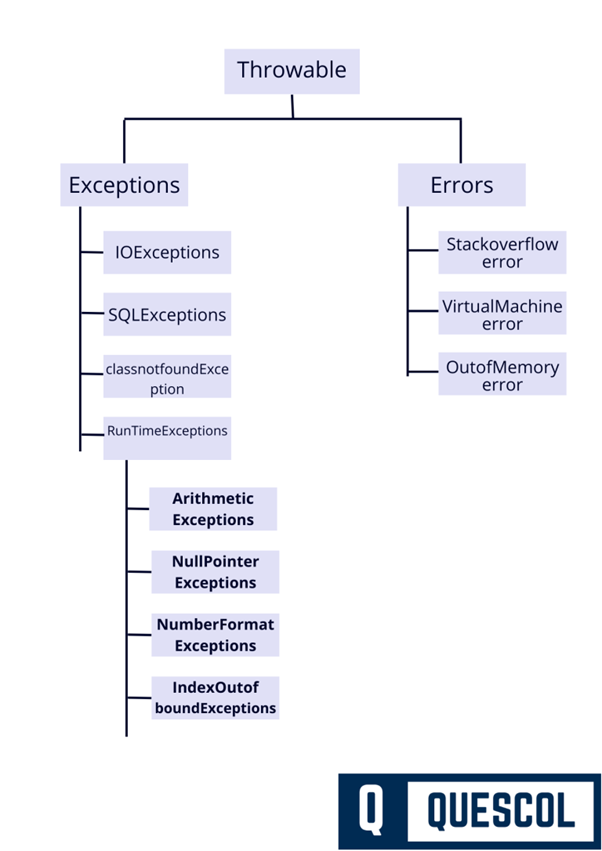
5.2. Difference between Checked and Unchecked Exceptions.
Checked exception
A compile-time exception, also known as a checked exception, is an exception type that the Java compiler requires you to handle during compilation. The exception itself occurs at runtime, but the compiler ensures that the code includes a try-catch block or a throws declaration before it can be compiled.
Checked exceptions usually happen in situations involving external resources, like file handling, database access, or network operations, where problems are possible and should be anticipated.
Unchecked exception
A runtime exception, also called an unchecked exception, is an exception that occurs while the program is running and is not checked by the compiler. These exceptions usually arise from programming errors, such as invalid logic, bad input, or illegal operations, and do not require try-catch or throws handling at compile time.
Examples are NullPointerException, ArithmeticException, and ArrayIndexOutOfBoundsException.
| Aspect | Checked Exception | Unchecked Exception |
| Definition | Exceptions that are checked at compile-time. | Exceptions that occur at runtime and are not checked at compile-time. |
| Class Hierarchy | Subclasses of Exception (excluding RuntimeException) | Subclasses of RuntimeException |
| Compile-Time Checking | Yes – compiler forces handling using try-catch or throws. | No – compiler does not force handling. |
| When It Occurs | During compile-time | During runtime |
| Handling Requirement | Must be handled or declared in method signature. | Handling is optional. |
| Examples | IOException, SQLException, ClassNotFoundException | NullPointerException, ArrayIndexOutOfBoundsException, ArithmeticException |
| Used For | Situations that are outside the program’s control (e.g., file not found) | Programming errors or logic mistakes |
| Program Behavior if Not Handled | Compile-time error | Program will compile but may crash at runtime |
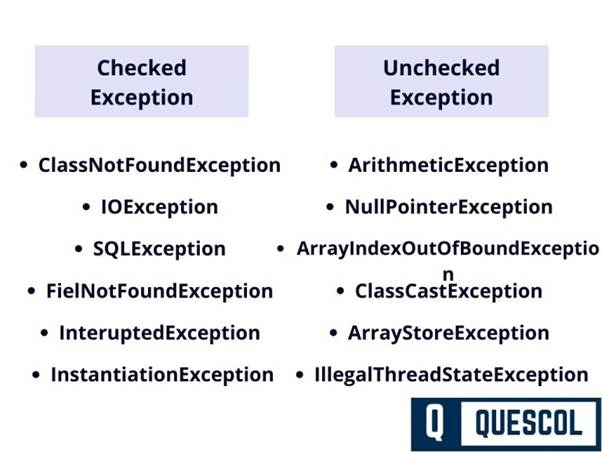
5.3. What is the difference between an Error and an Exception?
In Java, both Error and Exception are types of Throwable, which means they can be thrown during the execution of a program. But they are very different in terms of what they represent and how they are handled.
1. Error
- Represents serious problems that a program should not try to catch.
- Usually caused by the Java Virtual Machine (JVM).
- These are not meant to be handled in code.
- Examples: OutOfMemoryError, StackOverflowError.
Example
public class ErrorExample {
    public static void main(String[] args) {
        causeStackOverflow();
    }
    static void causeStackOverflow() {
        causeStackOverflow(); // Infinite recursion
    }
}
Output
Exception in thread "main" java.lang.StackOverflowError
2. Exception
- Represents issues that can be handled in your code.
- Caused by program errors or external factors.
- There are two types:
- Checked Exceptions (e.g., IOException)
- Unchecked Exceptions (e.g., NullPointerException)
- Represents issues that can be handled in your code.
Example
public class ExceptionExample {
    public static void main(String[] args) {
        try {
            int result = 10 / 0; // ArithmeticException
        } catch (ArithmeticException e) {
            System.out.println("Cannot divide by zero.");
        }
    }
}
Output
Cannot divide by zero.
Error VS Exception
| Aspect | Error | Exception |
| Represents | Serious system-level problems | Problems in program logic |
| Caused by | JVM (hardware failure, memory, etc.) | Program or external issues (e.g., I/O) |
| Can be caught? | Not usually | Yes, using try-catch |
| Should be handled? | No – let JVM handle it | Yes – developer should handle it |
| Examples | OutOfMemoryError, StackOverflowError | NullPointerException, IOException |
5.4. How many ways you can print exceptions in Java?
There are multiple ways to print the exceptions in Java. Here we will see 3 methods to print the exceptions:
- printStackTrace()
- toString()
- getMessage()
1. printStackTrace()
printStackTrace method prints exception information. printStackTrace() is a method of Java.lang.Throwable class. It is used to print the details of exceptions like class name and line number where the exception occurred.
Program to demonstrate printStackTrace() method
import java.io.*;
class Main {
    public static void main (String[] args) {
      int a=5, b=0;
        try{
          System.out.println(a/b);
        }
        catch(ArithmeticException e){
          e.printStackTrace();
        }
    }
}
Output:
java.lang.ArithmeticException: / by zero
at Main.main(Main.java:6)
2. toString()
toString() method is also used to print exceptions. It prints exception information in the format of Name of the exception along with a description of the exception.
Program to demonstrate toString() method
import java.io.*;
class Main {
    public static void main (String[] args) {
      int a=5, b=0;
        try{
          System.out.println(a/b);
        }
        catch(ArithmeticException e){
            System.out.println(e.toString());
        }
    }
}
Output:
java.lang.ArithmeticException: / by zero3. getMessage()
getMessage() method prints only the description of the exception message.
Program to demonstrate getMessage() method
import java.io.*;
class Main {
    public static void main (String[] args) {
      int a=5, b=0;
        try{
          System.out.println(a/b);
        }
        catch(ArithmeticException e){
            System.out.println(e.getMessage());
        }
    }
}
Output:
/ by zero5.5. What is the process to create custom Exception in Java?
Here we are showing two examples to create your own custom exception class in Java.
Program 1: Create Custom Exception
class CustomException extends Exception{
    public CustomException(String ex){
        super(ex);
    }
}
public class Main{
    public static void main(String ...a){
        int age = 13;
        try{
            if(age<18){
                throw new CustomException("no valid Age");
            }else{
                System.out.println("Age is valid");
            }
        }
        catch(CustomException e){
             System.out.println("Exception occured: " + e);
        }
        System.out.println("Rest Code is running");
    }
}
Output
Exception occured: CustomException: no valid Age
Rest Code is running
Program 2: Create Custom Exception
class CustomException extends Exception {
   String message;
   CustomException(String str) {
      message = str;
   }
   public String toString() {
      return ("Custom Exception Occurred : " + message);
   }
}
public class Main {
   public static void main(String args[]) {
      try {
         throw new CustomException("This is CustomException");
      } catch(CustomException e) {
         System.out.println(e);
      }
   }
}
Output
Custom Exception Occurred : This is CustomException5.6. Write the difference between Throw and Throws.
throw: throw is a keyword used to explicitly create and pass an exception object inside a method or block. It is used when you want to manually raise an exception at a specific point in the program.
throws: throws is a keyword used in a method declaration to indicate that the method may pass an exception to the calling method instead of handling it. It tells the compiler and the caller about possible exceptions that can occur during method execution.
Throw vs Throws
- throw keyword is used inside the function or the block of code to throw an exception explicitly when an exception occurs. Whereas throws keyword is used with method signature with exception means exception might be thrown by the function during the execution if an exception occurs.
- throw keyword is followed by an instance of Exception that will be thrown whereas throws keyword is followed by class names of Exceptions to be thrown.
- throw keyword can be used to throw only one exception at a time but in throws keywords, we can use multiple Exception classes separated by a comma.
- throw keyword is used to propagate unchecked Exceptions whereas the throws keyword is used to propagate checked Exceptions.
Program of using throw keyword
public class Main{
   public void checkAge(int age){
      if(age<18)
         throw new ArithmeticException("Age is not valid for voting");
      else
         System.out.println("Age is valid for voting");
   }
   public static void main(String args[]){
      Main obj = new Main();
      obj.checkAge(10);
      System.out.println("Execution continue");
   }
}
Output
Exception in thread "main" java.lang.ArithmeticException: Age is not valid for voting
at Main.checkAge(Main.java:4)
at Main.main(Main.java:10)
Program of using throws keywords
public class Main{
   public int division(int a, int b) throws ArithmeticException{
      int result = a/b;
      return result;
   }
   public static void main(String args[]){
      Main obj = new Main();
      try{
         System.out.println(obj.division(15,0));
      }
      catch(ArithmeticException e){
         System.out.println("We can't divide number by zero");
      }
   }
}
Output
We can't divide number by zero5.7. What is Serialization and why do we use it?
Serialization is the process of converting a Java object into a byte stream (sequence of bytes) so that it can be easily stored or transferred.
In this form, the object’s data, type information, and state can be saved or sent anywhere outside the JVM.
This is useful because it allows you to:
- Send objects over a network (e.g., to another server or remote system).
- Save an object to a file or database, and later load it back.
- Transfer object data between different parts of a distributed application.
Why is Serialization Needed?
Java objects are complex and exist only in memory (RAM) and cannot be directly stored or transmitted through hardware or external systems because they are complex structures.
However, external systems like:
- Network cables
- Hard disks
- Databases
- External devices
can handle only raw bytes, not Java objects.
So we use serialization to convert objects into bytes, allowing us to:
- Send them over the internet or across different JVMs
- Store them permanently on disk or in a database
- Cache or transfer them between applications
- Rebuild (deserialize) the same object later with the same state
5.8. What Is serialVersionUID?
serialVersionUID is a unique version identifier assigned to a Serializable class. It is used during deserialization to verify that the sender’s class (used during serialization) and the receiver’s class (used during deserialization) are compatible versions of the same class.
If the serialVersionUID values do not match, Java throws an InvalidClassException and the object cannot be deserialized.
SerialVersionUID is used here for identity purposes. It must be static, final, and of type long.
When Should You Change the serialVersionUID?
| Change Type | Need to Update serialVersionUID? |
| ✅ Add a new field | ❌ No |
| ✅ Add a new method | ❌ No |
| ❌ Remove a field | ✅ Yes |
| ❌ Change field type (int → String) | ✅ Yes |
| ❌ Rename a field | ✅ Yes |
| ❌ Rename the class or package | ✅ Yes |
| ❌ Change class from public → private | ✅ Yes |
Java Program for Serialization and Deserialization
import java.io.*;
public class Main {
    public static void main(String[] args) {
        Student student = new Student("quescol", 2);
        byte[] bytes = convertObjectToBytes(student);
        System.out.println(bytes);
        Student s = (Student) convertBytesToObject(bytes);
        System.out.println(s);
    }
    public static byte[] convertObjectToBytes(Object obj) {
        ByteArrayOutputStream boas = new ByteArrayOutputStream();
        try (ObjectOutputStream ois = new ObjectOutputStream(boas)) {
            ois.writeObject(obj);
            return boas.toByteArray();
        } catch (IOException ioe) {
            ioe.printStackTrace();
        }
        throw new RuntimeException();
    }
    public static Object convertBytesToObject(byte[] bytes) {
        InputStream is = new ByteArrayInputStream(bytes);
        try (ObjectInputStream ois = new ObjectInputStream(is)) {
            return ois.readObject();
        } catch (IOException | ClassNotFoundException ioe) {
            ioe.printStackTrace();
        }
        throw new RuntimeException();
    }
}
class Student implements Serializable {
    private String name;
    private int age;
    public Student( String name, int id) {
        this.age = age;
        this.name = name;
    }
}
Output
[B@7d4793a8
Student@721e0f4f
5.9. What is the Volatile and Transient keyword in Java?
Volatile: volatile is used with variables to ensure that changes made by one thread are immediately visible to all other threads. It prevents threads from using cached values and always reads the latest value from main memory.
Key Points
- Ensures visibility of changes between threads
- Does not guarantee atomicity
- Used in multi-threaded programming
Example use: flags, status variables shared between threads.
transient: transient is used with variables to indicate that they should not be serialized when an object is converted into a byte stream.
Transient fields are ignored during serialization and restored with default values during deserialization.
Key Points
- Used in serialization
- Prevents sensitive or unnecessary data from being saved
- Default value is assigned after deserialization
Example use: passwords, temporary data, cache fields.
Volatile Vs Transient
- A volatile keyword is used in a multithreading environment. When two threads are performing reading and writing operations on the same variable, a volatile keyword is used. It flushes the changes directly to the main memory instead of the CPU cache. A transient keyword is used in serialization. Variable where transient is used, cannot be part of the serialization and deserialization.
- volatile variable is not initialized with any default value whereas transient variables are initialized with a default value during deserialization.
- volatile variable can be used with the final keyword whereas transient cannot be used with the final keyword.
- volatile variable can be used with static keyword whereas transient cannot be used with the static keyword.
5.10. How you will create an Immutable class in Java?
An immutable class in Java is a class whose objects cannot be modified after creation. Once an instance is created, the values of its fields remain fixed and unchangeable throughout its lifetime.
This means:
- No setter methods
- Fields are private and final
- Only way to set values is through the constructor
- Any modification results in a new object, not changes to the existing one
All the wrapper classes like Boolean, Byte, Long, Short, Integer, Float, Double, Char, and String are immutable.
Steps to create an immutable class in Java
- First Declare the class with the final keyword so it can’t be extended.
- Make all the classes private. It will not allow direct access.
- Don’t make any setter methods for variables.
- Make all mutable fields final so that their value can be assigned only once.
- Initialize all fields value using the constructor.
Immutable Java Class Code
final class Student{
  private String name;
  private int roll;
  Student(String name, int roll) {
    this.name = name;
    this.roll = roll;
  }
  public String getName() {
    return name;
  }
  public int getRoll() {
    return roll;
  }
}
class Main {
  public static void main(String[] args) {
    Student obj = new Student("quescol", 1);
    System.out.println("Name: " + obj.getName());
    System.out.println("Roll: " + obj.getRoll());
  }
}
Output
Name: quescol
Roll: 1
5.11. How you will Create a Singleton class in Java.
Singleton class is a class in oops that can have only one object at a time and can be globally accessible.
It Saves memory because Only a single instance is created and reused again and again.
Singleton Class is mostly used in the multi-threaded system, database application, logging, caching, configuration settings, etc.
There are two forms of singleton design pattern
- Early Instantiation: In this Singleton design pattern object will create at the load time.
- Lazy Instantiation: In this Singleton design pattern object will create according to the requirement.
Early Instantiation Program
class Singlton {
    //Instance will be created at load time
    private static Singlton obj=new Singlton();
    private Singlton(){}
    public static Singlton getSinglton(){
        return obj;
    }
}
class Main {
   public static void main(String[] args) {
      Singlton s1;
      s1= Singlton.getSinglton();
      Singlton s2;
      s2= Singlton.getSinglton();
      System.out.println(s1);
      System.out.println(s2);
   }
}
Output
Singlton@1e81f4dc
Singlton@1e81f4dc
Lazy Instantiation example
class Singlton {
    private static Singlton singlton;
    private Singlton(){
    }
    public static Singlton getInstance() {
        if(null == singlton){
            singlton = new Singlton();
        }
    return singlton;
    }
}
class Main {
   public static void main(String[] args) {
      Singlton s1;
      s1= Singlton.getInstance();
      Singlton s2;
      s2= Singlton.getInstance();
      System.out.println(s1);
      System.out.println(s2);
   }
}
Output
Singlton@3b22cdd0
Singlton@3b22cdd0
Thread-Safe Singleton Class
public class Singleton {</p>
<p>    private static volatile Singleton instance;</p>
<p>    private Singleton() { }</p>
<p>    public static Singleton getInstance() {
        if (instance == null) {                     // First check (no locking)
            synchronized (Singleton.class) {
                if (instance == null) {             // Second check (with locking)
                    instance = new Singleton();
                }
            }
        }
        return instance;
    }
}
5.12. Runtime and Compile-Time Exceptions.
Compile-Time Exceptions (Checked Exceptions)
Compile-time exceptions are exceptions that are checked by the compiler at compile time and must be either caught or declared using throws.
- These are exceptions checked by the compiler during compilation.
- You must handle them using
try-catchor declare withthrows. - Mostly occur due to external factors (like file I/O, network).
Examples:IOException, SQLException, FileNotFoundException
try {
    FileReader file = new FileReader("data.txt"); // Checked exception
} catch (FileNotFoundException e) {
    e.printStackTrace();
}
Runtime Exceptions (Unchecked Exceptions)
Runtime exceptions occur during program execution and are not checked by the compiler.
- These occur during program execution (runtime).
- Not checked by the compiler.
- Usually caused by programming errors like bad logic or invalid input.
Examples:NullPointerException, ArrayIndexOutOfBoundsException, ArithmeticException
int x = 10 / 0; // Runtime exception (ArithmeticException)5.13. How return statement behaves in catch and finally blocks in Java?
If a finally block contains a return statement, it overrides the return from try or catch. If only try or catch has return, that value is returned after finally completes execution.”
1. Return in catch block
You can return from a catch block. It returns the value unless finally also has a return, which will override it.
public int test() {
    try {
        int a = 5 / 0; // will throw ArithmeticException
    } catch (Exception e) {
        return 10;
    } finally {
        System.out.println("In finally block");
    }
    return 0;
}
Console Output
In finally blockMethod Return Value: 10 (because finally does not return anything)
Execution Flow
5 / 0throws an ArithmeticException.- Control jumps to the catch block →
return 10. - Before returning, the finally block ALWAYS executes → prints ‘In finally block’
- After finally executes, the return value from
catchis used.
2. Return in finally block
If a finally block has a return statement, it overrides any return from try or catch.
public int test() {
    try {
        return 1;
    } catch (Exception e) {
        return 2;
    } finally {
        return 3; // this overrides everything
    }
}
Method Returned value: 3
Even though try and catch have return, the finally return takes priority.
6. Java 8 Questions
6.1. Explain the concept of lambda expressions in Java 8.
A lambda expression in Java 8 is a feature that provides a clear and concise syntax to implement the abstract method of a functional interface using an inline, anonymous function. A lambda expression creates an instance of a functional interface and provides the implementation of its single abstract method at runtime.
It allows you to write shorter and more readable code without creating an anonymous inner class.
Syntax of lambda expressions
(parameters) -> expression
(parameters) -> { statements }
Example
// Lambda to add two numbers
Calculator add = (a, b) -> a + b;
System.out.println(add.calculate(5, 3)); // Output: 8
Where Calculator is a functional interface:
interface Calculator {
    int calculate(int a, int b);
}
6.2. Explain the concept of anonymous classes in Java.
An anonymous class in Java is a special type of inner class without a name that is declared and instantiated in a single expression. In simple words, An anonymous class lets you create a small, one-time class inline without giving it a class name.
It is used to provide a one-time implementation of an interface or a subclass of a class at the place where the object is created, without defining a separate named class.
The syntax of an anonymous class
new superclass_or_interface() {
    // class body
};
Example:
Runnable r = new Runnable() {
    @Override
    public void run() {
        System.out.println("Thread running");
    }
};
Here:
- No class name is defined
Runnableis implemented directly at object creation
6.3. What is the difference between the Comparable and Comparator interfaces?
In Java, Both Comparable and Comparator are used to define the ordering (sorting) of objects, but they are used in different ways.
Comparable Interface
Comparable is used to define the natural (default) ordering of objects within the class itself.
Key Points
- Implemented by the class whose objects are to be sorted
- Method:
compareTo(Object o) - Allows only one sorting sequence
- Sorting logic becomes part of the class
Comparable Example
public class Employee implements Comparable<Employee> {
    private int id;
    public int compareTo(Employee other) {
        return Integer.compare(this.id, other.id);
    }
}
Above code explanations
- The
Employeeclass implements Comparable<Employee>, which means objects of this class have a natural ordering. - The ordering is defined by the
compareTo()method. - Here, employees are compared based on their id.
How sorting happens?
Integer.compare(this.id, other.id) returns:
- negative value → if
this.id < other.id - zero → if
this.id == other.id - positive value → if
this.id > other.id
This makes employees sortable using:
Collections.sort(employeeList);What is the natural order?
The natural order of Employee objects is ascending order of their id.
Comparator Interface
Comparator is used to define custom or multiple sorting orders externally, without modifying the class.
Key Points
- Implemented by a separate class
- Method:
compare(Object o1, Object o2) - Allows multiple different sorting sequences
- Does not change the original class
Comparator Example
public class AgeComparator implements Comparator<Employee> {
    public int compare(Employee e1, Employee e2) {
        return Integer.compare(e1.getAge(), e2.getAge());
    }
}
Above code explanations
AgeComparatorimplements the Comparator<Employee> interface.- It defines a custom sorting rule for
Employeeobjects. - The comparison is done based on the age of the employees.
How it works?
Integer.compare(e1.getAge(), e2.getAge()) returns:
- negative value → if
e1.getAge() < e2.getAge() - zero → if both ages are equal
- positive value → if
e1.getAge() > e2.getAge()
How it’s used?
You use this comparator when you want to sort employees by age, not by their natural order.
Example
Collections.sort(employeeList, new AgeComparator());Limitation with Comparable : ONLY ONE sorting rule is allowed
Comparable gives only one compareTo() method, so:
- If you set sorting by id→ You CANNOT sort by age or salary using Comparable.
- You cannot have multiple compareTo() implementations.
6.4. Explain the concept of method references in Java 8.
A method reference is a Java 8 feature that allows you to directly reference a method (either static or instance) of a class or object using the :: operator by its name, without invoking it. They are used to make the code cleaner and more readable when a lambda expression does nothing but call an existing method.
Think of it like this
Instead of writing this:
name -> System.out.println(name)You just write this:
System.out::printlnSyntax of method references
| Type | Example | Use When… |
| Static method | ClassName::method | You are calling a static method |
| Instance method | object::method | You are calling a method on object |
| Any instance method | ClassName::method | Method is called on each element |
| Constructor reference | ClassName::new | You are creating new objects |
6.5. What is the purpose of the default keyword in Java interfaces?
The default keyword in Java interfaces allows you to define concrete methods with a method body. Before Java 8, interfaces could only have method signatures without bodies means abstract methods. The addition of default methods makes interfaces more flexible and backward compatible.
The default method can be executed if the classes that implement the interface do not provide their own implementation.
Example of Interface with a Default Method
interface Vehicle {
    void start();
    // Default method with body
    default void stop() {
        System.out.println("Vehicle stopped.");
    }
}
Class implements the interface
class Car implements Vehicle {
    public void start() {
        System.out.println("Car started.");
    }
}
Main Method
public class Main {
    public static void main(String[] args) {
        Car c = new Car();
        c.start();  // Car started.
        c.stop();   // Vehicle stopped.
    }
}
Code Explanations
- Car did not implement stop()
- So, it used the default version from the Vehicle interface
6.6. Explain the concept of functional interfaces in Java 8.
A Functional Interface is an interface in Java that has exactly one abstract method.
That’s it! It have:
- One abstract method (Required)
- Any number of default or static methods (Optional)
Example of Functional interface
@FunctionalInterface
public interface Operation{
    // An abstract method that takes an integer and returns an integer.
    int operation(int x);
}
TestSimpleFunction.java
public class TestSimpleFunction {
    public static void main(String[] args) {
        // Create an instance of Operation using a lambda expression.
        Operations cube = x -> x * x * x;
        // Using the functional interface to perform an operation.
        int result = cube.operation(5);
        System.out.println("Cube of 5 is: " + result);
    }
}
6.7. Tell me some built-in functional interface in java 8.
(From java.util.function package)
1. Predicate<T>
- Takes one input, returns a boolean.
- Used for filtering.
- Predicate has boolean test(T t) Abstract method.
Predicate<String> isEmpty = s -> s.isEmpty();
System.out.println(isEmpty.test("")); // true
2. Function<T, R>
- Takes one input, returns one output.
- Used for transformation.
- Function has R apply(T t) Abstract method.
Function<String, Integer> length = s -> s.length();
System.out.println(length.apply("Hello")); // 5
3. Consumer<T>
- Takes one input, returns nothing.
- Used for performing operations like printing, saving.
- Consumer has void accept(T t) Abstract method.
Consumer<String> printer = s -> System.out.println(s);
printer.accept("Hello World"); // prints: Hello World
4. Supplier<T>
- Takes no input, returns an output.
- Used for lazy value generation.
- Supplier has T get() Abstract method.
Supplier<Double> randomValue = () -> Math.random();
System.out.println(randomValue.get());
5. BiFunction<T, U, R>
- Takes two inputs, returns one output.
- BiFunction has R apply(T t, U u) Abstract method.
BiFunction<Integer, Integer, Integer> add = (a, b) -> a + b;
System.out.println(add.apply(5, 3)); // 8
6. BiPredicate<T, U>
- Takes two inputs, returns boolean.
- BiPredicate has boolean test(T t, U u) Abstract method.
BiPredicate<String, String> isEqual = (a, b) -> a.equals(b);7. BiConsumer<T, U>
- Takes two inputs, returns nothing.
- BiConsumer has void accept(T t, U u) Abstract method.
BiConsumer<String, Integer> printInfo =
    (name, age) -> System.out.println(name + " is " + age);
printInfo.accept("John", 25);
8. UnaryOperator<T>
- A
Function<T, T>— same input and output type. - UnaryOperator has T apply(T t) Abstract method.
UnaryOperator<Integer> square = x -> x * x;
System.out.println(square.apply(6)); // 36
9. BinaryOperator<T>
- A
BiFunction<T, T, T>— two inputs, same output type. - BinaryOperator has T apply(T t1, T t2) Abstract method.
BinaryOperator<Integer> multiply = (a, b) -> a * b;
System.out.println(multiply.apply(4, 5)); // 20
6.8. Explain the concept of CompletableFuture.
CompletableFuture is a powerful class introduced in Java 8 (in java.util.concurrent) that represents the future result of an asynchronous computation. It enhances the old Future API by providing non-blocking, callback-based, and composable asynchronous programming features.
CompletableFuture implements both:
- Future → represents a result available in the future
- CompletionStage → allows building pipelines of async tasks
CompletableFuture is designed to represent a future result of an asynchronous computation. This means it acts as a placeholder for the result, which will become available at a future point in time.
CompletableFuture provides methods for composing and chaining multiple stages of asynchronous tasks. This allows you to perform further operations once the initial computation is done, or even combine multiple asynchronous computations.
6.9. Filter Concept in Streams
The filter() method in Java Streams is used to process elements based on a condition (predicate). It returns a new stream consisting only of elements that match the condition. It’s commonly used for filtering collections in a functional and readable way.
Example of filter()
List<Integer> numbers = Arrays.asList(1, 2, 3, 4, 5);
List<Integer> even = numbers.stream()
                            .filter(n -> n % 2 == 0)
                            .collect(Collectors.toList());
System.out.println(even); // Output: [2, 4]
Here, filter(n -> n % 2 == 0) filters out only even numbers from the list.
6.10. What is Intermediate and Terminal Operators in Streams?
Intermediate Operators
Intermediate operators are methods in the Stream API that transform a stream into another stream.
They do not execute immediately, instead, they build a processing pipeline. The actual processing happens only when a terminal operation is called. This behavior is called lazy evaluation.
These operations are lazy, meaning they do not run until a terminal operation (like collect(), forEach(), or reduce()) triggers the execution.
Examples: filter(), map(), sorted(), distinct(), limit().
Terminal Operators
Terminal operators are methods in the Stream API that trigger the execution of the entire stream pipeline. Unlike intermediate operators, which are lazy, terminal operators perform the actual processing and produce a result (such as a value, a collection, or a boolean) or a side-effect (like printing to the console). It is Used to produce a final output from the stream.
Once a terminal operation is executed, the stream is consumed and cannot be reused.
Examples: collect(), forEach(), reduce(), count(), anyMatch().
Example of Intermediate and Terminal Operators
List<Integer> list = Arrays.asList(1, 2, 3, 4, 5);
list.stream()
    .filter(n -> n % 2 == 0)    // intermediate
    .map(n -> n * 2)           // intermediate
    .forEach(System.out::println); // terminal
Output
4
8
Code Explanations
- Nothing happens at
filter() - Nothing happens at
map() - Everything is processed only when
forEach()is called.
6.11. Tell me some of Intermediate and Terminal Operators in Stream
Intermediate Operators
(These return a new Stream and are lazy.)
| Operator | Description |
|---|---|
filter(Predicate) | Filters elements based on a condition |
map(Function) | Transforms each element |
flatMap(Function) | Flattens nested structures |
distinct() | Removes duplicate elements |
sorted() | Sorts elements in natural order |
sorted(Comparator) | Sorts using a custom comparator |
limit(long n) | Limits the stream to first n elements |
skip(long n) | Skips first n elements |
peek(Consumer) | Performs an action for debugging |
mapToInt(), mapToDouble(), mapToLong() | Maps to primitive streams |
Terminal Operators (These trigger the stream processing and produce a result.)
| Operator | Description |
|---|---|
forEach(Consumer) | Performs an action for each element (no result) |
collect(Collector) | Collects results into a collection or string |
toArray() | Converts stream to array |
reduce() | Reduces elements to a single value |
count() | Returns the number of elements |
min(Comparator) | Finds the minimum element |
max(Comparator) | Finds the maximum element |
anyMatch(Predicate) | Checks if any element matches condition |
allMatch(Predicate) | Checks if all elements match condition |
noneMatch(Predicate) | Checks if no element matches condition |
findFirst() | Returns the first element (if present) |
findAny() | Returns any one element (useful in parallel streams) |
6.12. What is Stream API and why we use it.
Stream API is a feature introduced in Java 8 that allows us to process collections of data in a functional and declarative style, replacing the old loop-based, manual iteration model. It helps to perform operations like filtering, mapping, sorting, and reducing on large datasets efficiently using streams.
Unlike the old approach, which required verbose loops and temporary collections, the Stream API:
- Enables lazy evaluation, improving performance by processing only what’s needed
- Supports parallel processing easily using
parallelStream(), leveraging multi-core CPUs - Eliminates boilerplate code, making logic simpler and less error-prone
- Works immutably, avoiding side effects on the original collection
- Provides a powerful set of built-in operations (filter, map, reduce), reducing manual code.
In short, the Stream API is faster, cleaner, safer, and more scalable than traditional loops for processing large datasets.
6.13. What is Optional in Java?
Optional is a final class in java.util that acts as a container to hold a value that may or may not exist. Instead of returning null, a method can return an Optional to clearly indicate that the result might be empty. This helps reduce and avoid NullPointerException in Java programs.
| Term | Meaning in Context |
|---|---|
| Class | A blueprint in Java used to create objects. Optional is a final class in the java.util package. |
| Container Object | Describes how the class behaves — it holds a value or not (like a box that may be empty). |
Creating Optional
Optional<String> name = Optional.of("Java");             // value present
Optional<String> empty = Optional.empty();               // no value
Optional<String> nullable = Optional.ofNullable(null);   // may be null
Optional Methods
| Method | Description |
|---|---|
isPresent() | Returns true if value is present |
get() | Returns the value (unsafe without check) |
orElse("default") | Returns value or default |
orElseGet(Supplier) | Lazy version of orElse |
orElseThrow() | Throws exception if value is missing |
ifPresent(Consumer) | Executes code if value is present |
map(Function) | Transforms value if present |
filter(Predicate) | Filters value based on condition |
Example:
Optional<String> name = Optional.ofNullable(getName());
name.ifPresent(n -> System.out.println(n.toUpperCase()));
The above code safely wraps a possibly null value in an Optional and prints it in uppercase only if the value is present, avoiding a NullPointerException.
6.14. What was the problems with java.util.Date and java.util.Calendar?
java.util.Date and Calendar are mutable, error-prone, and poorly designed. They lack thread safety and have confusing APIs, which is why Java 8 introduced the improved java.time package.
If a flight booking system passes a Date object to another method, that method can change the date using setters. This may accidentally shift the passenger’s travel date, because Date is mutable and unsafe.
A meeting scheduled at 10 AM IST can suddenly appear as 9:30 AM or 11 AM because Date mixes local time and UTC inconsistently, creating errors in global applications like Google Calendar or Zoom.
Problems with java.util.Date and Calendar
1. Mutability
- Both
DateandCalendarobjects are mutable, meaning their state can be changed after creation. - This makes them not thread-safe and can lead to bugs in multi-threaded applications.
Date date = new Date();
date.setTime(0); // Modifies original object
2. Poor API Design
- Method names are confusing and inconsistent, e.g.:
getYear()returns year – 1900getMonth()is 0-based (January = 0)
- Requires a lot of manual adjustments.
3. Complex and Error-Prone
Calendarhas a complex and bloated API.- Simple operations like adding days or formatting time zones can be unnecessarily difficult.
4. Time Zone Handling is Clumsy
- Managing time zones is unintuitive and difficult to get right using
DateandCalendar.
5. Mix of Date and Time
Dateincludes both date and time, but you can’t easily separate them.
6. Thread Safety Issues
- Neither
DatenorCalendaris thread-safe → developers must handle synchronization manually.
Solution: Java 8 java.time Package (JSR-310)
Introduced modern, immutable, and fluent classes like:
LocalDate,LocalTime,LocalDateTimeZonedDateTime,Instant,Period,Duration- All are immutable, thread-safe, and much easier to use.
6.15. Benefits of java.time (New Date/Time API in Java 8)
The java.time API in Java 8 offers a modern, immutable, and thread-safe approach to handling dates and times with clear APIs, better time zone support, and safer calculations compared to Date and Calendar.
Using ZonedDateTime, scheduling a meeting across IST, EST, and UTC is handled automatically without time shifting or conversion mistakes, unlike the old Date/Calendar API.
LocalDate and LocalDateTime are immutable, so in a banking app, two threads calculating interest on the same date cannot accidentally change each other’s values.
Benefits of java.time (New Date/Time API in Java 8):
1. Immutability
- All classes like
LocalDate,LocalTime, andZonedDateTimeare immutable and thread-safe. - Ideal for use in multi-threaded environments.
2. Clear and Consistent API
- Easy to read and use.
- Uses well-named methods and fluent APIs, such as: javaCopyEdit
LocalDate.now().plusDays(5).getDayOfWeek();
3. No Confusing Offsets
- No more 0-based months (
Calendar) or years offset from 1900 (Date). - Everything is logically represented.
4. Better Time Zone Handling
- Includes classes like
ZonedDateTimeandZoneIdto clearly manage time zones.
5. Separation of Concerns
- Date and time are handled separately:
LocalDatefor date-onlyLocalTimefor time-onlyLocalDateTimefor both
6. Easy Adjustments and Calculations
- Simple and readable methods for adding/subtracting dates: javaCopyEdit
date.plusDays(7); date.minusMonths(1);
7. Safer and More Predictable
- No risk of accidental state changes like in mutable
DateandCalendar.
8. Support for Durations and Periods
Durationfor time-based calculationsPeriodfor date-based differences (years, months, days)
Here is an interview clearing guide to help you prepare effectively
- Review Core Concepts: Ensure you have a strong understanding of core Java concepts, including object-oriented programming, exception handling, collections, multithreading, and I/O operations.
- Data Structures and Algorithms: Refresh your knowledge of data structures like arrays, linked lists, stacks, queues, trees, graphs, and algorithms like searching, sorting, and dynamic programming.
- Java Libraries and Frameworks: Familiarize yourself with commonly used Java libraries and frameworks such as JDBC, Servlets, JSP, Spring, Spring Boot, Hibernate, and JavaFX. Understand their key features and usage.
- Design Patterns: Study commonly used design patterns in Java and understand their implementation, advantages, and use cases.
- Practice Coding: Solve coding problems related to Java on platforms like LeetCode or HackerRank. Practice implementing data structures, algorithms, and solving real-world programming challenges.
- Mock Interviews: Arrange mock interviews with friends or colleagues to simulate the interview environment. Receive feedback on your performance and work on improving weak areas.
- Stay Updated: Keep up with the latest trends and updates in the Java ecosystem. Stay informed about new Java versions, features, frameworks, and libraries.
- Prepare Questions: Be prepared to ask relevant questions to the interviewer about the company, project, or team to show your interest and engagement.
- Communication and Confidence: Practice presenting your ideas confidently and be prepared to explain your thought process during technical discussions. Pay attention to your communication skills and body language.
Remember, interview success not only depends on your technical knowledge but also on your problem-solving skills, ability to think critically, and your attitude towards learning and growth. Approach the interview with confidence, be enthusiastic, and showcase your ability to adapt and collaborate.